

What if adding containment changes how heat moves through the room without improving cooling performance? Modular data center containment can separate hot and cold air streams, but the result depends on how the design fits the facility’s airflow, cooling strategy and operating conditions. A retrofit that looks straightforward on a plan may be less suitable once rack rows, ceiling height, return-air paths and maintenance access are considered.
Before evaluating hot-aisle and cold-aisle containment, it helps to understand what each configuration encloses and how air is meant to move through the room. This article explains how modular systems separate supply and exhaust air, what distinguishes the two configurations, and why barriers alone don’t determine cooling effectiveness. It also outlines the layout, airflow and operational details to check before specifying a system, plus questions to raise with facility specialists. Use it to assess whether modular containment fits your data center, rather than assuming one configuration suits every room.
Key Takeaways
- Modular data center containment separates supply-air and return-air paths, but its effectiveness depends on the facility’s airflow and cooling arrangement.
- Hot-aisle and cold-aisle containment enclose different aisles, which changes how supply and exhaust air are directed.
- Assess rack orientation, cooling distribution, room constraints and airflow paths before selecting a containment approach.
- Document access routes, maintenance needs and anticipated equipment changes to identify operational constraints before specifying a system.
- Coordinate containment decisions with facility engineering and operational requirements. DCS Smart Modular Containment is one option to discuss in that context.
What Is Modular Data Center Containment, and What Problem Does It Solve?
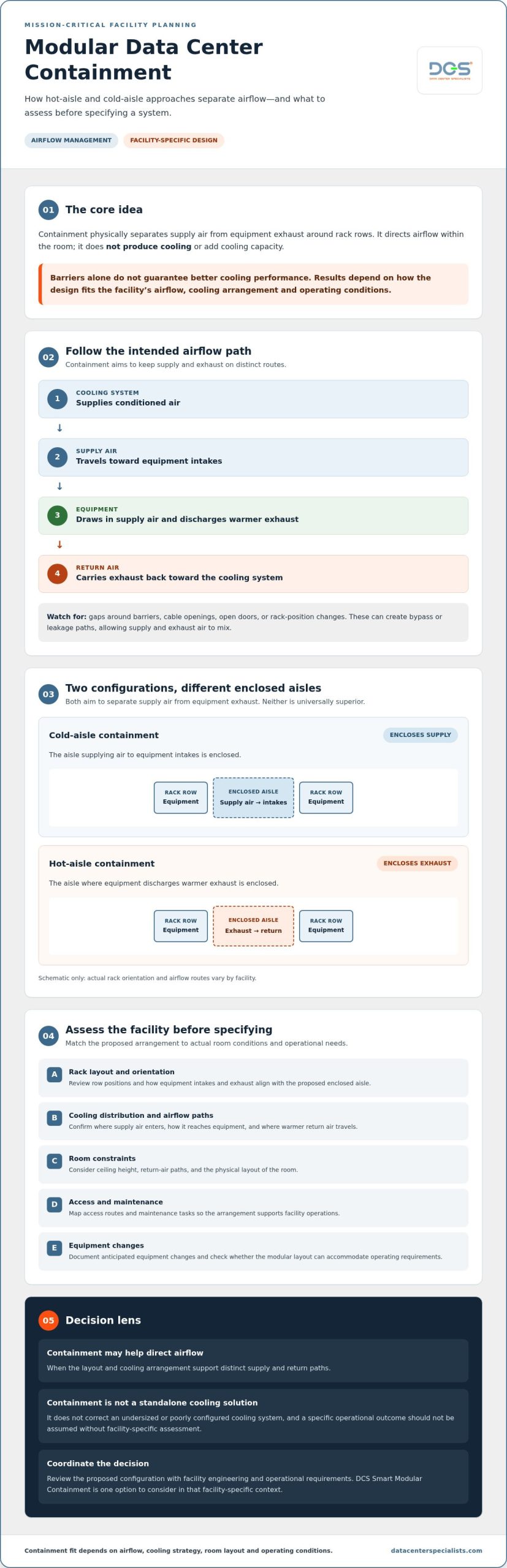
Modular data center containment is an infrastructure arrangement that physically separates supply-air and return-air paths around equipment rows. Its purpose is to limit mixing between cool air delivered to equipment and warmer air exhausted by servers. Without effective separation, hot and cold air can mix, making airflow management more difficult and complicating cooling-system operation.
Definition: Data center containment physically separates supply air from equipment exhaust around rack rows. It directs airflow within the room rather than producing cooling itself.
This distinction matters. Containment is not a cooling plant, and installing it does not guarantee an efficiency improvement. Its intended effect depends on how well it works with the room’s cooling distribution, equipment arrangement and operating conditions. Airflow is one part of the wider facility context described in this data center environmental controls overview.
How does containment separate hot and cold air?
Depending on the facility design, supply air travels from the cooling system toward equipment intakes through the room or an underfloor supply arrangement. Servers draw in that air and discharge warmer exhaust. With effective separation, supply air reaches the intakes while exhaust follows a distinct return path toward the cooling system, leaving less opportunity for the two streams to mix.
Barriers alone don’t establish that airflow path. Room configuration, rack placement and cooling-system operation also affect the result. Gaps, bypass airflow or changes to equipment positions may weaken separation. Assess the intended arrangement against actual facility conditions, including where air enters and returns and whether the paths remain clear.
What does modular mean in a data center?
Modular describes containment planned in sections to suit the facility’s layout and potential changes, rather than assuming one fixed arrangement will suit every room. Early planning should account for rack rows, access routes, maintenance tasks and anticipated equipment changes. These details help teams judge whether a proposed layout can support operations as well as airflow management.
Modularity alone doesn’t mean a system will be faster to install or simpler to expand. Confirm how the proposed arrangement fits the site and its operating requirements. DCS supplies and implements DCS Smart Modular Containment. Discuss its suitability in the context of facility engineering and measured airflow, without assuming a particular configuration or outcome.
How Modular Containment Influences Data Center Airflow and Cooling
Modular data center containment is intended to keep supply air and equipment exhaust on distinct paths within a defined arrangement. This can help direct conditioned air toward equipment intakes and return warmer exhaust to the cooling system with less mixing. It doesn’t add cooling capacity or correct an undersized or poorly configured cooling system. Containment needs to work with the facility’s cooling design and operating conditions.
Airflow path: Cooling system → supply air → equipment intake → equipment exhaust → return air → cooling system.
Gaps around barriers, cable openings, open doors or changes to rack positions can create bypass or leakage paths. For example, supply air may escape before reaching equipment intakes, or exhaust may mix back into the supply stream. These conditions can undermine the intended separation. Facility-specific measurements and engineering review are necessary before predicting operational outcomes. The ASHRAE thermal guidelines provide context for considering equipment environmental conditions, but they don’t establish that a particular containment design will deliver a specific result.
Where hot-aisle and cold-aisle containment fit
Hot-aisle containment encloses the aisle where equipment exhaust is discharged. Cold-aisle containment encloses the aisle supplying air to equipment intakes. Each approach aims to maintain separation between supply and exhaust, but the airflow route differs. Compare the options against rack orientation, cooling-air delivery and room constraints rather than assuming one is universally superior. For rack and aisle context, review DCS Smart Racks.
Why airflow balance and commissioning matter
Containment depends on more than enclosure boundaries. Airflow must be distributed appropriately across equipment rows, and supply delivery must align with rack demand. Doors left open, missing or displaced panels, cable openings and equipment changes can alter the intended path. Include these details in planning and check them during system-level verification, particularly after changes to the room or cooling operation.
Before selecting a configuration, have facility specialists review the airflow arrangement and relevant operating conditions. An assessment can help identify whether an issue relates to separation, supply distribution, cooling-system operation or a combination of factors. For context on system-level verification, see DCS HVAC system commissioning services.
Hot-Aisle vs Cold-Aisle Containment: How to Compare the Approaches
Hot-aisle and cold-aisle containment address the same basic challenge: separating equipment supply air from warmer exhaust. They enclose different parts of the rack layout, so compare them by first tracing how air is supplied and returned. Then account for room geometry and day-to-day operations. Neither arrangement is automatically more efficient or suitable without facility-specific evidence.
| Comparison factor | Hot-aisle containment | Cold-aisle containment |
|---|---|---|
| Enclosed aisle | The aisle where equipment exhaust is discharged. | The aisle supplying air to equipment intakes. |
| Intended air path | Collects warmer exhaust in a defined path for return toward the cooling system. | Directs supply air within a defined aisle toward equipment intakes. |
| Layout dependencies | Depends on rack orientation, room geometry, return-air arrangement and cooling-system design. | Depends on supply-air delivery, aisle boundaries, rack orientation and room constraints. |
| Operational access | Consider access to the enclosed exhaust aisle and the work teams must perform there. | Consider access to the enclosed supply aisle, equipment fronts and routine workflows. |
Decision principle: Compare configurations against the facility’s measured airflow and operating requirements, not a generic preference.
When might hot-aisle containment be considered?
Hot-aisle containment encloses the aisle where rack exhaust enters the return-air path. Consider it when the room’s cooling design and return arrangement can support that approach. Review room geometry, equipment orientation and service access before specifying it. A layout that looks suitable on a drawing may create access constraints or fail to match existing airflow patterns. Assess the operating facility rather than relying on a general rule.
When might cold-aisle containment be considered?
Cold-aisle containment encloses the aisle where supply air is delivered to equipment intakes. Check whether supply air reaches the aisle as intended, whether the aisle boundaries suit the rack arrangement, and how the enclosure affects access and operational workflows. Don’t assume it will resolve every hotspot or airflow imbalance. Modular data center containment must match actual room conditions. Rack and aisle planning can also be considered alongside DCS Smart Racks.
Before choosing, document the existing cooling distribution, rack orientation, room constraints and access practices. Then compare each arrangement against observed airflow and the work facility teams need to perform. This makes the decision a practical engineering assessment, not a preference based on containment type alone.
What Should Facility Teams Assess Before Specifying Modular Containment?
Start with the operating room, not a preferred containment configuration. A structured review helps facility and operations teams determine whether the proposed arrangement fits the rack layout, airflow conditions and work practices. Use this sequence to establish a clear basis for specifying modular data center containment:
- Document the current layout. Record rack locations and orientation, aisle geometry, equipment intake direction, room boundaries and relevant physical constraints.
- Review airflow. Gather available airflow measurements and operating information. Ask engineering specialists to interpret observations in the context of cooling distribution and equipment demand.
- Map constraints. Identify access routes, working clearances, obstacles and any conditions that could affect containment boundaries or airflow paths.
- Assess operations. Consult facility and operations teams about maintenance tasks, safe access, live-site coordination and change-control expectations. Include planned equipment moves or upgrades.
- Define requirements. State the operational objective, identify how it will be evaluated, and record assumptions that need verification before implementation.
Which facility conditions should be documented?
Capture physical and operational details that could affect the design: rack positions, equipment air-intake direction, aisle dimensions, room constraints and the cooling-system arrangement. Don’t assume a particular cooling system type. Record the operational information available, along with maintenance needs, access requirements and anticipated changes. This gives facility engineers a shared reference for assessing the proposed arrangement.
How should operators evaluate requirements and outcomes?
Define the purpose first. The objective might be clearer separation of supply and exhaust air or more manageable airflow paths. Agree which measurements or observations will inform the evaluation, who will review them and which operating conditions matter. Treat expected benefits as hypotheses until supported by a facility-specific engineering assessment.
For a live data center, include safe access, work coordination and change control in the planning discussion. Confirm how maintenance activities and future equipment changes will be handled without assuming a particular procedure or standard applies. These operational requirements belong in the design basis, not as details to resolve after selection.
A broader review of energy use and facility conditions can add context to containment planning. Explore DCS’s data center energy assessment information, or request a facility assessment discussion with Data Center Specialists.
How DCS Modular Containment Fits Into a Mission-Critical Facility Plan
Containment belongs in the facility’s engineering plan, not in isolation as an enclosure decision. DCS offers DCS Smart Modular Containment for data center environments. Its suitability depends on site conditions, including rack arrangement, cooling strategy, observed airflow and operational requirements. Assess those conditions before making assumptions about configuration or performance.
Where containment fits alongside other facility work
Containment planning may affect rack arrangement, airflow management and facility teams’ access to equipment for maintenance. Review these interfaces together, particularly where planned changes could alter rack orientation, aisle boundaries or access routes. For rack and containment considerations, see DCS Smart Racks.
Don’t presume energy or cooling outcomes from containment design alone. They depend on facility-specific conditions and should be evaluated through appropriate assessment and verification. Coordinating the discussion with facility engineering and airflow specialists helps ensure the proposed approach is considered in its operating context.
What to discuss with a containment specialist
Prepare information that keeps the technical discussion grounded in actual site conditions:
- Facility layout, rack locations, orientation and aisle arrangement
- Airflow observations, available measurements and cooling-system context
- Access routes, maintenance needs and live-site operating constraints
- Planned equipment changes that could affect the layout or airflow
Ask how the proposed containment approach relates to those conditions, how it accommodates access and maintenance, and what further assessment may be needed. Facility operators, consultants and operations teams should also identify who will review airflow observations and confirm whether the design meets the site’s requirements.
Data Center Specialists works in data center and mission-critical facility environments and can discuss containment alongside related engineering considerations, including energy assessment and Testing, Adjusting & Balancing (TAB). For a site-specific discussion, discuss modular containment requirements with DCS.
Plan Containment Around Your Facility’s Needs
Modular data center containment can help separate supply and exhaust air, but its value depends on how well the arrangement fits the facility. Hot-aisle and cold-aisle approaches enclose different airflow paths, so compare them against room layout, cooling distribution, rack orientation and operational access. Before specifying a system, document current conditions and review airflow observations with facility specialists.
Containment is one part of a broader mission-critical facility plan. Maintenance access, anticipated equipment changes and system operation all matter. Treat projected energy or cooling benefits as unverified until assessed. DCS supplies and implements DCS Smart Modular Containment, alongside related data center energy assessment and Testing, Adjusting & Balancing (TAB) services for a facility-focused discussion.
Bring your layout, airflow observations and operational requirements to the conversation. Discuss modular containment requirements with DCS to take a considered next step toward a design that aligns with your facility’s needs.
Frequently Asked Questions
What is modular data center containment?
Modular data center containment is a physical arrangement that separates supply-air and equipment-exhaust paths around equipment rows. Its purpose is to manage airflow within a defined facility layout. “Modular” describes an approach organised in sections, but the term alone doesn’t confirm compatibility, performance or expandability. Those depend on the actual design and site conditions, including rack placement, cooling distribution, room constraints and operational requirements.
What is the difference between hot-aisle and cold-aisle containment?
Hot-aisle containment encloses the aisle where equipment exhaust air is discharged, while cold-aisle containment encloses the aisle supplying air to equipment intakes. Both approaches aim to reduce mixing between supply and exhaust air streams. The appropriate option depends on room layout, cooling distribution, equipment orientation and operational requirements. Neither configuration is universally preferable without reviewing the facility’s conditions.
Does modular containment improve data center cooling efficiency?
Containment can support more deliberate separation of supply air and equipment exhaust, but it doesn’t guarantee improved cooling efficiency. Outcomes depend on factors such as the existing cooling system, airflow balance, leakage paths, equipment layout, controls and operating conditions. Establish a baseline before installation, then assess relevant conditions afterward. This helps facility teams determine whether observed changes relate to containment rather than assuming benefits from the design alone.
Can modular containment be installed in an existing data center?
It may be considered for an existing data center, but feasibility depends on room geometry, rack arrangement, cooling distribution, access needs and live-site constraints. Review the facility before selecting an approach. Consider how containment could affect maintenance access and future equipment changes, not just whether it physically fits around the racks. A site-specific engineering review can help identify constraints that may not be apparent from layout drawings alone.
How do I choose between hot-aisle and cold-aisle containment?
Start by documenting the existing airflow arrangement, equipment orientation, cooling-system configuration, room constraints and operational workflows. Compare each approach against those conditions, then define how the selected arrangement will be evaluated. A facility-specific engineering review is more reliable than choosing based only on a generic comparison or an expected benefit. Include facility operations staff, who can identify practical access and maintenance requirements.
What should be assessed before specifying data center containment?
Review rack and aisle layouts, supply-air delivery, equipment exhaust paths, access and maintenance needs, cooling-system context and planned facility changes. Document relevant observations and agree on the operational objective before defining requirements. If projected performance matters, specify how it will be evaluated and who will review the findings. Treat unverified projections as estimates, not guaranteed outcomes, until supported by a facility-specific assessment.