
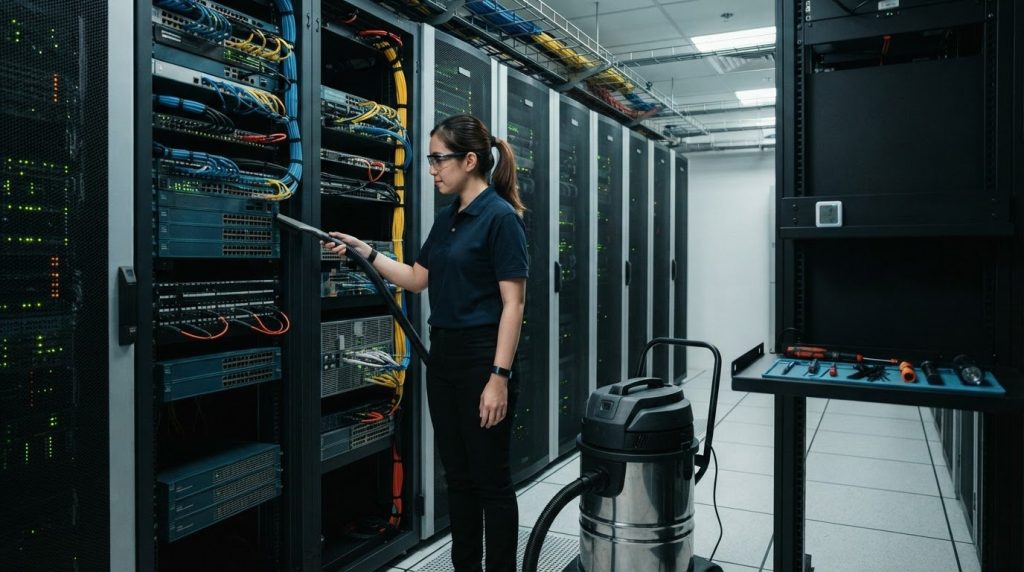
Insurance matters, but it does not replace a controlled cleaning method. Professional cleaning services for network closets and comms rooms focus on physical contamination control: inspecting for dust and blocked airflow, then cleaning agreed equipment areas and surfaces without treating a critical room like ordinary storage.
Before work begins, ask whether cleaners are insured and bonded. The useful answer goes beyond yes or no: understand what the policy covers, whether the agreed work is included, and how the team will protect equipment, access controls, and confidential information. In wider workplace maintenance, experienced commercial providers like Advance Cleaning Services Inc. illustrate how proper insurance and structured operating procedures safeguard assets while supporting clean, well-managed premises.
This guide explains what an inspection and preventive maintenance can cover, how dust and poor organisation may contribute to heat, troubleshooting delays, and outage risk, and what to ask about insurance and privacy. It also shows how to assess a cleaning approach for an operational comms room, including cable handling, equipment access, and contamination control, so you can decide based on the room’s needs rather than a generic checklist.
Key Takeaways
- Inspect for dust, blocked airflow, loose or tangled cables, and equipment left connected without a clear purpose.
- Use environmental monitoring to track temperature and humidity; the guidance in this article gives operating ranges to consider for network closets.
- Understand how contamination and disorganisation can contribute to heat, complicate troubleshooting, and increase operational risk.
- Before cleaning, align the work scope with room access, equipment handling, insurance coverage, and privacy controls.
- Choose a cleaning method designed for critical environments, with clear controls for equipment areas and contamination.
1. Inspection and preventive maintenance
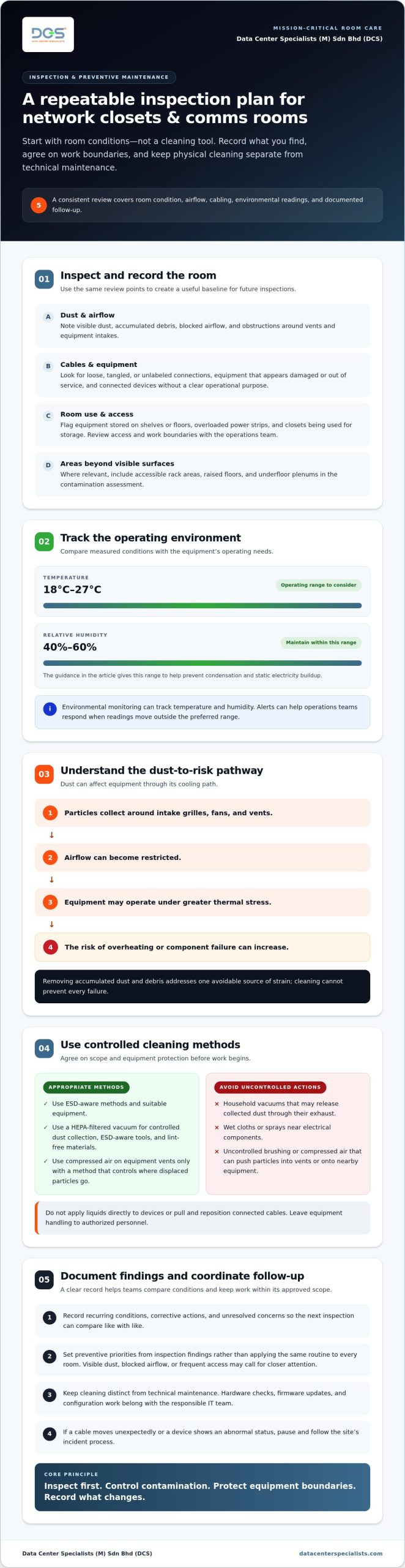
Begin with a room inspection, not a cleaning tool. Record visible dust, blocked airflow, loose cables, unlabeled connections, and equipment that appears damaged or out of service. Check whether devices remain connected without a clear operational purpose. Shelves or floor areas holding network equipment, overloaded power strips, and closets used for storage are additional warning signs.
Measure the environmental conditions and compare them with the equipment’s operating needs. Network closet equipment should typically be kept between 18°C and 27°C. Relative humidity should be maintained between 40% and 60% to help prevent condensation and static electricity buildup. Environmental monitoring can track both conditions, while alerts allow operations teams to respond when readings move outside the preferred range.
What procedures prevent static electricity and equipment damage during comms room cleaning? Use ESD-aware methods and suitable equipment, avoid applying liquids directly to devices, and do not pull or reposition connected cables. Agree on access and work boundaries with the operations team before cleaning, and leave equipment handling to authorized personnel.
Make the inspection repeatable. Review access and room conditions, inspect racks and cable routes, identify dust accumulation, and record findings before work begins. Note airflow obstructions around vents and equipment intakes. A dusty surface alone does not show where contamination is settling, so include accessible rack areas and, where relevant, the raised floor and underfloor plenum in the assessment.
Separate cleaning from technical maintenance. An inspection can flag equipment that may need a hardware check, but firmware updates and configuration work belong with the responsible IT team. Coordinate these tasks through the facility’s maintenance process. This keeps physical contamination control distinct from changes to live network equipment.
Use inspection findings to set preventive priorities instead of applying the same routine to every room. A closet with visible dust, blocked airflow, or frequent access may need closer attention than a controlled, low-traffic room. Record recurring conditions, corrective actions, and unresolved concerns so the next inspection can compare like with like. A documented baseline also helps teams identify changes before they become operational problems.
For critical environments, professional data center cleaning should account for equipment exposure and contamination pathways. This is especially relevant when a comms room connects to raised-floor or underfloor spaces that can hold dust beyond immediate view.
2. Equipment lifespan and downtime risks
Dust affects network equipment through its cooling path. When particles collect around intake grilles, fans, and vents, airflow can become restricted. Equipment may then operate under greater thermal stress, increasing the risk of overheating or component failure. Cleaning cannot prevent every failure, but removing accumulated dust and debris addresses one avoidable source of strain.
Maintenance also affects how quickly teams can diagnose faults. In a tangled rack, tracing a connection can take longer and may disturb adjacent cables. Clear routing and accessible equipment help technicians identify affected devices and follow connections during troubleshooting. That clarity matters when a switch supports phones, wireless access points, security cameras, or other business systems.
What specialist tools and HEPA-filtered equipment are used for server room cleaning? A suitable scope may use a HEPA-filtered vacuum for controlled dust collection, ESD-aware tools, and lint-free materials. Compressed air may be used on equipment vents only with a method that controls where displaced particles go.
What are the risks of using ordinary cleaners or cleaning methods around network equipment? Household vacuums can release collected dust through their exhaust, while wet cloths or sprays can introduce moisture near electrical components. Uncontrolled brushing or compressed air can push particles into vents or onto nearby equipment.
Cleaning is only one part of lifecycle care. Hardware checks can identify physical wear, damaged connectors, or fans that no longer perform as intended. Firmware updates may also form part of scheduled maintenance, but the responsible IT team should plan and carry out software changes. Separating these tasks prevents a cleaning activity from becoming an unapproved configuration change.
Plan work around operational dependencies. Before disturbing a rack area, identify which devices support shared services and which connections must remain untouched. Agree on access boundaries, escalation contacts, and stop-work conditions with the operations team. If a cable moves unexpectedly or a device shows an abnormal status, pause and follow the site’s incident process rather than continuing the task.
Use maintenance records to connect cleaning observations with operational events. Note recurring dust near a particular intake, repeated fan alerts, or debris beneath a rack. Comparing these observations with equipment checks can help teams decide whether to adjust the cleaning scope, investigate airflow, or schedule technical maintenance. Record the affected area and action taken so follow-up work has a clear reference.
For facilities where equipment condition and service continuity are closely linked, planned maintenance for critical equipment can help coordinate cleaning observations with authorized technical checks.
3. Network closet equipment and infrastructure
A network closet can support internet access, phones, wireless networks, security cameras, servers, and other business technology. Map those dependencies before changing rack layouts or cleaning around connected equipment. A room plan should identify each rack, device, cable route, and required clearance. This gives operations and facilities teams a shared reference when equipment is added, moved, or inspected.
Rack dimensions affect both equipment fit and access for maintenance. Standard server rack cabinets are 19 inches wide, while cabinet depths can range from 500 to 1000 mm. Check the installed cabinet and device dimensions before planning replacements or expansions. A deeper cabinet may affect rear access and cable routing, while a crowded rack can make routine inspection more difficult.
Keep cable management functional, not merely tidy. Cable trays, ties, and labels can organise and secure network cables, but labels should remain readable and match current records. For example, a label identifying the switch and destination port helps a technician trace a connection without disturbing adjacent wiring. Avoid tight bends, excessive tension, or bundles that obstruct equipment access.
Documentation should record the room layout, installed equipment, and configurations. Include the systems each device supports, connection paths, and changes made during an upgrade. This record helps distinguish active infrastructure from equipment marked for removal. It also supports cleaning planning, since technicians need to know which routes and devices must remain untouched.
Expansion planning should consider the closet’s physical limits as well as new equipment. Assess available rack positions, power distribution, airflow paths, cable routes, and access space before adding devices. A new switch, for instance, may need additional cabling and may alter how teams reach existing equipment. DVL recommends one network closet for every 10,000 square feet of space; treat that as a planning recommendation, not a substitute for reviewing actual building requirements and infrastructure.
How should Malaysian businesses compare network room cleaning companies? Compare written scopes for the exact areas covered, equipment-handling boundaries, contamination controls, access procedures, and completion records. A clear scope distinguishes rack surfaces from raised floors or underfloor spaces and explains how technicians will protect live connections.
Before approving work, align the room drawing and equipment inventory with the cleaning scope. Identify restricted racks, vulnerable cable paths, and planned infrastructure changes. For a new installation or expansion, schedule cleaning around commissioning milestones so construction debris is addressed before equipment becomes operational. For an occupied closet, coordinate the work sequence with the team responsible for connected services.
4. Privacy and client guidance during closet cleaning
Set access boundaries before a technician enters a comms room. Name an authorised escort, identify restricted racks, and record permitted work areas. For example, a cleaner assigned to rack exteriors should not open cabinets or handle patch panels. Use the facility’s access log to record entry and exit, then confirm that keys or temporary passes are returned.
Protect information that may be visible inside the room. Screens, console displays, printed network diagrams, asset labels, and whiteboards can reveal operational details. Tell the cleaning team which areas are off-limits, and prohibit unauthorised photography or copying. If documentation is needed for safe access, provide only the relevant extract through the approved site process.
What standards and safety rules apply to cleaning IT and telecommunications rooms in Malaysia? Follow the facility’s approved procedures, task risk assessment, equipment instructions, and applicable workplace and electrical safety controls. A site-specific method should define access, equipment handling, contamination control, and stop-work conditions. A generic checklist is not a substitute.
Agree how the work will be supervised. The facility representative should identify live equipment, cable routes, emergency contacts, and activities that require prior approval. For example, specify that a cleaner must stop if a cable appears loose or an alarm activates. This prevents an environmental cleaning task from becoming an unauthorised intervention in network or electrical systems.
How should businesses prepare a comms room before a professional cleaning visit? Provide the approved scope, escort arrangements, restricted-area map, and contact details for the responsible operations lead. Identify equipment that must remain untouched, have authorised staff remove unrelated stored items, and schedule any required service interruption separately.
Privacy controls should also cover records after the visit. Specify who receives the completion report, where authorised photographs may be stored, and how access records are handled under the site’s information-control process. Keep the report focused on findings such as dust accumulation or obstructed access; exclude credentials, configuration details, and unrelated screen content.
Before work starts, review insurance documentation against the agreed scope and site conditions. Ask the facility’s procurement or risk team to assess relevant coverage, including the work being performed and potential equipment damage. Keep the approved scope, risk assessment, access record, and incident escalation route together so the site contact can resolve questions during the visit.
Close with a joint walk-through. The escort and cleaning lead can compare the agreed work areas with completed areas, note any exceptions, and confirm that restricted racks stayed untouched. Record unresolved observations for the operations team instead of allowing cleaning staff to adjust equipment or cabling. A clear handover protects privacy and operational control.
5. What is included in a professional network closet or comms room cleaning service?
A defined service starts with an agreed scope and review of room conditions. The scope should identify the comms room, rack exteriors, accessible equipment surfaces, vents, raised floor, and underfloor areas, where included. This prevents assumptions about hidden spaces or equipment interiors. A live room also needs clear boundaries around connected devices and cables.
Dust removal should control where particles travel. A technician may use suitable vacuum equipment on accessible surfaces and controlled compressed air to clean equipment vents. Compressed air can dislodge particles, so the method should prevent debris from settling elsewhere in the room. The work plan should distinguish exterior cleaning from any activity that could expose internal components.
Surface cleaning covers rack exteriors, cabinet tops, doors, and other agreed surfaces. Materials and methods should suit each surface and avoid leaving lint or residue. In a raised-floor room, the scope can include accessible floor panels and the underfloor plenum. These areas may require separate access and contamination controls from the rack aisle.
Cable organisation and labelling can be part of the service scope, but handling must be controlled. Cable trays, ties, and labels help keep routes identifiable and secure. Before any adjustment, the site team should identify permitted work and provide current cable records. A cleaner should not disconnect, reroute, or relabel a live connection based on guesswork.
Clarify whether equipment surfaces, vents, raised-floor panels, or underfloor spaces are included. These are distinct tasks. A scope that says only “clean the room” leaves important limits unclear. It should name accessible areas, excluded equipment, and work requiring operations-team approval. For construction or upgrade projects, timing matters: post-construction cleaning removes project debris before the room enters service, while operational cleaning must preserve live-system boundaries. In facility-wide maintenance, comprehensive commercial providers like Sentinel Clean Solutions can maintain the surrounding property, ensuring general dust and debris do not infiltrate critical technical areas.
Completion records make the work auditable. A useful report can note the areas addressed, access limitations, visible contamination, and conditions needing facilities follow-up. It should not imply that cleaning repairs equipment or verifies network performance. If particle assessment or equipment maintenance is required, treat it as a separate technical activity with its own scope.
For a useful quotation, share a room layout, rack inventory, access requirements, and the areas requiring attention. Review professional data center cleaning scope against the room’s contamination risks, operational status, and required reporting. This gives facility and IT teams a practical basis for agreeing on work boundaries before scheduling.
Data Center Specialists (M) Sdn Bhd (DCS): Professional Data Center ISO Cleaning Services
Data Center Specialists (M) Sdn Bhd (DCS) provides Professional Data Center ISO Cleaning Services for mission-critical environments. Choose this service when dust, construction debris, or contamination in racks, equipment areas, raised floors, or underfloor spaces calls for a controlled cleaning scope.
DCS can also address pre-commissioning and post-construction cleaning, where the work must reflect the facility’s stage and operational boundaries. For an occupied room, share the access requirements, areas of concern, and equipment handling limits so the scope can be aligned with site operations. Explore professional data center cleaning for details on the service.
Contact DCS to discuss cleaning requirements for your network closet, comms room, or critical facility.
Set a clear plan for your next maintenance cycle
Turn the findings from your room review into a decision with a named owner and a recorded next step. This keeps environmental concerns visible in routine facility planning instead of leaving them as observations without follow-through.
For teams evaluating cleaning services for network closets and comms rooms, define what a successful engagement should document and how operations will use those findings. A consistent review process helps make future maintenance decisions more deliberate.
Contact Data Center Specialists (M) Sdn Bhd (DCS) to discuss your facility’s requirements. A clear next step puts your team in a stronger position to manage its critical environment.
Frequently Asked Questions
Are your cleaners insured and bonded?
Insurance and bonding are not interchangeable. Insurance may respond to covered losses under its policy terms, while a bond relates to specified contractual obligations. Neither label guarantees that every incident is covered. For procurement review, distinguish the protection each document provides and how it relates to the contract. This helps your team interpret claims accurately instead of treating “insured and bonded” as one comprehensive assurance.
Can I ask for special requests or request focus on certain areas?
Yes. You can also specify the format and purpose of the closeout record, such as a summary for facilities, procurement, or an internal audit file. If the work supports a construction handover, state which observations should be recorded for project follow-up. Agree on these deliverables before the visit so the final documentation serves its intended audience rather than offering only a generic note that work was completed.
How often should I schedule a deep cleaning service?
There is no universal calendar interval for every comms room. Establish a baseline, then use recorded observations to determine whether the planned frequency remains suitable. For example, recurring dust deposits can indicate that the current schedule needs review. Include cleaning in the facility maintenance calendar and reassess it after significant changes to room use, building work, or equipment layout.
What is a Network Closet?
A network closet is a dedicated space for communications infrastructure serving a building or part of one. It may function as a local distribution point for connections rather than as a full data centre. The label describes the room’s role, not a fixed equipment list: some closets contain network distribution hardware, while others also house servers or telecommunications equipment.
What cleaning services are available for network closets and communications rooms in Malaysia?
Cleaning services for network closets and comms rooms in Malaysia address physical contamination in technical spaces, with the scope defined for the room and its operating conditions. Specialist cleaning may cover equipment areas, raised floors, underfloor plenums, or construction-related debris. The objective is controlled physical cleaning, not software or database cleaning. Make sure the agreed scope clearly identifies included areas and exclusions.
How often should network closets and communications rooms be cleaned?
Set the frequency through a documented maintenance plan, then review whether it still fits the facility’s operating pattern. Compare inspection records over time instead of relying only on a recurring calendar entry. If room usage or surrounding building activity changes, reassess the plan and record the reason for any adjustment. This makes scheduling decisions traceable for operations teams.
Which providers offer comms room or data centre cleaning across Malaysia?
Data Center Specialists (M) Sdn Bhd (DCS) provides professional cleaning for mission-critical IT environments. Its work supports organisations seeking physical contamination control for technical rooms, rather than general building cleaning. When discussing requirements, describe the facility type and intended outcome. This gives the technical conversation a clear starting point without assuming every comms room needs the same scope.