
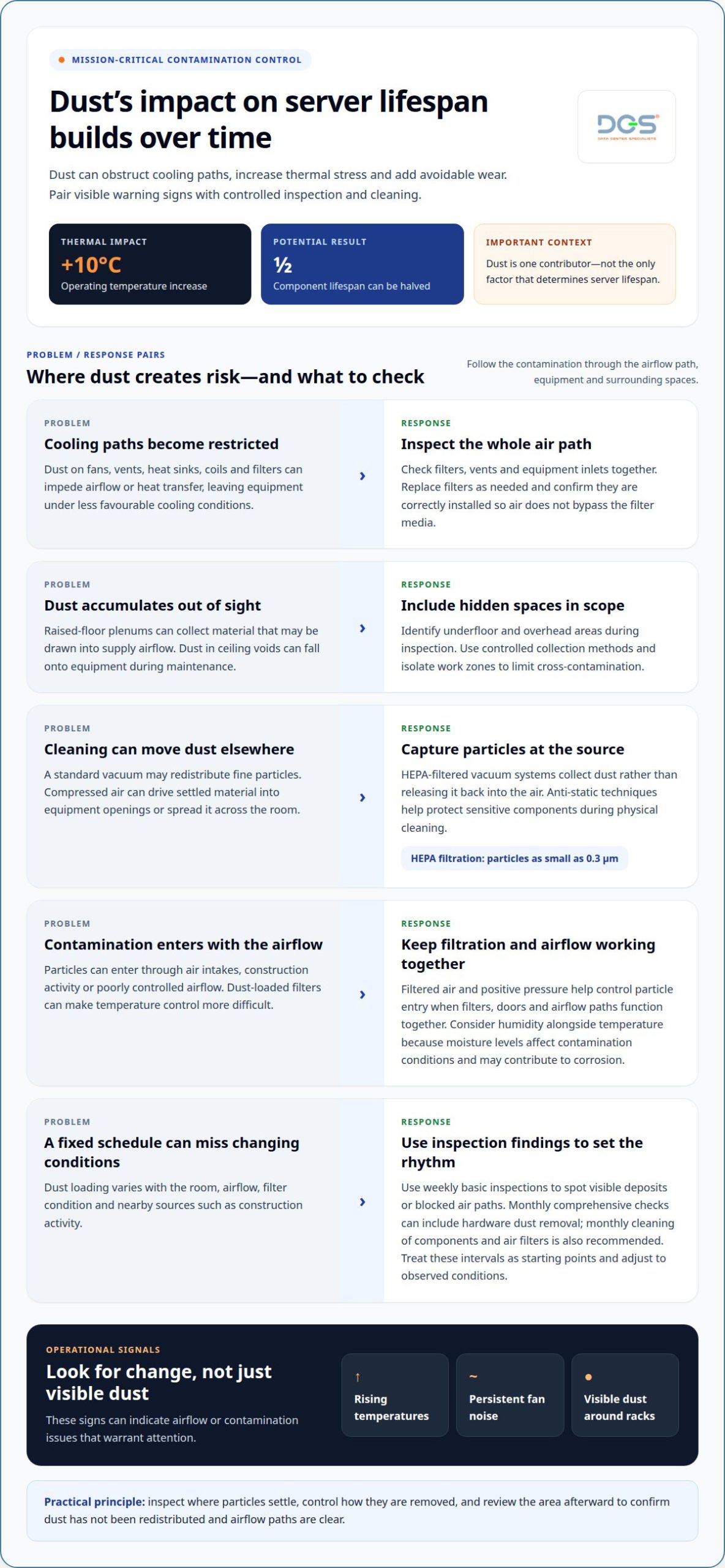
The long term impact of dust on server lifespan is cumulative: restricted airflow can raise operating temperatures, force fans to work harder and accelerate wear on components. A 10°C increase in operating temperature can halve component lifespan. Dust is not the only factor that determines how long a server lasts, but unmanaged contamination can add avoidable thermal and electrical stress.
Clean cooling paths and controlled contamination matter to data centre operators because equipment reliability depends on more than server design or age. This article explains how dust affects airflow, cooling, electrical safety and component wear, and how those effects can build over time. It also covers signs of contamination and how professional data centre cleaning and environmental assessment can help manage dust in mission-critical spaces.
Key Takeaways
- Dust in filters, vents and underfloor areas can disrupt the airflow that cooling systems depend on.
- Contamination control should account for the data centre’s environment and how quickly dust accumulates, rather than rely on a one-size-fits-all schedule.
- Rising temperatures, persistent fan noise and visible dust around racks can signal airflow or contamination issues that need attention.
- Conductive particles can create electrical risks when they settle on sensitive equipment, making appropriate cleaning methods important.
- Professional cleaning and environmental assessment can help identify contamination sources and support more reliable cooling and equipment operation.
What Is Dust Contamination in a Data Center?
Dust contamination is the accumulation of airborne particles on equipment, filters and surfaces in a server environment. Its effects depend on where particles settle and whether they obstruct cooling airflow.
Dust Buildup on Server Components
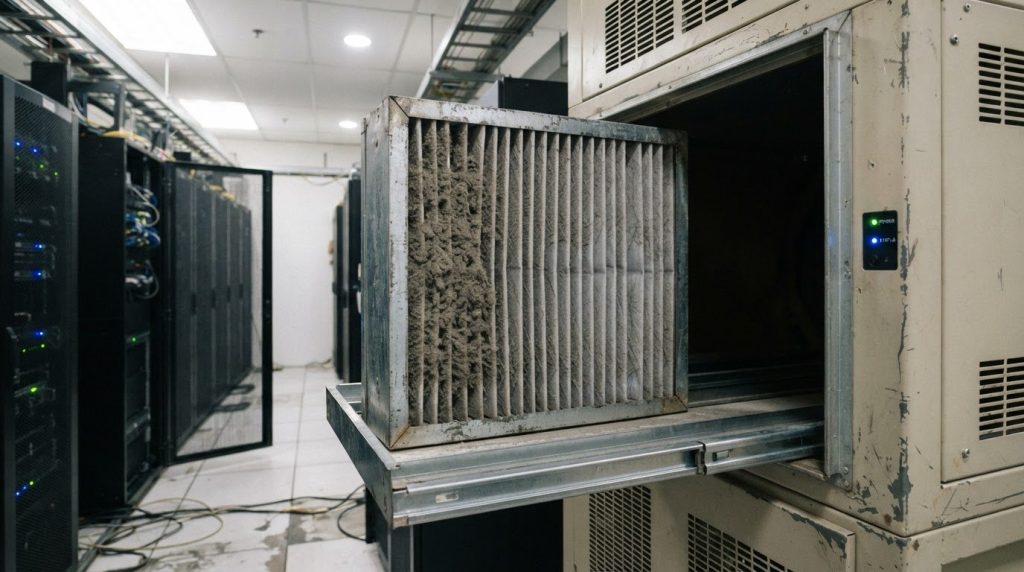
Cooling fans, vents, heat sinks and cooling coils are vulnerable because they move air or transfer heat through narrow passages. Dust on a fan can restrict airflow, while deposits on a heat sink can slow heat dissipation. Filters and server-room vents matter too: as dust collects, it can impede the air needed to control equipment temperatures. These restrictions can leave components operating under less favourable cooling conditions.
Dust Risks Across Server Environments
In a home, a server may collect household dust, fibres or particles from nearby activity; an office can add dust from occupied spaces and renovation work. Data centres use managed cooling and air filtration, but contamination can still enter through air intakes, construction activity or poorly controlled airflow. The amount and source of dust help operators decide where to focus inspection, filtration and cleaning.
Dust Blocking Cooling-System Filters
Dust-loaded filters can restrict air supplied to cooling systems and make temperature control more difficult. As filter resistance rises, less air may pass through the intended route, affecting airflow to server racks. A practical assessment considers both the filter and the surrounding air path, including vents and equipment inlets. Regular filter changes support steady airflow, while inspection can identify visible loading or air bypass around the filter.
Filtered, Positive-Pressure Airflow
Filtered air and positive pressure help control how particles enter a server environment. With positive pressure, clean, filtered air moves outward through designated exhaust paths instead of allowing uncontrolled air to enter through gaps. This works only when filters, doors and airflow paths function together. Operators should consider humidity alongside temperature, since moisture levels affect contamination conditions and may contribute to corrosion.
HEPA Filtration and Decontamination
HEPA filtration can capture particles as small as 0.3 µm, supporting the removal of fine airborne contamination. During decontamination, HEPA-filtered vacuum systems collect dust rather than redistributing it into equipment areas. Anti-static techniques help protect sensitive components during physical cleaning. The method should account for the affected surfaces, including racks, vents and nearby areas, so removed material does not simply settle elsewhere in the data center.
Routine professional data-centre cleaning
Routine cleaning manages physical contamination across server rooms, equipment areas and cooling paths. In a data centre, the method must control dust without transferring it to sensitive components or disrupting operations.
Routine Server-Room Cleaning
Routine server-room cleaning removes accumulated dust from accessible surfaces and equipment areas using methods suited to a mission-critical environment. A professional scope can include rack exteriors, nearby surfaces, vents and filters, with attention to electrostatic discharge risks. A standard vacuum can redistribute fine particles, while careless cleaning can move them toward internal equipment or cooling systems.
Compressed air can dislodge settled material but may also drive it into equipment openings or spread it across the room. A HEPA-filtered vacuum captures particles instead of releasing them back into the air. Anti-static techniques help protect sensitive equipment during cleaning. Operators should define access boundaries and coordinate work around live equipment so cleaning does not interfere with operational controls.
Cleaning Frequency and Dust Prevention
A practical cleaning interval depends on how quickly dust accumulates in each environment. Weekly basic server inspections can reveal visible deposits or blocked air paths, while monthly comprehensive checks can include hardware dust removal. Monthly cleaning of components and air filters is also recommended. Treat these intervals as starting points, not substitutes for observing actual contamination.
Dust loading changes with the room’s airflow, filter condition and nearby sources such as construction activity. Record inspection findings, including where deposits appear, to identify recurring entry points and adjust cleaning frequency. Filter replacement and correct installation help limit particle ingress; poorly seated filters can let air bypass the filter media. This preventive work supports consistent airflow to equipment.
Raised-floor plenums and ceiling voids need attention because they can collect dust outside normal sightlines. Material beneath access-floor panels may be drawn into supply airflow, while overhead deposits can fall onto equipment during maintenance. A professional cleaning scope should identify these spaces and use controlled collection methods. Isolating the work area helps limit cross-contamination between dusty zones and cleaner operational areas.
Cleanliness also supports a safer operating environment. Data centres run high-powered equipment continuously, so accumulated contamination around electrical and mechanical infrastructure warrants attention. Cleaning should address the source and location of deposits, not just visible surfaces. For example, black residue near cooling equipment calls for investigation of its mechanical source as well as careful removal.
After cleaning, an environmental review can assess whether dust remains in the treated area and whether airflow paths are clear. Match the method to the surface, contamination and operating conditions; avoid ordinary vacuums or uncontrolled air blasts around sensitive equipment. A disciplined approach reduces the chance that cleaning will spread particles or expose internal components.
Dust-related overheating and restricted airflow
Dust can obstruct cooling paths, raising server temperatures and making heat removal less effective. The consequences can range from local hot spots to higher cooling demand and added stress on hardware.
Restricted Airflow and Localized Hot Spots
Restricted airflow occurs when dust obstructs a server inlet, fan, heat sink or exhaust path, creating uneven cooling across equipment. A blocked inlet can leave one rack position hotter than nearby positions, even when the room’s average temperature appears stable. Compare conditions at equipment intakes and across rack locations, rather than relying only on a room-level reading.
Dust on heat sinks and cooling fins slows heat dissipation from processors and other components. Fans may run more continuously to move air through the obstruction, while some processors or GPUs can reduce clock speeds through thermal throttling. In a server room, rising temperatures, persistent fan noise and unstable performance are practical signs to investigate airflow and contamination together.
Airflow and Particulate Monitoring
Airflow monitoring examines whether cooling air reaches equipment through intended paths; particulate monitoring identifies airborne contamination that can settle along those paths. Together, these checks help distinguish a cooling imbalance from a dust source. A useful assessment maps supply and return routes, reviews intake conditions and records where particles or restricted airflow appear.
Monitoring should consider both operating conditions and physical evidence. Compare temperature readings at rack inlets with fan activity, then inspect filters and nearby surfaces for dust loading. Particle-count testing can characterize airborne contamination, while airflow assessment shows whether cooling is distributed as intended. Repeatable observations help teams identify changes and target maintenance.
Temperature and Hardware Failure Rates
Higher operating temperatures increase thermal stress and can shorten component lifespan; sustained overheating may also contribute to crashes. A 10°C increase in operating temperature can halve component lifespan. This relationship makes temperature trends relevant to reliability planning, although a room reading alone cannot establish the condition of every server or component.
Dust-related damage can add maintenance work through inspection, cleaning, repair or premature component replacement. Warranty coverage depends on the applicable product terms and evidence of the fault, so dust exposure alone does not establish whether a claim is covered. Keep temperature and maintenance records to help distinguish recurring environmental issues from isolated hardware faults.
Dust on cooling coils or vents can also make cooling systems work harder, increasing electricity use. A structured response is to locate the obstruction, assess airflow and temperatures, then remove contamination using suitable controlled methods. This sequence supports efforts to extend equipment life without treating cleaning as a substitute for cooling-system maintenance. Professional data center cleaning can address contamination in equipment areas while supporting particulate control.
Electrical and fire risks from conductive dust
Conductive dust presents an electrical risk when particles settle across energized or sensitive equipment. In a server environment, contamination on printed circuit boards, power distribution units and backplanes can create unintended conductive paths. The risk depends on particle properties, deposit location and operating conditions, so visible dust near electrical assemblies deserves attention even if equipment continues running normally.
On a circuit board, a conductive particle can bridge separate electrical pathways and contribute to a short circuit. Dust accumulation may also retain moisture, increasing conductivity around exposed contacts. This combination can lead to malfunction or premature equipment failure. A dust deposit across closely spaced contacts presents a different concern from loose particles on an external rack panel.
Electrostatic discharge is a separate mechanism. A dust particle carrying a static charge can discharge on contact with sensitive server equipment, potentially damaging electronic components. Zinc whiskers, fine conductive growths associated with zinc-coated surfaces, can also bridge circuit-board components. These particles may be difficult to identify during a routine visual inspection, yet their location can make them relevant to electrical reliability.
Risk assessment should consider the whole environment, not only the server chassis. Dust can settle on power distribution units, cable connections and equipment surfaces, while contamination sources may be elsewhere in the room. If black dust appears near cooling equipment, inspect for a mechanical source such as worn belts or sheaves. Removing residue without addressing its source can allow particles to return and expose equipment again.
Electrical symptoms can include unexpected resets, failed components or interruptions affecting connected systems. A short circuit in one assembly may cause downtime beyond the affected server, depending on the equipment and power arrangement. Dust does not automatically cause every fault, but contamination near electrical pathways should be investigated rather than dismissed as cosmetic.
Cleaning in an energized data centre requires controlled methods. Uncontained air blasts can move particles onto circuit boards or into power assemblies; ordinary vacuuming can also redistribute fine material. Use suitable HEPA-filtered collection and anti-static practices, with work boundaries planned around equipment and airflow. If contamination is concentrated near electrical equipment, isolate the affected area where operational procedures permit, then identify and correct the source before final cleaning.
Conductive contamination can shorten component life through electrical damage, repeated faults or moisture-related corrosion. Record where particles appear, which equipment is affected and whether deposits return after cleaning. Recurring black residue near the same cooling unit points to a source investigation, while isolated dust on a rack exterior may require a different response. Linking observations to maintenance findings helps teams prioritize corrective action.
Dust and server lifespan
The long term impact of dust on server lifespan comes from repeated stress, not one visible deposit. Dust accumulation can make fans work harder, interfere with heat transfer and expose delicate hardware to ongoing wear. Equipment reliability depends on operating conditions as well as age, workload and maintenance history.
Fan bearings are one point of cumulative wear. When dust restricts a fan’s movement or airflow, the fan may work harder to move air through the chassis. Over time, added mechanical strain can shorten fan service life and create another maintenance issue. When reviewing repeated fan replacements, consider contamination alongside component condition and operating temperatures.
Thermal stress can also build across processors, graphics processors and power components. Dust on heat sinks slows heat dissipation, and recurring elevated temperatures can contribute to premature failure. This does not mean every dusty server will fail early. It means contamination is a controllable factor among the conditions that influence hardware life and operational efficiency.
Some published guidance places typical server life at 3-5 years, while proper maintenance may extend service life to 6-8 years or more. These ranges are not a replacement timetable for every facility. Workload, component condition, cooling performance, support arrangements and the consequences of failure all influence replacement decisions. Dust control supports equipment care, but does not determine the full lifecycle alone.
Storage hardware has distinct contamination concerns. Dust entering a hard-drive or tape-drive mechanism can damage magnetic media, while particles on delicate components may contribute to read/write errors or data corruption. These risks differ from dust on an external surface, so assessment should consider the equipment’s location, enclosure and evidence of contamination. Keep operational records linked to affected hardware and observed faults.
For data centre operations, treat recurring dust as a maintenance signal. Compare inspection findings with fan activity, temperature history, service incidents and the locations where deposits return. If accumulation repeatedly appears near the same racks or airflow paths, address the contamination source as well as the affected surfaces. This gives maintenance teams a clearer basis for planning corrective work and equipment replacement.
Professional cleaning can help manage physical contamination around server equipment and reduce dust-related stressors, while an energy efficiency assessment can examine wider cooling performance. If deposits persist or hardware concerns recur, a server-room contamination assessment can inform the next maintenance decision.
Data Center Specialists (M) Sdn Bhd (DCS): Data Center Server Room Cleaning
Data Center Specialists (M) Sdn Bhd (DCS) provides professional data centre cleaning for server rooms where dust affects cooling paths, equipment surfaces or underfloor areas. Its Professional Data Center ISO Cleaning Services address physical contamination in mission-critical environments, including rack and equipment areas and raised floors.
Consider a professional cleaning assessment when dust repeatedly accumulates near server inlets, filters or underfloor plenums, or when construction work introduces debris. Cleaning is one part of contamination control; persistent cooling or airflow concerns may also call for a Data Center Energy Assessment or Testing, Adjusting & Balancing (TAB). The appropriate scope depends on the affected areas and operating conditions.
For support managing physical dust contamination in your data center, contact Data Center Specialists (M) Sdn Bhd (DCS) to discuss professional data center cleaning.
Make Contamination Trends Part of Lifecycle Planning
Include contamination control in lifecycle decisions before replacing equipment or changing a facility layout. During refresh planning, consider how rack placement, equipment access and future maintenance may affect the environment around installed hardware. This connects facility design choices with the conditions in which servers operate, rather than treating contamination as a separate housekeeping concern.
The long term impact of dust on server lifespan can also inform how teams assign responsibility across operations, facilities and project delivery. Set clear ownership for contamination-related decisions when planning upgrades or changes to server-room infrastructure. This keeps environmental considerations visible as requirements evolve, without assuming that one cleaning activity addresses every operational need.
For a technical discussion about your facility’s requirements, contact Data Center Specialists (M) Sdn Bhd (DCS) and consider the next step for your environment.
Frequently Asked Questions
What Factors Determine Server Lifetime?
Server lifespan depends on workload, component condition, supportability and whether the equipment still meets operational requirements. A system may remain functional but become unsuitable if it cannot support required applications or security updates. During lifecycle reviews, compare the cost and risk of continued operation with the demands of the planned workload. Include spare-parts availability and compatibility with facility infrastructure in that decision.
How does dust affect server lifespan and reliability over time?
Dust can contribute to reliability problems, but assess it alongside workload, component age and maintenance history. If a fault occurs, identify the affected part and review its service records before treating contamination as the cause. This helps teams avoid replacing an entire server when a specific component can be serviced. It also keeps fault investigations evidence-based, rather than attributing every equipment issue to the room environment.
How does dust reduce server cooling and increase operating temperatures?
Dust can impede heat removal, but its effect on an individual server depends on design, workload and cooling arrangement. Compare telemetry with the equipment manufacturer’s operating limits rather than applying one temperature target to every configuration. A server that briefly reaches a threshold under a changing workload requires a different investigation from one that repeatedly approaches its limit under steady demand. This context makes temperature alarms more useful for operational decisions.
How much can dust increase server power use and cooling costs?
There is no single increase that applies across facilities. The effect depends on server fan behaviour, cooling controls, operating hours and the facility’s electricity tariff. To estimate the impact, separate IT load from cooling-system consumption and compare periods with similar workloads and operating conditions. Apply the relevant Malaysian tariff to measured energy use for a site-specific cost estimate, without assuming every cooling change results from dust.
What are recommended server room dust and particulate limits?
Set a particulate target based on the facility’s contamination-control specification and the measurement method used. A useful specification identifies particle-size channels, sampling locations and whether measurements occur during normal operation. ISO 14644-1 provides a framework for classifying airborne particle concentration, but the appropriate classification depends on the environment’s requirements. Consistent sampling conditions make results more useful for tracking changes and evaluating whether a control measure is effective.