
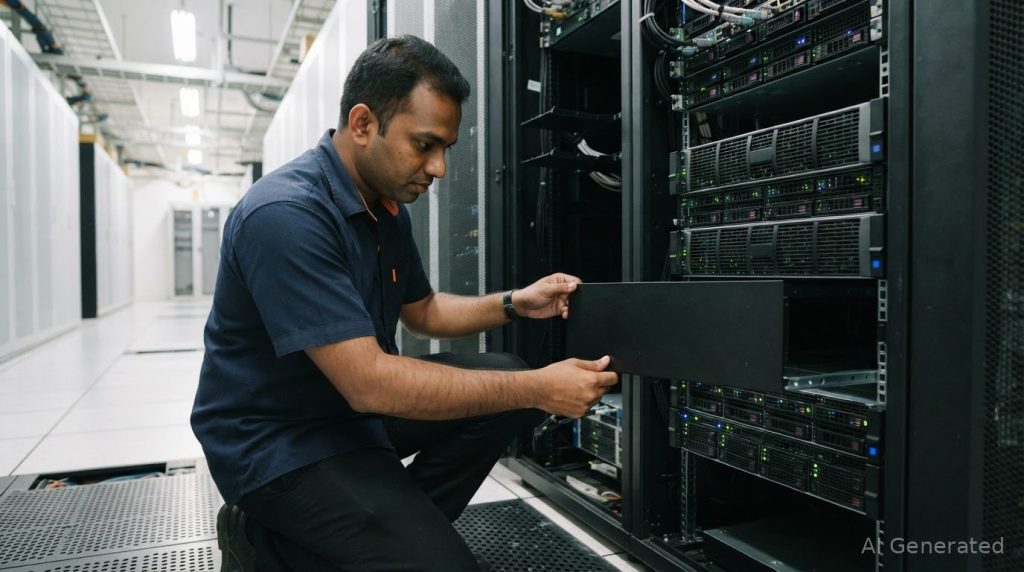
Lowering the cooling setpoint may not resolve a server room hot spot. Effective server room overheating troubleshooting starts by identifying whether the cause is restricted airflow, hot-air recirculation, cold-air bypass, rising IT loads or poorly maintained cooling equipment. In Malaysia’s warm climate, airflow problems can persist even when cooling systems run continuously.
Overheating can signal more than a room-temperature problem. Poorly arranged racks, obstructed vents, unsealed cable openings and dirty filters can keep cooled air from reaching equipment inlets, while hot exhaust air may recirculate toward them. The result can be uneven temperatures and added strain on IT and cooling systems.
This article explains how to trace causes, assess cooling maintenance and rack airflow, and use blanking panels, sealed openings and hot- or cold-aisle containment to improve airflow paths. You’ll learn why containment matters, which warning signs to watch for, and when a technical airflow assessment can help distinguish a local hot spot from a wider cooling-capacity issue.
Key Takeaways
- Trace hot spots to airflow restrictions, recirculation, changing IT loads or cooling performance before adjusting room settings.
- Assess rack layout, cable routing and vent placement to identify where cooled air is blocked or bypassing equipment.
- Keep cooling equipment and filters maintained, and consider how the system performs during peak loads or equipment faults.
- Use blanking panels and seal cable openings to reduce unwanted airflow paths through racks and raised floors.
- Evaluate hot aisle or cold aisle containment when separating supply and exhaust air could improve airflow management; consider specialist cleaning when dust or contamination is part of the problem.
Do Server Racks Need Cooling?
Yes. Cooling must deliver air to equipment inlets through each rack and carry exhaust heat away. In Malaysia, follow the electrical, fire-safety and data-centre criteria adopted for the facility’s approved design. Applicable requirements depend on the installation and its approvals.
Rack Airflow Planning
Rack airflow planning coordinates equipment orientation, supply-air delivery and exhaust-air removal. It matters because equipment can overheat even when room cooling has capacity if cold air misses the inlets. Plan cooling ducts and supply points to distribute air across the room, then align rack intake and exhaust directions. For example, front-to-back equipment airflow works best when cold air reaches rack fronts and hot exhaust leaves at the rear without returning to the inlets.
Airflow Balancing and Tile Repositioning
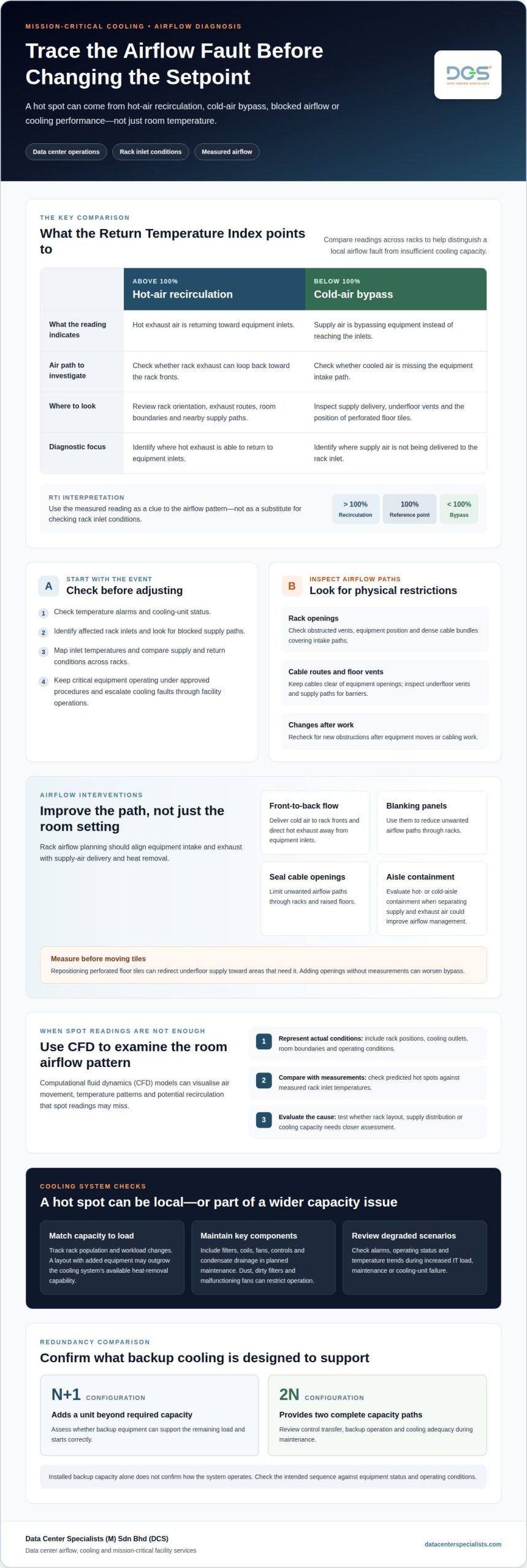
Airflow balancing adjusts supply delivery to meet cooling demand at rack inlets. Repositioning perforated floor tiles can redirect underfloor supply toward areas that need it, but adding openings without measurements can worsen bypass.
During an overheating event, check temperature alarms and cooling-unit status first, then identify affected rack inlets and any blocked supply paths. Keep critical equipment operating under approved procedures, and escalate cooling faults through facility operations. To assess airflow, map inlet temperatures and compare supply and return conditions across racks. A Return Temperature Index above 100% indicates hot-air recirculation; below 100% indicates cold-air bypass. These readings help distinguish a local airflow fault from insufficient cooling capacity.
Airflow Blockages and Cable Management
Airflow blockages include obstructed rack vents, poorly positioned equipment and dense cable bundles covering intake paths. These restrictions create uneven airflow, leaving some devices with less cooling than nearby equipment. Inspect rack fronts, rear exhaust paths and underfloor vents for barriers. Route cables through designated pathways, keep them clear of equipment openings, and remove obstacles that disrupt front-to-back flow. Check for new obstructions after equipment moves or cabling work.
CFD Airflow Diagnosis
Computational fluid dynamics (CFD) uses a room model to visualise air movement, temperature patterns and potential recirculation. It helps teams examine conditions that spot readings may miss, such as exhaust air looping toward rack fronts or supply air bypassing equipment.
A useful CFD model reflects actual rack positions, cooling outlets, room boundaries and operating conditions. Compare predicted hot spots with measured inlet temperatures before changing tile positions or cooling settings. Use the findings to test proposed airflow adjustments and determine whether rack layout, supply distribution or cooling capacity needs closer assessment.
Cooling system maintenance
Server rooms use room-based air conditioning, precision cooling or hybrid systems combining compressors and heat pipes. In Malaysia, compare options by equipment type, cooling capacity, installation requirements, energy use, redundancy and maintenance needs. Actual costs depend on site conditions. Effective server room overheating troubleshooting begins by assessing whether the installed system matches the facility’s operating load.
Cooling Capacity and Equipment Density
Cooling capacity is the heat-removal capability available for the IT equipment operating in a room. It matters because servers convert consumed electricity into heat, and adding racks increases the cooling load. A system sized for an earlier, lower-density layout may struggle after equipment is added. Track changes to rack population and workload, then assess whether cooling delivery still matches heat output.
Review rack-level conditions alongside room-wide capacity. A room may have sufficient total cooling capacity yet leave a dense rack short of effective cooling. Compare operating temperatures across equipment areas and check whether hot spots coincide with new installations or sustained high workloads. This helps distinguish a capacity shortfall from a distribution problem.
Cooling System Sizing and Failures
Cooling system sizing matches installed heat-removal capability to expected IT loads and operating conditions. An undersized system may not maintain stable conditions during load peaks, while poor maintenance can reduce available performance. Include filters, coils, fans, controls and condensate drainage in planned maintenance. Dust, dirty filters and malfunctioning fans can restrict operation and complicate diagnosis.
Review system performance during normal operation and degraded scenarios, including a cooling-unit failure or increased IT load. Check alarms, operating status and temperature trends to identify changes early. Precision cooling equipment is designed to operate 24/7, so scheduled inspection and maintenance support reliable operation. A data center preventive maintenance programme can help address equipment condition systematically.
Redundancy and Backup Cooling Capacity
Cooling redundancy provides additional capacity if a primary unit fails or requires maintenance. It matters because backup equipment must support the remaining load, not merely exist as installed capacity. N+1 and 2N are common configurations: N+1 adds a unit beyond required capacity, while 2N provides two complete capacity paths.
Assess how controls transfer load, whether backup units start correctly, and whether cooling remains adequate during maintenance. Confirm the intended operating sequence against equipment status and alarm behaviour. Include power availability in the review, since cooling equipment depends on its electrical supply. A sound cooling fault assessment considers the entire operating arrangement, not just nameplate capacity.
Hybrid compressor and heat-pipe systems combine active mechanical cooling with heat transfer through a heat pipe when conditions permit. Their efficiency depends on equipment design, ambient conditions and load profile. When evaluating a hybrid arrangement, compare intended operating modes with local conditions and maintenance requirements.
What Causes IT Equipment to Overheat?
IT equipment overheats when heat generation exceeds the cooling reaching its air inlets. Common causes include rising workloads, restricted airflow, cooling-unit problems, dust accumulation and ageing components.
To identify the cause, compare rack inlet temperatures, cooling-unit status and recent changes, such as added servers or altered workloads. A hot spot isolated to one rack suggests a local airflow or equipment issue; rising temperatures across the room point to a broader cooling problem.
Heat Effects on IT Equipment and Uptime
High temperatures can trigger protective responses that affect performance and availability. Processors may reduce speed, storage drives can experience greater wear, and network equipment may become unstable. Power supplies may also consume more energy as operating conditions worsen.
Use temperature trends alongside incident records to spot patterns. For example, correlate a rack’s rising inlet temperature with unexpected restarts or processor throttling. Prolonged exposure to elevated temperatures may increase drive failures over time, so sustained trends matter for infrastructure planning.
Humidity Management and Equipment Risks
Temperature readings alone don’t describe the full environment. Humidity sensors help identify conditions that may affect equipment operation, including excessive dryness or moisture. Rapid changes can also matter, particularly when air conditions shift near sensitive equipment.
Place environmental sensors where they reflect conditions around equipment, rather than relying only on a room-level reading. Track humidity and temperature together, then compare changes with the equipment’s specified operating envelope. For example, a stable room sensor may miss a local condition near a rack inlet.
Outdated and Inefficient IT Equipment
Older IT equipment can generate more heat or have less effective cooling than newer systems. Ageing components may also perform less efficiently, adding heat while delivering less computing capability. Review asset age, workload and power trends together to identify equipment that contributes disproportionately to room heat.
Dust and dirt inside equipment can impede efficient operation and increase overheating risk. If a device runs hotter than comparable equipment under similar workloads, inspect its cooling path and contamination condition as part of the diagnosis. Cleaning must protect the equipment and account for the operating environment.
Monitoring Temperature and Humidity
Continuous environmental sensors provide a clearer picture than occasional manual readings. Monitor temperature, humidity, airflow and energy consumption, positioning sensors to reveal conditions at rack inlets and potential hot spots.
Set warning and critical alerts against the applicable equipment operating limits and the facility’s response procedures. Review alert trends, sensor placement and alarm escalation together, so thresholds flag actionable changes instead of generating repeated, unhelpful notifications.
Blanking panels and sealing cable openings
Empty rack spaces and unsealed floor cut-outs can disrupt the intended cooling-air path. Air may bypass equipment instead of reaching server inlets, or hot exhaust may recirculate toward them. In racks with unused U spaces, install compatible blanking panels. Seal raised-floor cable openings around installed cables to limit uncontrolled airflow through the floor.
A blanking panel closes an unused equipment opening between installed devices. Without one, air can pass through the open space instead of flowing across equipment designed to receive cooling at its inlet. This weakens separation between the rack’s intake and exhaust sides. For example, an open slot above a server can offer air an easier route than the server’s intake path.
Inspect each rack from top to bottom, including spaces left after equipment is removed or relocated. Fit panels across vacant U positions and ensure they sit securely without obstructing installed equipment. Repeat the inspection after rack changes. A panel left off after a hardware move can reintroduce bypass even if the room’s overall cooling arrangement has not changed.
Raised-floor cut-outs need similar attention. Partly open cable openings let supply air escape into spaces that do not serve equipment inlets. Use suitable seals around cables while preserving safe cable routing and access. Avoid leaving gaps around newly installed cables, and record the opening’s location so later additions do not leave it exposed again.
Rack placement affects how supply and exhaust air travel through the room. Align rack fronts with the intended cold-air delivery path and direct exhaust sides toward the return path. A rack turned across that arrangement can obstruct supply or send hot air toward nearby inlets. Review placement whenever equipment moves, floor tiles change or cable routes are modified.
Poor cable management can obstruct vents, crowd equipment openings and make rack changes harder to inspect. Route cables through designated rack pathways rather than across perforated doors or server intakes. For example, a bundle hanging across a server’s front can restrict its intake, while loose cables beneath a rack can interfere with floor airflow. Keep service loops controlled and clear of vents.
After installing panels or sealing openings, assess conditions at affected rack inlets and compare them with nearby locations. Check for remaining bypass paths, unexpected hot-air return and changes in temperature distribution. Don’t assume that opening more floor area automatically improves cooling. Additional tiles may increase bypass and energy consumption without correcting recirculation.
Use these measures as part of a wider airflow review, not as a substitute for diagnosing cooling capacity or distribution. If rack openings, cable paths and floor cut-outs are controlled but hot spots persist, assess the room’s supply and return paths. A systematic airflow management review can help identify whether the remaining causes involve rack layout, air distribution or recirculation.
Hot aisle and cold aisle containment
Hot- and cold-aisle containment separates server intake air from equipment exhaust. Cold-aisle containment encloses the aisle where rack fronts receive supply air. Hot-aisle containment encloses rack rears, directing heated exhaust toward the cooling system’s return path. Both approaches aim to reduce mixing, so cooled air reaches equipment and hot air can be removed efficiently.
Choose the arrangement that fits the room’s rack orientation, supply-air delivery and return-air design. In a cold-aisle layout, containment may use doors and overhead panels to create a defined supply zone. In a hot-aisle layout, barriers enclose exhaust air instead. The right arrangement depends on the existing airflow path, not the label alone.
Containment components must work as a coordinated system. Doors, roof panels, end-of-row barriers and rack alignment affect whether air escapes or mixes. For example, a gap above a cold aisle can let supply air disperse before it reaches rack inlets. Openings around cables or vacant rack spaces can also undermine separation, so assess them alongside the enclosure.
Evaluate results at equipment level. Compare rack inlet temperatures across the contained aisle, observe exhaust-air return conditions, and review sensor trends before and after changes. If one rack remains hot while nearby inlets are stable, investigate local blockage or equipment arrangement. If temperatures rise across the aisle, assess supply delivery, return paths and cooling capacity together.
Containment does not create cooling capacity; it manages how available air moves. A system with insufficient cooling or poorly balanced supply may still overheat after an enclosure is installed. Test conditions during normal operation and relevant load changes, and check whether fans, cooling units and controls respond as intended. Avoid lowering setpoints or adding floor openings before identifying the airflow fault.
Operational planning matters in Malaysian facilities where equipment access and maintenance must continue without disrupting the intended airflow arrangement. Confirm that doors can open for service, cable routes remain accessible, and containment components do not obstruct required equipment access. Coordinate proposed changes with facility operations and applicable fire-protection and safety design requirements.
Use temperature and airflow observations to decide whether containment addresses the diagnosed cause. If exhaust recirculation persists, inspect enclosure gaps and return-air paths. If cold air bypasses racks, review supply distribution and aisle boundaries. A focused containment design assessment can help determine how the arrangement should support the room’s airflow strategy.
Data Center Specialists (M) Sdn Bhd (DCS): Data Center Server Room Cleaning
Data Center Specialists (M) Sdn Bhd (DCS) provides Data Center Server Room Cleaning for facilities where dust or particulate contamination may affect equipment areas and airflow. Cleaning server rooms, racks and equipment can address contamination that routine cooling maintenance does not remove.
Consider a specialist cleaning assessment when dust is visible around rack equipment, contamination is present beneath raised floors, or construction work has introduced particles into the environment. DCS also provides Professional Data Center ISO Cleaning Services, Data Center Energy Assessment, and Testing, Adjusting & Balancing (TAB). These services address distinct facility needs, from contamination control to energy and airflow assessment.
For a technical discussion about server room cleaning or related facility conditions, contact Data Center Specialists (M) Sdn Bhd (DCS).
Make Airflow Findings Part of Ongoing Operations
Turn overheating observations into an operational record. Document where temperature changes occur, the conditions present and the corrective actions taken. This gives facility teams a useful baseline when workloads, equipment layouts or cooling arrangements change. A disciplined approach to server room overheating troubleshooting can focus on causes rather than repeated adjustments that leave underlying conditions unresolved.
When the next step requires specialist support, match the assessment to the issue. Data Center Specialists (M) Sdn Bhd (DCS) offers Professional Data Center ISO Cleaning Services, Data Center Energy Assessment and Testing, Adjusting & Balancing (TAB). These services support contamination control, energy evaluation and airflow balancing in mission-critical environments.
Discuss your facility’s conditions and operational priorities with Data Center Specialists (M) Sdn Bhd (DCS). A clear assessment can help your team plan the next step with greater confidence and protect reliable operations.
Frequently Asked Questions
Understanding the Enemy: What’s Causing Your Server Room to Overheat?
Common causes include rising IT loads, cooling equipment faults, restricted air paths, dust and hot-air recirculation. Compare temperature readings with recent changes, such as added servers, a cooling alarm or equipment relocation. If only one rack is affected, investigate local conditions first; if readings rise across the room, review cooling-system operation and load together. This helps distinguish a local fault from a wider facility issue.
What is a hot spot?
A hot spot is a localized area where temperatures exceed nearby conditions or equipment operating limits. It may occur at one rack inlet even while room-level sensors appear normal. For example, a poorly served rack beside a heavily loaded row can have higher inlet temperatures than adjacent racks. Use sensors near equipment intakes and compare readings across the room to locate the affected area.
What is the Ideal Server Room Temperature?
Treat these as general reference values, not a substitute for each device’s operating limits. Server models and workload conditions differ, so review equipment specifications and inlet readings before changing the room setpoint. A single room sensor may not reflect rack-level conditions.
Where does overheating in a data center come from?
Overheating can originate in IT equipment, cooling infrastructure or the air path connecting them. High workloads add heat; failed fans or dirty filters can reduce cooling performance. Rack arrangement, cable obstructions and openings can also cause supply air to miss equipment or exhaust air to return toward intakes. Compare affected locations with cooling alarms and recent operational changes to narrow down the source.
What is the recommended temperature and humidity range for a server room?
For temperature, the general reference range is 50 to 82 degrees Fahrenheit, with 68 to 71 degrees Fahrenheit described as optimal. Humidity limits depend on equipment specifications and facility operating conditions, so use the applicable manufacturer guidance rather than assuming one universal range. Monitor temperature and humidity together at representative equipment locations. Investigate sustained deviations and abrupt changes, not only room averages.
How should I calculate the cooling load for a server room in kW or BTU/h?
Start with measured electrical load from installed IT equipment, then account for other heat sources and the room’s operating conditions. Use actual equipment power data rather than rack counts alone, since devices and workloads differ. A qualified cooling assessment can convert the resulting load into the units used for equipment selection and evaluate distribution, redundancy and expected peak operation. Reassess after significant changes to the installed IT load.
What are the risks of overheating servers and how quickly can equipment be damaged?
Excess heat can cause processors to reduce speed, increase storage-drive wear and destabilize network equipment. Power supplies may also consume more energy under thermal stress. The time before damage depends on the equipment, temperature, workload and duration of exposure; there is no single timeline for every system. Treat thermal alarms, unusual fan behaviour and unexpected restarts as reasons to assess conditions promptly.
How often should server room air conditioners and filters be maintained?
Set maintenance intervals using equipment-manufacturer guidance and the room’s operating conditions, including dust exposure, run time and alarm history. Inspect filters and cooling equipment often enough to identify fouling, fan problems or drainage issues before performance declines. A dusty environment or recurring filter alarms may require closer attention than a clean, stable room. Record inspections, faults and corrective work to establish a maintenance pattern suited to the facility.