
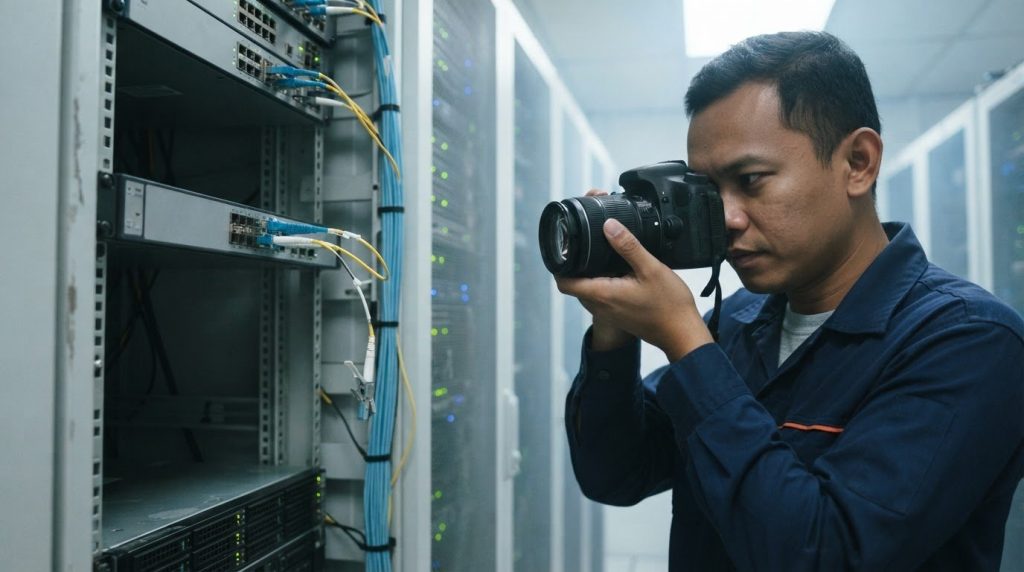
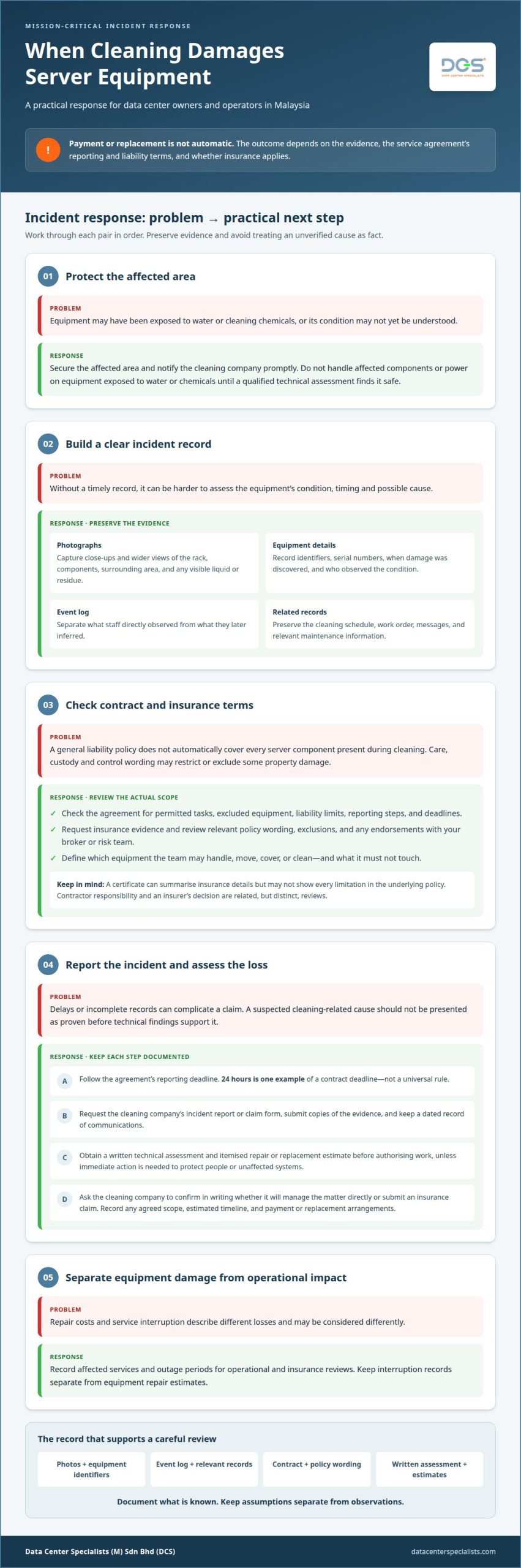
If a cleaner damages server equipment, secure the affected area, document the damage and notify the cleaning company promptly. What happens if a cleaner damages server equipment depends on the evidence, the service agreement’s reporting and liability terms, and whether insurance applies. Payment or replacement is not automatic. Preserve photographs, equipment details and communications, and do not handle affected components until they have been assessed safely.
You should receive a clear account of what happened and a practical path to resolving the damage. This guide explains how to document the incident, review the cleaning contract and insurance terms, and decide what to do next in a Malaysian data centre. It also explains how to distinguish a cleaning-related incident from an equipment fault, and when a technical assessment can help establish the extent of damage or contamination. A structured response supports informed decisions, protects unaffected systems and creates an accurate record for any claim.
Key Takeaways
- Secure the affected area, report the incident promptly, and preserve equipment for a proper technical assessment.
- Review the policy wording for care, custody and control exclusions before assuming damaged equipment is covered.
- Build a clear incident record with photographs, equipment identifiers, an event log and relevant maintenance information.
- Check the service agreement for liability limits, exclusions and reporting deadlines, then keep all claim communications in writing.
- Use professional data center cleaning expertise to support contamination control and reduce avoidable risks during future cleaning work.
What Happens If Something Gets Damaged During a Cleaning Service?
If cleaning-related damage occurs, protect affected equipment, notify the cleaning company and preserve evidence before repairs begin. Coverage and reimbursement depend on the agreement, policy wording, exclusions and documented cause.
Do not power on equipment exposed to water or cleaning chemicals until a qualified technical assessment finds it safe. Damage can disrupt workloads, applications, customer access and internal operations. Record affected services and outage periods for operational and insurance reviews.
-
Check Coverage Before Hiring
Before work begins, ask the cleaning company for evidence of current liability insurance and review whether its policy addresses property damage. Check the stated limits and exclusions, and whether electronic equipment or property in the cleaner’s care, custody or control is treated differently.
Compare those terms with your asset inventory and contract checklist. For example, a server rack may contain high-value equipment, while an exclusion for electronics could materially affect a claim. Keep the insurance details and agreed cleaning scope with the internal work order.
-
Document the Damage
As soon as you identify damage, photograph the affected rack, components, surrounding area and any visible liquid or residue. Take close-ups and wider views, then record equipment identifiers, serial numbers, when the damage was discovered and who observed the condition.
Preserve the cleaning schedule, work order, messages and relevant maintenance records. Create an event log that separates what staff directly observed from what they later inferred. This evidence helps an insurer assess timing, condition and possible cause without presenting an unverified assumption as fact.
-
Handle Claims and Repair Estimates
Notify the cleaning company promptly and follow the reporting deadline in the agreement; 24 hours is one example of a contract deadline. Request its incident report or claim form, submit copies of your evidence, and keep a dated record of each communication.
Obtain a written technical assessment and itemised repair or replacement estimate before authorising work, unless immediate action is needed to protect people or unaffected systems. General liability insurance may cover eligible third-party property damage, but reimbursement depends on the policy terms, exclusions and documented circumstances.
Ask the cleaning company to confirm in writing whether it will manage the matter directly or submit an insurance claim. If repairs are accepted, record the agreed scope, estimated timeline and payment or replacement arrangements. Keep records of operational interruption separate from equipment repair estimates, since they describe different losses and may be considered differently.
Care, custody and control coverage
Review care, custody and control wording before a cleaning company enters an operational data centre. A commercial liability policy may treat property temporarily handled by employees differently from property damaged nearby.
- Identify the equipment the cleaning team will physically handle, move, cover or clean. A server, removable panel, rack door or floor tile may fall under different descriptions of the work. Record these boundaries in the work order, including any equipment the team must not touch.
Care, custody and control is a policy concept, not a universal promise of payment. Policy wording can exclude or restrict damage to property in the insured party’s care, custody or control. Its meaning and effect depend on the policy language and circumstances. Do not assume general liability automatically covers every server component present during a cleaning task.
- Request the cleaning company’s insurance evidence and review the relevant policy wording with your broker or risk team. Focus on the insured business, covered activities, property damage terms, exclusions and any endorsements addressing equipment handled during work. A certificate can summarise insurance details, but may not show every limitation in the underlying policy.
Compare those terms with your planned scope. For example, vacuuming an aisle beside a rack differs from removing a server or opening equipment for cleaning. If employees are expected to access equipment, describe that activity specifically in the contract and ask how the policy treats it. Owners should retain the response and supporting documents with procurement records.
- Assess contractor responsibility separately from the insurance response. The agreement may define permitted tasks, excluded equipment, reporting steps and liability limits; the insurer then evaluates the claim under its policy terms. These reviews are related but distinct. A contract statement alone does not establish that an insurer will reimburse a loss.
Preserve the work scope, access approvals, equipment inventory and incident timeline. For example, note whether a rack component was handled, whether damage appeared during the visit and who observed it. Do not describe a suspected cause as proven before technical findings support it. Clear records help the facility owner, cleaning company and insurers assess the same event.
For future work, define equipment boundaries and contamination-control expectations before access begins. A documented professional data center cleaning scope can clarify which surfaces and areas are included, reducing ambiguity around physical handling.
Before work begins, tell cleaning teams about specialty flooring, antique furniture, or surfaces that need particular care, and identify handling restrictions in the scope. Check whether the cleaning provider’s liability insurance covers property damage and ask about exclusions. The recommended liability coverage is at least $500,000 to $1 million, with higher coverage for high-value environments.
The page recommends using the IRS’s 3-part test, behavioral, financial and relationship factors, to assess whether workers are employees or contractors. These checks help clarify who performs the work and what protections apply if a loss occurs.
Common causes of cleaning-related damage
Prevent damage by defining the cleaning scope, briefing the team and inspecting the work area before access. To reduce risk to server rooms and IT equipment, separate cleaning tasks from equipment handling, control liquids and report hazards before work begins.
- Set clear boundaries between general cleaning tasks and data centre cleaning services. Identify equipment, rack doors, cables, sensors and controls that employees must not touch. For example, a cleaning team can clean an approved floor area while leaving server chassis and connected components undisturbed.
Use a written checklist identifying permitted tools, surfaces, access routes and restricted zones. General commercial cleaning methods may not suit a live server environment, where airflow, sensitive connections and contamination controls matter. Brief the team on the approved scope before entry.
- Control cleaning equipment and movement to prevent accidental impacts. A vacuum hose, trolley, ladder or floor tool can strike a rack door, cable or exposed connection if routes are poorly planned. Mark the work boundary and keep tools away from equipment fronts, rear connections and underfloor cabling.
Inspect the route before work begins, then supervise activity near racks. If an obstacle requires moving a panel or cable, stop and refer the task to authorised facility staff. Cleaning employees should not reposition IT equipment to reach a surface.
- Prevent spills and residue by controlling product use. A leaking container or overspray can reach rack surfaces, floor openings or equipment intakes. Keep cleaning products contained, follow the approved method and do not apply liquids directly to electronic equipment.
If a spill occurs, stop work and notify facility operations. Do not wipe internal components or try to dry them, as handling can drive moisture deeper or create static discharge. Cooling-system water may leave conductive or corrosive residue after it evaporates.
- Manage water intrusion through the site’s safety process, not improvised cleanup. Staff must not enter standing water until power to the area is confirmed shut off at the breaker. Once it is safe, isolate the leak source if possible and protect unaffected racks with physical barriers.
For affected zones, follow facility emergency power-off procedures to shut equipment down in a controlled manner. Do not restore power based only on a dry-looking exterior, as moisture or residue may remain inside a chassis.
- Record pre-existing conditions and inspect the work area together before cleaning begins. Note cracked panels, loose floor tiles, fragile connections or existing leaks on the checklist. A joint inspection gives the cleaning team and facility staff a clear reference if a new condition appears.
After the work, inspect the area for displaced panels, residue, moisture or disturbed cables. Record and escalate anything unusual before normal access resumes.
Documenting damage with photos and videos
Build an evidence package that helps reviewers distinguish the incident scene from later testing or remediation. Along with visual records, preserve independent facility records and document how each evidence item was collected, handled and shared.
- Record the camera or device used and who captured each file. Maintain a simple evidence register with a unique reference, capture time, location and file name. If facility systems use different clocks, note their displayed times and known offsets rather than silently adjusting timestamps.
This context helps reviewers interpret footage alongside operational records. Do not edit source files. If you need a cropped view for a report, retain it as a separate working copy.
- Preserve relevant CCTV footage through the facility’s authorised security process. Identify camera views covering the work zone, entry route or nearby equipment, and ask the responsible team to retain relevant recordings before routine deletion. Note any blind spots that limit what the footage can establish.
CCTV may show movement or activity, but it may not reveal what happened inside a server chassis. Treat it as supporting context, not proof of a technical cause.
- Export system records that may clarify equipment behaviour, such as hardware event logs, monitoring alerts, building management system trends and approved change records. Where possible, preserve native exports and record the system name, export time and responsible operator.
For example, a cooling or environmental alarm may help establish conditions around the affected rack. Ask the relevant system owner to explain what each record measures rather than interpreting an alert without technical context.
- Document any inspection or testing after the incident as a separate evidence stage. Record who authorised the work, the equipment state before testing, the test method and any parts removed or replaced. Keep technician findings distinct from the original scene record.
If a component is removed, identify its source and transfer it through the facility’s controlled process. Do not label a part as the confirmed cause unless the assessment supports that conclusion.
- Maintain a transfer record whenever evidence moves between operations, security, engineering, the cleaning company or an insurer. Note the recipient, date, purpose and files or physical items transferred. Restrict access to personnel with an operational or claims role.
Before sharing a recording externally, have security review it for sensitive facility details or third-party information. Provide a copy set with a contents index, while retaining controlled source material within the facility’s evidence process.
Reviewing contract responsibility and reporting terms
Review the signed service agreement, work order and incident notice requirements before assigning responsibility. In Malaysia, an employer should not assume server damage automatically permits a deduction from a cleaner’s wages. Assess any proposed deduction under applicable wage rules before taking action. Responsibility for damaged company property depends on the agreement, evidence and circumstances, including whether the cleaning company or its employee caused the damage.
- Locate the contract clauses covering scope, property damage, exclusions, liability limits and claims procedures. Compare them with the work order and access approvals for the cleaning visit. For example, a clause excluding electronic equipment may matter if the cleaner was assigned only to nearby floor surfaces.
Check whether the agreement requires written notice, a particular reporting channel, or an incident form. The stated deadline controls the contract process; 24 hours is one example of a reporting period. Record when the damage was discovered and when notice was sent.
- Clarify each party’s role before deciding who should respond. The cleaning company may have contractual duties, while the facility owner controls access, equipment procedures and site instructions. Review who approved the task, what the cleaner was told and whether the activity stayed within the agreed scope.
Liability is not established solely because damage appeared during a cleaning visit. Compare the timeline, inspection findings, work records and relevant instructions. If the cleaning company disputes responsibility, retain both positions and their supporting documents rather than treating an allegation as a finding.
- Check how the contract treats excluded items and equipment under the cleaner’s care. An agreement can specify that cleaners must not touch, move or open servers. If an authorised task involved physical contact, compare that written permission with the work performed and the policy’s care, custody and control wording.
Review liability limits alongside asset and repair records. A limit may affect contractual recovery, while insurance coverage follows separate policy terms. Keep the contract, insurance correspondence, technical assessment and repair estimate together for a consistent claim record.
- Send written notice identifying the date, location, equipment, observed condition and requested response. Attach relevant photographs or an incident report, but distinguish confirmed observations from suspected causes. Ask the cleaning company to acknowledge receipt and respond through the agreed process.
Preserve the notice trail, including delivery records and replies. If the contract requires a claim form, submit it with supporting evidence and retain a copy. For future work, define equipment exclusions and permitted cleaning boundaries in the service scope. A clear data center cleaning scope can document which physical areas are covered and which equipment remains untouched.
Data Center Specialists (M) Sdn Bhd (DCS): Professional Data Center ISO Cleaning Services
Data Center Specialists (M) Sdn Bhd (DCS) provides Professional Data Center ISO Cleaning Services for mission-critical environments. Choose this service when planning controlled cleaning for server rooms, rack areas or other operational spaces where contamination and equipment access require careful coordination.
A defined cleaning scope helps facility teams establish which surfaces and areas are included, how access is managed and what equipment remains untouched. DCS focuses on physical data centre cleaning and contamination control, not general janitorial tasks. After an incident, a professional assessment can help identify appropriate cleaning controls for future work.
Explore professional data center cleaning, or contact Data Center Specialists (M) Sdn Bhd (DCS) to discuss your facility’s requirements. You can also visit datacenterspecialists.com.
Turn the Incident Into Stronger Operational Controls
Use the incident to improve how future work is authorised and monitored. Assign a facility owner to approve access, define escalation responsibilities and review whether cleaning procedures align with operational risk. A post-incident review can turn findings into practical changes for procurement and site teams, who can draw on guidance from the Council of Procurement & Supply Chain Professionals (CPSCP) to strengthen vendor contract terms and commercial risk controls.
An incident involving damaged server equipment can also expose gaps in coordination between facilities, security and operations. Give those teams a shared process for recording decisions and updating work controls, so changes are applied consistently across future maintenance and cleaning activities.
For a technical discussion about your facility’s cleaning requirements, contact Data Center Specialists (M) Sdn Bhd (DCS). A considered next step can help your team improve its operational controls with confidence.
Frequently Asked Questions
What should you do immediately if a cleaner damages server equipment?
When considering what happens if a cleaner damages server equipment, activate your facility’s incident command and operational continuity procedures. Confirm which workloads, network paths and dependent services are affected, then have authorised operations staff assess failover or workload migration under existing change controls. Keep cleaning personnel outside restricted zones until operations releases access. This prioritises service stability and prevents unapproved changes while the incident is managed.
Does a cleaning company’s insurance cover accidental damage to servers in Malaysia?
A cleaning company’s policy may cover accidental server damage if its terms apply to the incident and contracted work. First identify the equipment’s legal owner: it may belong to your organisation, a customer or a lessor. Then establish which entity holds the relevant property policy and coordinate claim records with the cleaning company’s insurer. This helps avoid gaps when the asset owner and facility operator are different parties.
How do cleaning contracts and service agreements allocate liability for equipment damage?
Agreements allocate responsibility through their defined parties, scope and claim procedures. If a master agreement, statement of work and purchase order all apply, check their order-of-precedence clause to see which terms govern a conflict. Confirm that the named contractor matches the entity performing the work, including any subcontractor arrangements. Also check whether “equipment” includes customer-owned or leased assets, since ownership can affect how the agreement applies.