
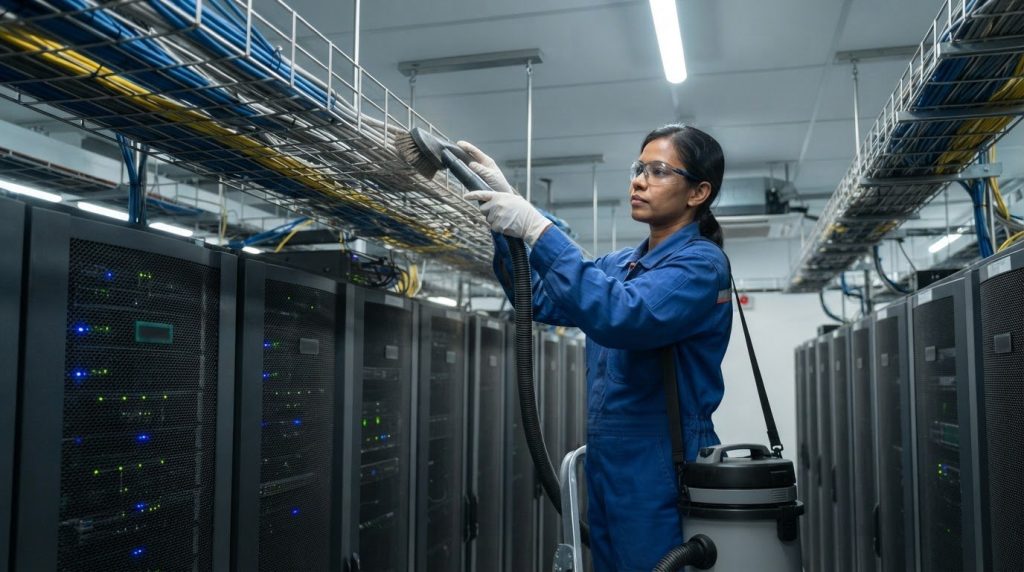
A clean overhead cable tray isn’t the end of the job: cables, supports and connections need careful inspection before the area returns to normal operation. Effective overhead cable tray cleaning procedures control dust, use materials compatible with the tray, protect connected equipment and include a post-cleaning check. Coordinate any required electrical isolation with the facility team before work begins.
It’s easy to focus on visible dust, especially where wire mesh traps particles at its intersections. But cleaning without checking what the process may disturb can leave loose debris, damaged tray components or connections that need attention. This guide explains how to prepare the area, select a compatible cleaning method, clear mesh and other tray surfaces, and inspect cables and connections afterward. It also covers cleaning frequency and the safety considerations that matter in Malaysian server rooms, where operational continuity depends on disciplined work around critical infrastructure.
Key Takeaways
- Match the cleaning agent to the tray material and finish to reduce the risk of corrosion or surface damage.
- Plan access to wire mesh intersections, where particles can collect and be harder to remove.
- Include a post-cleaning inspection of cable condition, tray supports and connections before returning the area to normal operation.
- Set cleaning frequency according to dust, humidity and other site conditions rather than relying on a fixed schedule for every room.
- Assess tray condition and protect connected equipment before work begins, with safe access and cleaning methods suited to the live environment.
Stainless steel tray surface finish and cleaning-agent compatibility
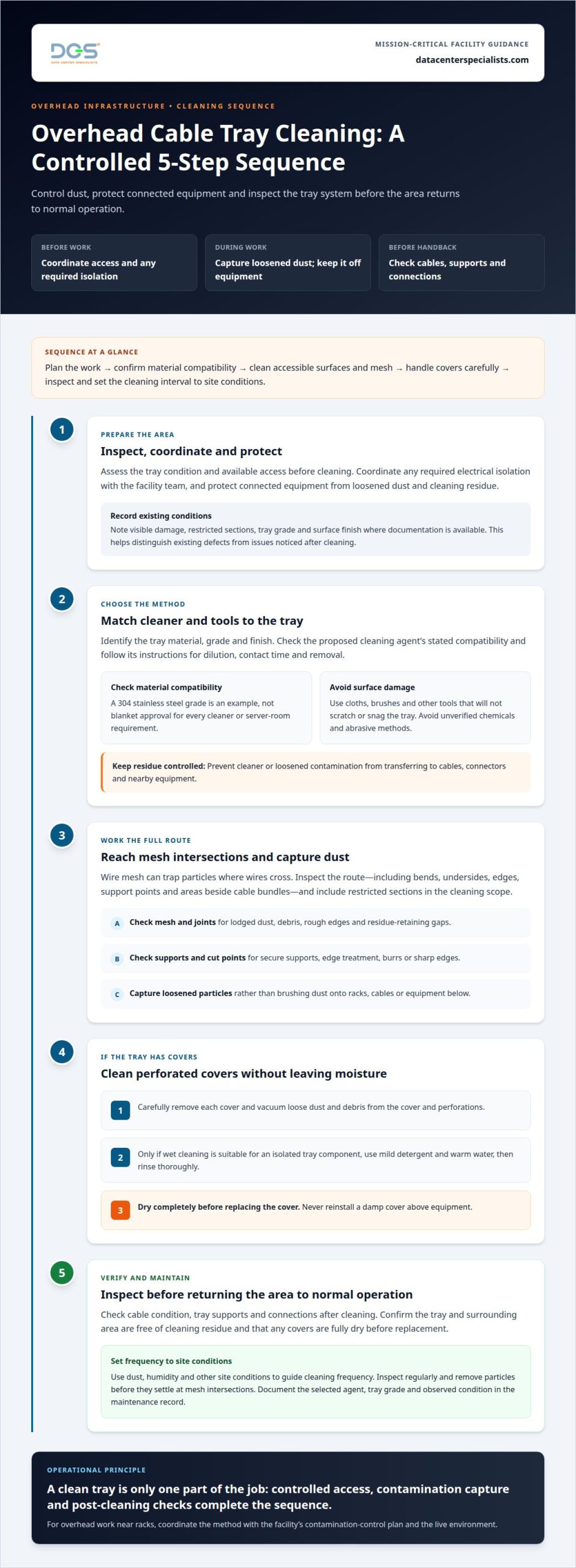
Stainless steel cable trays are used in cleanrooms because their smooth surfaces are easier to clean and resist corrosion. The finish still needs protection: an unsuitable cleaning agent or abrasive tool can affect the surface or leave residue. Before choosing a method, identify the tray grade and finish, then check them against the cleaning agent’s compatibility information.
Grade matters. Stainless steel used in a clean room should be compatible with the cleaning agents used in that environment. A 304 stainless steel tray, for example, is suitable for general food processing and packaging areas, but that application does not establish compatibility with every cleaner or server-room requirement. Treat the grade as one part of the selection, not as blanket approval for a chemical.
For a 304 tray installation, record the grade where documentation is available and check the cleaner’s stated material compatibility. Follow the cleaner manufacturer’s instructions for dilution, contact time and removal. If the documentation does not cover the tray finish, choose a method that avoids introducing an unverified chemical or abrasive. Don’t transfer a cleaner approved for another surface directly to stainless steel.
Use these checks to select a cleaning method:
- Identify whether the tray is stainless steel and note its grade, such as 304.
- Compare the proposed cleaner with the grade and surface-finish information.
- Check that cloths, brushes and other tools won’t scratch or snag the tray.
- Keep cleaning residue from transferring to cables, connectors or nearby equipment.
Surface geometry also affects the result. Smooth stainless steel is easier to inspect than complex joints or rough welds. During installation inspections, look for burrs, sharp edges and rough welds that could pose safety concerns or retain particles. Record visible damage before cleaning so existing defects aren’t mistaken for cleaning-related damage afterward.
Apply overhead cable tray cleaning procedures to all accessible surfaces, including joints and support interfaces, without forcing tools against the tray or connected cables. Use a controlled amount of the selected cleaner, then remove residue according to its instructions. Pay particular attention to bends and fixings, where uneven application can leave deposits. Use a consistent method across each tray section.
For server rooms in Malaysia, document the selected agent, tray grade and observed condition in the maintenance record. If the cleaning scope includes overhead surfaces near racks, coordinate the method with the facility’s contamination-control plan. A professional data center cleaning approach considers tray surfaces alongside nearby equipment and environmental controls.
Wire mesh particle accumulation and cleaning access
Prevent dust and debris buildup by keeping tray surfaces accessible, inspecting them regularly and removing particles before they settle at mesh intersections. During cleaning, capture loosened dust rather than brushing it onto racks, cables or equipment below.
Wire mesh has many intersecting wires, creating more places for particles to collect than a smooth tray surface. Dust can lodge where wires cross, around supports and beside cable bundles. Visually inspect the full route, including bends and areas above equipment. In a cleanroom, assess mesh against the relevant cleanroom class and ensure its intersections are accessible for cleaning.
Plan access during installation. Leave enough working space around the tray for tools to reach its underside, edges and support points. Check whether nearby containment, ceiling services or rack tops obstruct access. A tray that can be cleaned from only one side may retain particles on inaccessible surfaces. Record restricted sections and include them in the cleaning scope rather than treating visible surfaces as the entire tray.
- Inspect mesh intersections for lodged dust and debris.
- Check cut points for edge treatment, which reduces exposed sharp edges.
- Confirm supports are secure, limiting vibration that can release particles.
- Review accessories for gaps, rough edges or residue-retaining joints.
Hygienic accessories matter because couplers, brackets and end caps can create small ledges. Where practical, choose components with cleanable surfaces and continuous contact. Inspect welds, cut points and fixings for burrs or sharp edges, which can impede wiping, catch cleaning materials or pose safety concerns. Check for corrosion or damaged finishes, and assess whether affected components need attention before cleaning continues.
Drainage and cleaning access depend on tray design and location. Open designs allow water and cleaning solutions to drain in food-processing environments, while solid-bottom trays can retain water, residue and debris. Those washdown considerations don’t mean wet cleaning is suitable above server equipment. In a server room, choose a controlled method that keeps moisture and loosened contamination away from connected systems.
For covered perforated trays, carefully remove each cover, then vacuum loose dust and debris from the cover and perforations. If wet cleaning is suitable for an isolated tray component, use mild detergent and warm water, rinse thoroughly, and dry it completely before replacing the cover. Never reinstall a damp cover above equipment. During installation reviews, confirm that tools can reach each surface without disturbing cables or tray supports.
Where overhead access is constrained by racks, include tray routes in the room’s contamination-control plan. A coordinated data center cleaning approach can account for overhead surfaces and adjacent equipment areas.
Post-cleaning cable and connection checks
Cleaning is complete only after inspecting the tray, cables and nearby connections. Compare the cleaned route with pre-work observations or site records. Look for debris on cable jackets, connectors, tray supports and rack tops. Check that cleaning hasn’t shifted a cable, loosened a support or left residue around an access point. Record findings before the work area returns to normal operation.
Start at the tray supports and follow each accessible cable path. Confirm that the tray remains securely fixed, with no visibly displaced sections or loose components. Check that aluminium tray components are secure and free of debris. Ensure cable bundles remain supported and aren’t resting against sharp edges, cut points or rough welds. These checks can reveal conditions that may generate particles or strain cables.
Inspect cable jackets for visible cuts, abrasion, crushing or unexpected bends. Check accessible connectors and junction-box entries for looseness, residue or displaced covers. Don’t pull, twist or reposition a cable just to improve visibility. If cleaning has moved a cable or revealed a defect, record its location and notify the facility operations team for assessment.
- Check cable jackets for visible damage or contamination.
- Inspect connectors, junction-box entries and covers for displacement.
- Confirm tray supports and aluminium components remain secure.
- Remove remaining debris from tray surfaces and nearby equipment.
- Document defects, restricted views and any follow-up action.
Keep the inspection visual unless the approved facility procedure calls for additional testing. Cleaning personnel shouldn’t disconnect or handle live connections during a routine surface check. If a connector appears loose, damaged or contaminated, leave it in place and escalate the observation to authorized technical staff. This keeps a cleaning inspection from becoming an unplanned intervention.
After inspecting the overhead route, check adjacent equipment surfaces. Dust released during cleaning can settle on rack tops, cable bundles or nearby panels. Remove visible debris using the site-approved method, then review the area under suitable lighting. Pay particular attention beneath mesh intersections and tray joints, where loosened particles may remain.
Finish the task with a clear record: identify the tray route, note its visible condition, list defects, and document corrective actions or escalations. If access prevented inspection of a connector or support, describe that limitation precisely. A completed checklist gives operations staff a practical handover and helps distinguish pre-existing damage from changes observed after cleaning.
If access prevented inspection, note the restricted area in the task record and identify any follow-up required. A cleanroom cable tray inspection should confirm that aluminium tray components are secure and free of loose parts that could generate debris. Record any loose part or debris and refer the condition to authorized technical staff for assessment, without handling or disconnecting a connection. Specify the route and affected location so the facility operations team can assess the observation before normal operation resumes.
How often should overhead cable trays be cleaned
A clean indoor environment may need cable-tray cleaning once or twice a year. Dusty industrial or high-humidity environments may need cleaning quarterly or monthly. These are starting intervals, not a universal schedule for every server room. Set the actual frequency by observing how quickly particles collect along each overhead route.
Start by assessing contamination in the room. During routine inspections, record visible dust on tray surfaces, nearby rack tops and cable bundles. Compare the same locations over time. If dust returns quickly after cleaning, shorten the interval. If surfaces remain clean, continue inspections and adjust the schedule based on documented observations.
In Malaysian facilities, consider humidity alongside airborne dust and work activity. A tray near construction, maintenance work or a dusty intake route may collect debris faster than one in a controlled indoor area. Assess each zone separately instead of applying a single interval across the facility.
Wire mesh needs particular attention at its intersections, where particles can lodge beyond the reach of a quick visual check. Include bends, supports and sections above rack rows in inspection rounds. Note whether dust is loose, settled or repeatedly accumulating. These observations help determine whether quarterly cleaning is sufficient or monthly cleaning is more appropriate.
Cleaning frequency should also reflect changes in the room. Construction work, cable installation or altered airflow can change where particles settle. After such work, inspect the affected overhead route and nearby equipment surfaces. Arrange targeted cleaning where visible debris appears, then use later inspections to determine whether the existing interval remains suitable.
Use a simple maintenance record to make the schedule defensible:
- Identify each tray route and its surrounding room conditions.
- Record inspection dates and visible dust or debris.
- Note construction, maintenance or airflow changes near the route.
- Document cleaning completed and observations from the next inspection.
For a clean indoor area, use once-or-twice-yearly cleaning as an initial planning reference. Dusty industrial or high-humidity conditions may call for quarterly or monthly cleaning. Base the decision on observed accumulation between inspections, not the calendar alone.
Keep inspections separate from cleaning tasks. A route may need closer monitoring even when it doesn’t yet need cleaning. Conversely, visible particles above equipment may warrant prompt attention before the planned date. Apply the same assessment to tray joints and supports, where dust can be missed from floor level.
Review the schedule after each cleaning cycle. Compare the recorded condition with the previous inspection, then keep or revise the interval according to actual accumulation. This gives facility teams a practical basis for scheduling overhead work without assuming every cable tray has the same exposure.
What safety precautions are required when cleaning overhead cable trays
Before cleaning, inspect the tray route for cracks, bends and loose connections. Check supports, joints and accessible cable sections before raising tools overhead. If you find significant damage, stop work and arrange repair or replacement before cleaning continues. A damaged tray can shift when touched, while loose debris may fall toward racks or equipment.
Coordinate electrical isolation with facility operations. Before cleaning, isolate power sources connected to cables in the tray to reduce electric-shock risk. In a live data centre, identify affected circuits and agree on isolation through the site’s operating procedure. Don’t assume a cable is de-energized because its equipment appears inactive. Confirm the work boundary before anyone reaches into the tray.
Wear gloves, safety glasses and a dust mask while removing particles. Gloves protect hands from sharp tray edges, while safety glasses help shield eyes from falling dust. A dust mask reduces exposure to particles disturbed overhead. Choose tools that control debris rather than dislodging it onto racks, panels or cable connections below.
- Review the work area, tray condition and facility access arrangements.
- Identify connected cables and coordinate required power isolation.
- Wear gloves, safety glasses and a dust mask before cleaning.
- Control tools and loosened dust above racks and equipment.
- Inspect the cleaned route and report damage or displaced connections.
Overhead access introduces additional hazards. Keep a stable working position and don’t lean against cable trays or use them as handholds. Secure tools so they can’t fall onto equipment. If a tray is difficult to reach from the planned access point, change the setup rather than stretching across cables or supports.
Protect the server-room environment as well as the worker. Keep loosened dust from settling on rack tops, open equipment surfaces or connectors. Use a controlled cleaning method suited to the tray and surrounding equipment. Avoid introducing moisture near connected systems unless the work plan specifically permits it for isolated components.
Stop and escalate if a cable moves, a support loosens, a connection appears damaged or isolation cannot be confirmed. Don’t tighten, disconnect or reposition a cable as an improvised cleaning task. Record the location and notify the facility operations team. After cleaning, check for remaining debris and confirm the work area is clear before returning it to normal operation.
For overhead work near sensitive equipment, plan the method around access, contamination control and operational constraints. A professional data center cleaning assessment can help define a controlled scope for the facility.
Make inspection a prerequisite for cleaning: check the tray for cracks, bends and loose connections, and repair or replace it if significant damage is found.
Data Center Specialists (M) Sdn Bhd (DCS): Professional Data Center ISO Cleaning Services
Data Center Specialists (M) Sdn Bhd (DCS) provides Professional Data Center ISO Cleaning Services for mission-critical environments where overhead contamination needs controlled attention. Consider this service when cable trays collect dust, access is difficult, or cleaning must be coordinated with nearby racks and equipment.
A defined cleaning scope can include overhead surfaces as part of the wider server-room environment. The appropriate scope depends on tray access, observed debris, surface materials and operational constraints.
For a technical discussion about overhead cleaning at your facility, contact Data Center Specialists (M) Sdn Bhd (DCS) or visit datacenterspecialists.com.
Turn tray findings into a practical maintenance plan
Use inspection records to guide the next maintenance decision. If contamination returns in the same areas, map those tray routes and review nearby airflow patterns, room conditions and recent work. This can help establish whether the issue is isolated or part of a wider facility concern.
Build observations into a maintenance plan with clear follow-up responsibilities. Apply overhead cable tray cleaning procedures as part of the site’s contamination-control approach, and carry unresolved findings into the next facility review.
Discuss your facility’s requirements with Data Center Specialists (M) Sdn Bhd (DCS) to consider an appropriate next step. A focused technical discussion can help keep future maintenance planning informed and practical.
Frequently Asked Questions
How to clean overhead cable trays step by step?
Clean overhead cable trays in a controlled sequence: authorize access, assess nearby equipment and contamination, protect sensitive surfaces, then remove loose debris with a HEPA-filtered vacuum and soft ESD-safe brush. Work from the highest tray section downward without pulling, lifting or disconnecting cables. Collect waste at the source and inspect the route before reopening the area. Stop if access requires moving cables or contacting electrical components.
What tools and cleaning agents are safe for cable trays and cables?
Use a HEPA-filtered vacuum with a suitable attachment, a soft ESD-safe brush and clean, lint-free wipes where permitted by the cable or tray manufacturer. Choose cleaning agents only after checking compatibility with the tray material and cable jacket. Don’t spray liquids onto cables or energized equipment, or use abrasive brushes, unapproved solvents or compressed air that could disperse contamination. Follow product instructions and applicable site safety procedures.
How should cable trays be cleaned in food, chemical, or dusty industrial environments?
Identify the contaminant and its source before choosing a cleaning method. In food areas, coordinate work to prevent debris or cleaning residues reaching exposed products or food-contact surfaces. For chemical deposits, check the relevant safety data sheet and material compatibility; stop if the residue is unknown. In dusty areas, contain debris and capture it at the source, coordinating with facility operations to protect equipment and air intakes.
How should cables and trays be inspected for damage after cleaning?
Inspect the full accessible route under adequate lighting. Look for cuts, crushing or exposed conductors on cable jackets; displaced cables; sharp tray edges; corrosion; loose covers; and sagging supports. Compare suspected changes with existing condition records or photographs, and document their locations. Don’t handle or repair damaged cables during cleaning. Escalate concerns to qualified electrical personnel, who can determine whether further testing or corrective work is needed.