

Why does your monitoring dashboard report a safe 22°C while your high-density AI nodes are silently throttling and shortening their operational lifespan? This discrepancy is a common frustration for facility managers who find that average room temperatures rarely tell the full story of rack-level health. Conducting a comprehensive data center thermal assessment is the only way to resolve these contradictions. You’ve likely noticed that even with robust cooling infrastructure, unpredictable hardware failures and rising energy bills continue to challenge your operational continuity.
A professional assessment provides the granular visibility needed to pinpoint hidden cooling inefficiencies and hotspots that threaten your hardware investment. You’ll discover how specialized diagnostics can stabilize your thermal environment and significantly improve your Power Usage Effectiveness (PUE). We’ll examine the technical process of identifying thermal risks, the impact of the latest ASHRAE guidelines on high-density environments, and how strategic solutions like DCS Smart Modular Containment ensure your facility remains resilient against the intense demands of modern GPU workloads.
Key Takeaways
- Understand how a professional data center thermal assessment maps heat distribution to ensure your IT equipment operates strictly within ASHRAE-recommended envelopes.
- Discover the technical methodology of thermal audits, utilizing infrared thermography and calibrated airflow velocity testing to reveal invisible cooling inefficiencies.
- Identify hidden thermal risks such as the ‘thermal blanket’ effect, where micro-dust accumulation traps heat on server components despite low ambient room temperatures.
- Optimize your Power Usage Effectiveness (PUE) by adjusting CRAC/CRAH setpoints based on empirical rack intake data to prevent the high costs of over-cooling.
- Transition from diagnostic data to corrective action by implementing DCS Smart Modular Containment systems to stabilize your thermal environment and protect hardware uptime.
What is a Data Center Thermal Assessment?
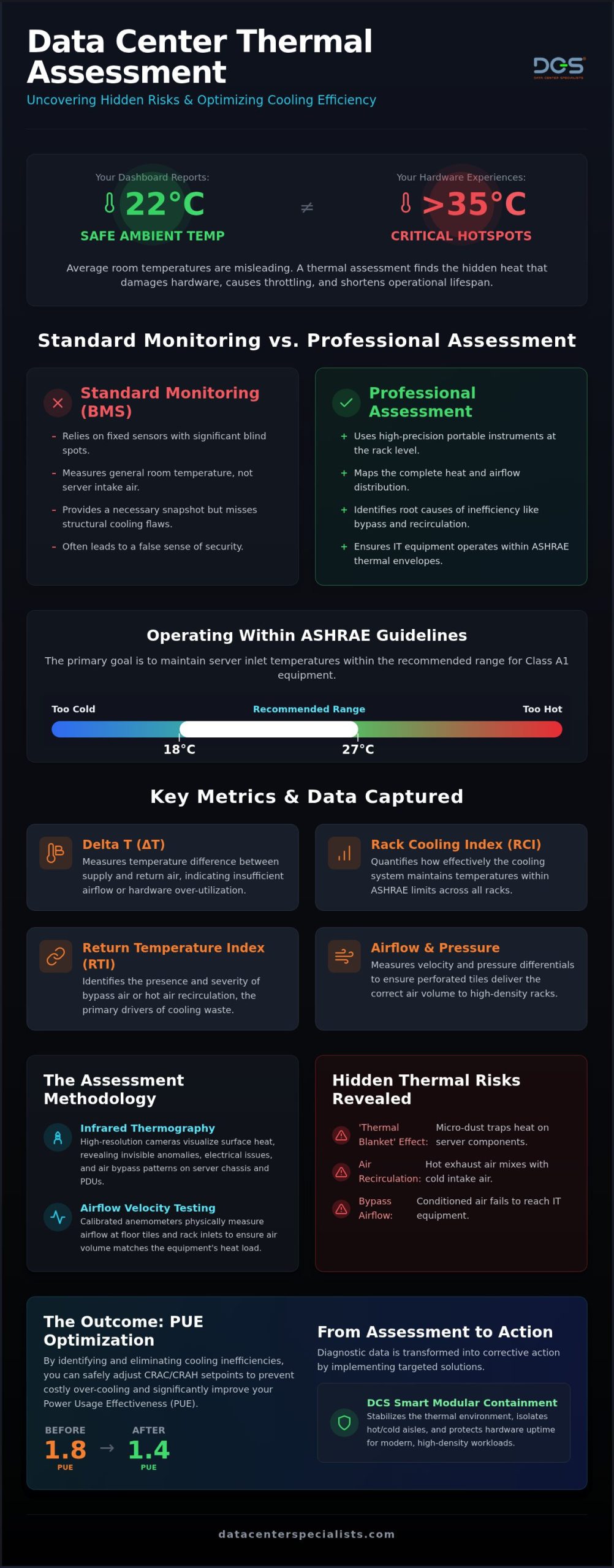
A data center thermal assessment is a specialized technical audit designed to map the complex heat distribution within a mission-critical facility. Unlike a cursory walkthrough, this process involves a deep dive into the thermodynamics of the server room. The primary objective is to verify that IT equipment operates within the ASHRAE-recommended thermal envelopes. For Class A1 environments in 2026, the recommended range remains 18°C to 27°C at the server inlet. This diagnostic serves as a foundational precursor to a comprehensive data center energy assessment, ensuring that energy-saving measures don’t compromise hardware reliability.
Relying on “average temperature” is a dangerous practice in modern, high-density environments. A facility might report an acceptable average of 22°C, yet harbor localized hotspots exceeding 35°C due to poor airflow management or bypass air. In Malaysia’s tropical climate, this risk is amplified. High ambient humidity and external temperatures put immense pressure on heat rejection systems. If your cooling plant is struggling with external conditions, internal inefficiencies like air recirculation become catastrophic rather than just expensive. Integrating these findings into your Data Center Infrastructure Management (DCIM) strategy allows for a more resilient operational posture.
The Difference Between Monitoring and Assessment
Real-time monitoring through a Building Management System (BMS) provides a necessary snapshot of environmental health. However, fixed sensors often have blind spots. They’re typically mounted on walls or CRAC units rather than at the critical rack intake level. A professional data center thermal assessment uses portable, high-precision instrumentation to evaluate the air that actually enters the server chassis. It moves beyond asking if the room is cold. It asks if the cold air is reaching the components that need it most. This point-in-time evaluation identifies structural cooling flaws that real-time sensors frequently overlook.
Key Metrics Tracked During an Audit
A meticulous audit focuses on several specialized KPIs to quantify performance:
- Delta T: This is the temperature difference between the supply air and the return air. Large variances often indicate insufficient airflow or equipment over-utilization.
- Rack Cooling Index (RCI): This measures how effectively the cooling system maintains temperatures within ASHRAE limits across all racks.
- Return Temperature Index (RTI): A metric used to identify the presence of bypass air or air recirculation. These are the primary drivers of cooling waste.
- Airflow Velocity and Pressure: Using calibrated anemometers to measure pressure differentials in raised floor systems ensures that perforated tiles deliver the correct volume of air to high-density rows.
The Methodology: How Thermal Data is Captured and Analyzed
A comprehensive data center thermal assessment follows a rigorous, multi-step protocol to transform invisible thermal patterns into actionable intelligence. This process integrates high-precision physical measurements with advanced digital modeling. By following a structured methodology, facility managers gain a granular understanding of their cooling performance. We move beyond simple temperature readings to analyze the complex interactions between airflow, pressure, and heat rejection.
Using Infrared Thermography for Hotspot Detection
Professional auditors use high-resolution infrared cameras to visualize surface heat across the entire infrastructure. This non-invasive step identifies thermal anomalies on server chassis and PDUs that are invisible to the naked eye. Infrared imaging detects loose or corroded electrical connections in rack PDUs by identifying localized heat signatures caused by increased resistance. Beyond electrical safety, this visualization reveals air bypass and recirculation patterns. It shows exactly where cold air escapes before it reaches the hardware.
Physical verification continues with Testing, Adjusting & Balancing (TAB) services. Technicians use calibrated anemometers to measure airflow velocity at perforated floor tiles and rack inlets. This ensures the volume of air delivered matches the heat load of the equipment. Without this physical baseline, digital models remain purely theoretical. For operators in Malaysia, these physical checks are critical to ensure that high ambient humidity hasn’t compromised the integrity of air seals or floor plenums. If you suspect your cooling delivery is inconsistent, engaging a specialist for professional TAB services is the necessary first step.
Computational Fluid Dynamics (CFD) in 2026
In 2026, CFD has evolved into a dynamic “digital twin” of the white space. These models allow operators to test containment strategies or hardware additions before a single rack is moved. We use these simulations to visualize the path of every cubic meter of air. This is particularly useful for simulating fan failure scenarios. By modeling a total CRAC failure, we determine the exact “ride-through” time available before temperatures breach ASHRAE limits. This predictive capability is essential when planning for high-density GPU clusters that generate extreme, localized heat loads.
The final stage of the methodology involves correlating technical thermal data with overall data center energy efficiency and PUE metrics. By aligning thermal maps with power consumption, we identify where over-cooling is wasting the operational budget. This meticulous approach ensures that every watt of cooling is used effectively. It protects your uptime while simultaneously lowering the cost of maintaining a mission-critical environment.
Identifying Hidden Hotspots: Beyond the Visible
Hotspots don’t always announce themselves with high ambient temperatures. Many facility managers are surprised to find that a room which feels uncomfortably cold to a human operator can still harbor racks experiencing thermal throttling. This paradox occurs because air temperature at the CRAC unit is a poor proxy for the environment inside the server chassis. A meticulous data center thermal assessment identifies these invisible risks by looking past the thermostat and analyzing the micro-climates within individual cabinets. By aligning your facility with ASHRAE’s AI Data Center Energy Performance Framework, you can move beyond guesswork and address the root causes of heat retention.
One of the most insidious causes of hidden heat is airflow short-circuiting. This happens when cold supply air returns to the cooling unit before it ever passes through a server. This bypass air creates a false sense of security, as it lowers the return air temperature and suggests the system is over-performing. In reality, the servers remain starved of cooling, forcing internal fans to work harder and consume more power. This inefficiency is often compounded by the “Thermal Blanket” effect, where microscopic dust particles settle on sensitive components.
The Impact of Contamination on Thermal Conductivity
Contamination is a direct threat to thermal efficiency. When particulate matter accumulates on heat sinks and circuit boards, it acts as an insulative layer that prevents heat from escaping into the airflow. This results in higher chip temperatures even when the intake air is within the recommended range. Maintaining ISO 14644-1 cleanliness standards isn’t just about aesthetics; it’s a critical thermal management strategy. Specialized data center cleaning services Malaysia ensure that these thermal blankets are removed, allowing for optimal heat exchange and lower internal fan speeds. Professional cleaning reduces the mechanical stress on your hardware and extends its operational life.
Airflow Obstructions in Underfloor Voids
In facilities with raised floor systems, the underfloor void acts as a pressurized plenum to distribute cold air. However, years of “spaghetti cabling” and abandoned infrastructure can disrupt this laminar airflow. These obstructions create turbulence and uneven pressure distribution, leading to some racks receiving plenty of air while others are starved. Dust bunnies and debris also accumulate in these voids, eventually being pushed up into the server racks. In one technical evaluation, removing underfloor debris and redundant cabling improved rack intake temperatures by 3 degrees Celsius. This simple restorative action allowed the facility to increase its cooling setpoints, directly reducing energy consumption without risking hardware failure.
The Link Between Thermal Health and PUE Optimization
Many facility managers respond to localized hotspots by lowering the temperature setpoints for the entire room. This practice, known as over-cooling, is the silent killer of energy efficiency. It forces cooling units to work harder than necessary while often failing to address the underlying airflow issues that caused the hotspot in the first place. A professional data center thermal assessment provides the empirical data needed to raise these setpoints safely. By aligning your cooling delivery with actual rack intake requirements, you can significantly reduce your Power Usage Effectiveness (PUE) without risking hardware reliability.
Optimizing your thermal environment has a direct financial impact, particularly through the reduction of fan speeds. Testing, Adjusting & Balancing (TAB) ensures that airflow is distributed precisely where it’s needed. Because fan power consumption follows a cubic relationship with speed, even a small reduction in fan RPM leads to substantial energy savings. In Malaysia’s high-tariff environment, this level of precision is essential for maintaining a competitive operational budget. Aligning these technical improvements with international standards like ASHRAE 90.4-2025 demonstrates a commitment to both fiscal responsibility and national sustainability goals.
Reducing Bypass Air and Recirculation
Efficiency is largely dictated by how well you manage two phenomena: bypass air and recirculation. Bypass air is cold supply air that returns to the cooling unit without ever passing through a server. It represents paid-for cooling that does zero work. Recirculation is the opposite; it occurs when hot exhaust air leaks back into the cold aisle and enters the server intake. Both issues inflate your energy bills and compromise the thermal stability of your racks. Identifying and fixing these airflow “leaks” is the fastest way to lower your PUE and extend the life of your cooling plant.
Preparing for a Cooling Audit
Effective preparation ensures that your data center thermal assessment yields the most accurate results. Start by inventorying your facility to distinguish between high-density AI/GPU zones and standard low-density storage areas. You must also verify that all blanking panels are correctly installed; a single missing panel can allow hot exhaust air to recirculate, skewing the audit data. A comprehensive Cooling Audit Checklist for IT managers must include the verification of blanking panel integrity, the identification of high-density clusters, and the assessment of underfloor pressure distribution. To ensure your facility is operating at peak efficiency, consider scheduling a comprehensive data center energy assessment with the specialists at DCS.
From Assessment to Action: Implementing DCS Solutions
A data center thermal assessment provides the technical blueprint for optimization; however, the real value lies in the subsequent infrastructure remediation. Data alone won’t protect your uptime or lower your energy bills. It requires a disciplined transition from diagnostic insights to engineered solutions. By utilizing the granular mapping of hotspots and airflow imbalances, facility managers can implement targeted upgrades that transform their cooling performance from a liability into a strategic advantage.
Modular Containment as the Ultimate Thermal Fix
DCS Smart Modular Containment systems are engineered based on the specific airflow velocity and pressure data captured during your audit. Whether your assessment suggests Hot Aisle or Cold Aisle containment depends on your existing architecture and heat load density. Cold aisle containment is often preferred for raised floor environments where supply air is the priority. Hot aisle containment is frequently more effective for high-density GPU clusters that require aggressive heat extraction. These modular systems are designed to adapt to legacy environments, allowing for a phased rollout without disrupting ongoing operations.
The financial justification for containment is compelling. Industry benchmarks frequently demonstrate that implementing modular containment can lead to a 20-40% reduction in cooling costs by completely eliminating the mixing of air streams. This immediate ROI is paired with long-term hardware protection, as consistent intake temperatures prevent the thermal stress that leads to component failure. For facilities managing high-density workloads, this infrastructure layer is no longer optional; it’s a prerequisite for operational stability.
Beyond containment, executing a precise Testing, Adjusting & Balancing (TAB) protocol is essential to fix the pressure imbalances identified during the audit. This ensures that every perforated tile and cooling unit is tuned to the specific needs of the IT load. Furthermore, establishing a recurring Data Center Professional ISO Cleaning Service schedule is critical. Regular cleaning maintains the thermal conductivity of your heat sinks and prevents the “thermal blanket” effect from recurring, ensuring your facility remains at peak efficiency between assessments.
The Strategic Partnership with DCS
Moving from reactive “firefighting” to a proactive thermal strategy requires a partner with deep technical expertise. DCS serves as more than a vendor; we act as a strategic guardian of your technical environment. We provide national support across Malaysia, ensuring that multi-site enterprise facilities receive consistent, ISO-standard care regardless of their location. Upgrading to DCS Smart Racks further enhances this strategy by providing localized, persistent environmental monitoring that alerts you to thermal shifts before they become outages.
Protect your hardware investment and optimize your energy performance today. Contact Data Center Specialists to schedule a professional thermal assessment and take the first step toward a more resilient, efficient data center.
Stabilizing Your Thermal Environment for Long-Term Resilience
Maintaining operational continuity requires more than just cooling the room; it requires precise control over the air that enters your server chassis. A professional data center thermal assessment provides the diagnostic clarity needed to transition from reactive maintenance to a proactive thermal strategy. By identifying bypass air and the “thermal blanket” effect caused by micro-contamination, you can protect your hardware investment and optimize your PUE. Don’t let hidden hotspots compromise your operational integrity when empirical data can provide a clear path to efficiency.
Data Center Specialists (DCS) brings over 15 years of expertise in mission-critical infrastructure to every audit. As specialists in ISO 14644-1 contamination control and providers of technical Testing, Adjusting & Balancing (TAB) services, we deliver the precision required to stabilize high-density environments. It’s time to align your facility with modern performance standards and ensure your cooling infrastructure is perfectly tuned to support the demands of 2026 and beyond.
Secure Your Uptime with a DCS Thermal Assessment
Taking control of your facility’s thermal health is the most effective way to ensure long-term reliability and sustainable energy performance.
Frequently Asked Questions
What is the ideal temperature for a data center in 2026?
The ideal temperature at the server inlet for Class A1 environments remains 18°C to 27°C, according to the latest ASHRAE guidelines. While these ranges allow for efficiency, high-density AI workloads often require more precise monitoring at the lower end of this envelope to prevent throttling. Facility managers should focus on intake temperatures rather than ambient room air to ensure hardware longevity and reliable performance in 2026.
How often should a thermal assessment be conducted?
You should schedule a professional data center thermal assessment at least once per year to account for seasonal changes and hardware migrations. Facilities experiencing rapid growth or those deploying high-density GPU clusters should consider bi-annual evaluations. In Malaysia’s tropical environment, regular assessments ensure that external heat and humidity haven’t compromised your cooling plant’s efficiency or led to internal airflow imbalances that threaten your uptime.
Can a thermal assessment help reduce my energy bills?
A comprehensive assessment identifies cooling waste such as bypass air and recirculation, which are the primary drivers of high energy bills. By resolving these inefficiencies, you can safely raise cooling setpoints and reduce fan speeds. This technical optimization significantly improves your Power Usage Effectiveness (PUE). It’s common for facilities to see a noticeable reduction in operational expenses after implementing the airflow corrections suggested during a thermal audit.
What is the difference between a thermal audit and a cooling audit?
A thermal audit specifically maps heat distribution and hardware intake health to ensure compliance with ASHRAE standards. In contrast, a cooling audit evaluates the entire mechanical infrastructure, including chiller capacity and heat rejection efficiency. A data center thermal assessment serves as the diagnostic foundation for broader energy assessments, focusing on the immediate risks to IT equipment before addressing the efficiency of the cooling plant itself.
How does dust accumulation affect server rack temperatures?
Dust accumulation creates a “thermal blanket” on sensitive server components, significantly reducing their ability to dissipate heat. This particulate matter clogs heat sinks and forces internal server fans to operate at higher RPMs, which increases power consumption and chip-level temperatures. Maintaining ISO 14644-1 cleanliness standards through professional cleaning is a vital thermal management strategy that prevents these silent failures and ensures your cooling air reaches the hardware effectively.
Is CFD modeling necessary for small server rooms?
While physical measurements are the priority, CFD modeling is essential if your small room contains high-density hardware or complex airflow paths. It allows you to simulate “what-if” scenarios, such as a CRAC failure, to determine your facility’s thermal ride-through time. Even in smaller environments, CFD helps predict the impact of adding new equipment, ensuring that your cooling strategy remains robust as your technical requirements evolve.
What are the signs that my data center has hidden hotspots?
Common indicators include localized hardware throttling, excessive fan noise from specific cabinets, and inconsistent temperature readings between your BMS sensors and manual rack checks. If you notice specific servers failing more frequently than others, or if your energy bills are rising despite a stable IT load, hidden hotspots are likely present. These invisible risks require technical visualization through infrared thermography to identify and resolve before they cause a total outage.
How do I prepare my facility for a professional thermal assessment?
Start by ensuring all blanking panels are correctly installed and that underfloor voids are free of abandoned cabling or debris. You should also have an inventory of your high-density racks ready for the audit team. Providing accurate power draw data for each row allows the specialists to correlate thermal signatures with actual workload. This preparation ensures your assessment delivers the most precise and actionable insights for your infrastructure.