
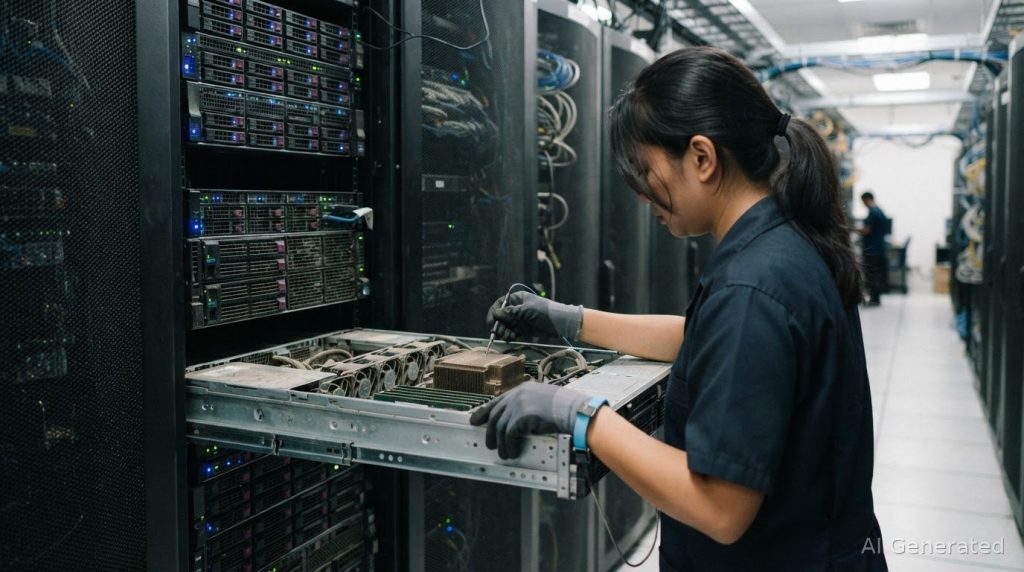
Dust alone doesn’t set a server’s replacement date. Standard production servers are commonly replaced after 4 to 6 years, but the cost of replacing servers prematurely due to dust should be weighed against the hardware’s condition, maintenance needs and operational risk. A contamination issue may call for environmental control and assessment rather than an immediate hardware refresh.
When dust affects equipment, replacement can seem like the safer choice, especially in a mission-critical environment. But the cost goes beyond the server itself. Keeping hardware in service depends on its reliability, supportability and maintenance.
This article explains how to weigh dust-related replacement risks against maintenance and upgrades, when server age calls for closer review, and how a five-year total cost of ownership comparison can inform the decision. You’ll have a clearer basis for deciding whether to maintain, extend or replace server hardware in a Malaysian data centre.
Key Takeaways
- Use server age as a review trigger, not an automatic replacement deadline; weigh reliability, workload, support and recovery risk together.
- Compare the cost and operational impact of an early refresh with the risks of downtime, lost productivity and repeated repairs.
- Assess whether targeted maintenance or component upgrades can extend useful service life while keeping performance and support requirements in view.
- Build a five-year ownership comparison that includes hardware, support, energy, cooling, migration and operational disruption.
- Investigate dust as an environmental and airflow concern; professional server-room cleaning can help address physical contamination around mission-critical equipment.
Server Lifespan: When Should You Replace Or Upgrade?
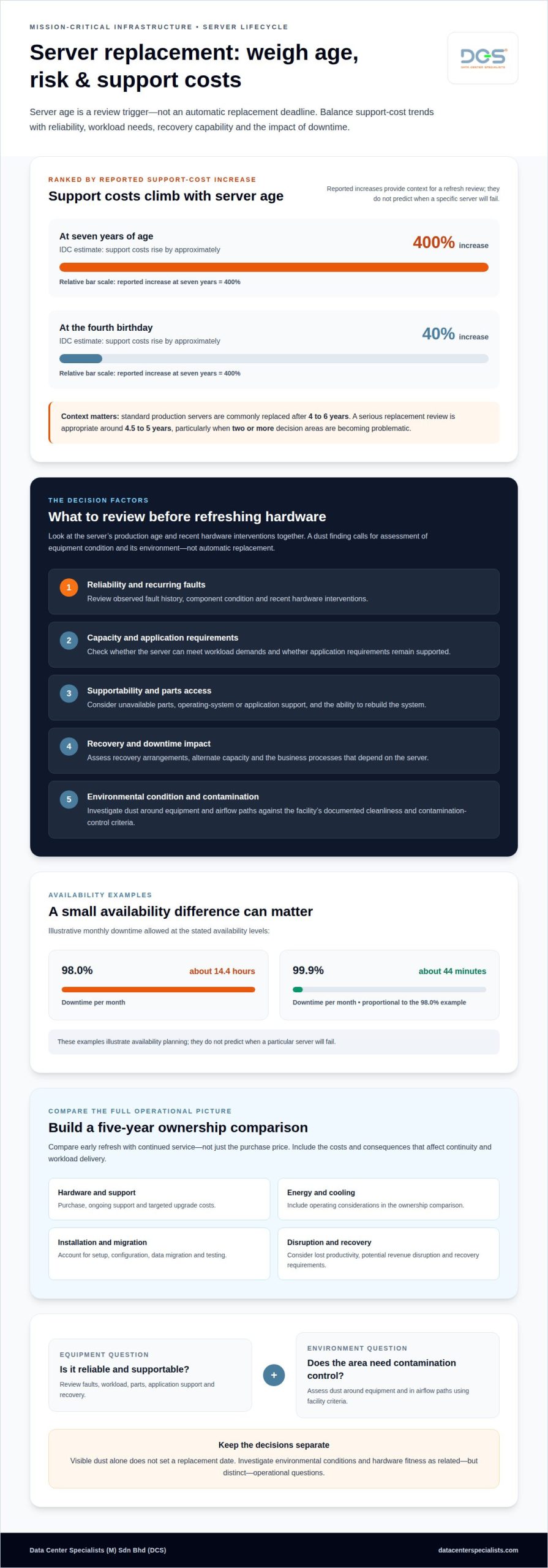
Standard production servers are commonly replaced after 4 to 6 years, but age alone does not determine whether hardware needs replacement. Compare reliability, application requirements, supportability and the operational impact of downtime.
Early Replacement and Lost Productivity
Early replacement means refreshing a server before it has completed its useful production life, often to reduce the risk of failure or poor performance. A new system brings hardware, installation, setup and migration costs, while keeping a failing system can disrupt applications and employee tasks. Assess the cost of replacing servers prematurely due to dust against the risks of leaving affected equipment in service.
Review the server’s production age and recent hardware interventions together. A serious replacement review is appropriate around 4.5 to 5 years, particularly when two or more decision areas are becoming problematic. These include recurring faults, inadequate capacity, unavailable parts, unsupported operating systems or applications, and difficult recovery. A dust finding should prompt an assessment of equipment condition and the surrounding environment, not an automatic replacement decision.
Business Disruption from Downtime
Server downtime is the period when a system or its applications cannot provide required services. Its operational impact depends on the business processes that rely on the server, how quickly they can resume, and whether alternate capacity is available.
An outage affecting shared applications, for example, can interrupt work across several teams, while a failure in a less critical system may have a narrower impact. Planned replacement also involves configuration, data migration and testing, all of which can affect service continuity. Include lost productivity and potential revenue disruption in the total cost comparison, rather than comparing hardware purchase costs alone. A staged transition can reduce exposure by preparing applications and migration steps before switching systems.
Availability and Hardware Failure
Availability describes how much of a period a server remains usable; hardware failure contributes to downtime when it interrupts service. For example, 98.0% availability allows about 14.4 hours of downtime per month, while 99.9% means about 44 minutes per month.
These examples show why a small availability difference can matter to operational planning. They do not predict when a particular server will fail. Consider the server’s role, observed fault history, recovery arrangements and whether replacement components remain accessible. IDC estimates server support costs rise by approximately 40% when a server reaches its fourth birthday, and by 400% at seven years of age. Those support-cost trends belong in a replacement review alongside availability requirements and failure consequences.
Cleanliness and Dust Control Guidelines
In a Malaysian data centre, use the facility’s documented cleanliness and contamination-control criteria to guide dust management. Apply them to equipment spaces, airflow paths and maintenance procedures. Visible dust alone does not establish that hardware needs replacing.
Separate two questions: whether the server remains reliable and supportable, and whether its environment needs contamination control. Dust around equipment or in airflow paths warrants attention to the affected area and operating conditions. Record findings against the facility’s inspection criteria, then consider equipment concerns alongside age, application needs and recovery capability. This grounds the refresh decision in operational evidence, rather than treating cleanliness as a substitute for hardware assessment.
What is the typical lifespan of an enterprise server?
Enterprise servers can support production workloads for several years, but no single replacement age suits every system. Workload demands, component condition and ongoing support determine how long an individual server remains useful.
Factors Affecting Server Lifespan
Server lifespan is the period during which hardware can meet its assigned workload and operational requirements. It matters because servers of the same age can have very different service prospects.
High utilization, intensive applications and changing capacity needs can shorten a server’s practical usefulness. A file-storage system with stable demand may remain fit for purpose longer than a server running resource-intensive applications. Component condition, access to compatible parts, operating-system support and the ability to rebuild the system also shape the decision. Assess the server’s full infrastructure role, not its age alone.
Keep server temperature and humidity within the equipment manufacturer’s operating specifications and the facility’s environmental criteria. Limits vary by model, so consult the relevant hardware documentation instead of applying a universal temperature or humidity target.
Lifespan Extension and Return on Investment
Extending server life means continuing to use capable hardware while its performance and support remain suitable. This can improve the return on the initial investment by delaying a refresh that does not address a genuine operational need.
Compare ongoing support and targeted upgrade costs with the value of the workload the server handles. A memory or storage upgrade, for example, may resolve a capacity constraint, while virtualization may consolidate workloads if the host can handle them. Include application compatibility and recovery requirements in the assessment. Extending service is less worthwhile if the system cannot be restored or maintained effectively.
Dust Damage and Premature Failure
Dust concerns call for an environmental assessment alongside an equipment review. Contamination in a room does not, by itself, prove that a server has suffered hardware damage.
Review maintenance records and diagnostic findings to identify affected equipment and components. Dust may be present around racks or in underfloor spaces even when a server fault has another cause. A component-level diagnosis can distinguish a repairable issue from wider equipment deterioration.
Dust-related damage does not automatically determine warranty or insurance coverage. The applicable agreement and evidence about the equipment’s condition and maintenance history inform that decision.
Extending server life with maintenance
Maintenance can extend server life by addressing equipment condition, software support and environmental risks before they become operational problems. The aim is not to keep every server indefinitely, but to preserve useful hardware when its reliability, workload and recovery arrangements still justify continued use.
Start with a documented maintenance record. Review hardware interventions over the previous 12 months, including recurring faults, replaced components and unresolved performance issues. A server with isolated, replaceable component problems presents a different decision from one with repeated failures across several systems. Record each intervention alongside the affected workload and its operational impact.
Include software support in the review. On-premises environments commonly require monthly patching and software updates. Unsupported operating systems or applications can limit security maintenance and complicate recovery, even when the physical server still works. Map application dependencies before upgrades, then test changes in a controlled way to avoid instability in production workloads.
Maintenance that protects useful service life
Preventive maintenance is planned work to reduce avoidable equipment and operating-environment risks. For a server, this includes checking its condition, cooling path, fan operation, power components and support status. These checks matter because a replaceable component or airflow issue may be fixable without discarding otherwise capable hardware.
Dust control is part of environmental maintenance, not a substitute for hardware diagnosis. Dust around racks, on raised floors or in underfloor plenums can affect airflow paths and should be assessed as part of the facility’s contamination-control plan. A post-construction environment, for example, may need a different cleaning response from an established room with stable conditions.
Set cleaning frequency by facility conditions
No single cleaning interval suits every data centre. Set the schedule according to observed dust accumulation, particle trends, construction activity, airflow conditions and facility requirements. Review it when conditions change instead of relying only on a calendar interval.
For server racks, distinguish routine visual inspection from physical cleaning. Inspection can reveal visible accumulation or changes around air intakes; cleaning should use a controlled method suited to an operational environment. Avoid improvised techniques that could redistribute particles or disturb live equipment. Document the area, findings and work completed to inform future maintenance and refresh decisions.
Maintenance also includes deciding when continued use no longer makes sense. Compare support and repair needs with application performance, component availability and recovery capability. If a specific workload still fits the server, targeted upgrades may extend its service; if support gaps or repeated faults increase operational exposure, plan a replacement instead. A data center preventive maintenance programme can help structure that assessment alongside the facility’s equipment and environmental records.
Five-year total cost of ownership
A five-year total cost of ownership (TCO) comparison covers more than a server’s purchase price. In a Malaysian data centre, include hardware, maintenance, energy, cooling, migration and disruption over the same five-year period.
Premature Replacement and Preventive Maintenance
Premature replacement commits capital before existing hardware has delivered its planned service life, while preventive maintenance manages risks through planned work. Replacement costs include installation and migration, whereas maintenance costs vary with equipment condition and workload.
There is no fixed cost ratio between replacement and maintenance. Model both choices over the same five-year period, including planned maintenance, repair history, support, energy use and downtime exposure. Consider component upgrades when more memory or storage can meet workload needs without a full refresh. Then compare that option with replacement hardware, migration effort and transition disruption.
Build the TCO model around costs incurred at different stages. In the first year, include hardware acquisition, installation, setup and data migration. For each later year, account for maintenance and support, server electricity and the cooling needed to remove its heat. Include staff time for patching, troubleshooting and recovery planning where those tasks affect the operating budget.
Make the comparison specific to the workload. A server running intensive applications may need more capacity than one supporting basic file storage. If adding memory or storage can meet demand, compare that intervention with replacing the whole machine. Include application compatibility and operating-system support, since migration may require changes beyond the physical hardware.
Repair and Replacement Costs After Dust Damage
Repair or replacement costs after dust-related damage depend on the affected components, required parts, labour, migration and service interruption. A failed fan or other replaceable component requires a different scope of work from damage that makes the server uneconomic to maintain.
Use a condition-based estimate rather than a universal average. Separate diagnosis and component repair costs from replacement hardware, configuration and data migration. Add the business impact of downtime, including interrupted applications and delayed work. The extent of contamination and whether other equipment or airflow paths need attention also affect the response.
Older servers can carry rising support and energy costs. IDC estimates that server support costs rise by 200% in the server’s fifth year. Older servers consume 40-60% more electricity than modern equivalents, so include measured or documented energy requirements in the five-year model. Do not assume a refresh automatically produces savings: compare equivalent workloads and account for migration and cooling.
Finally, test two scenarios: maintaining the current server, or replacing it and migrating its workload. Record assumptions about support, energy, storage, memory, downtime and repair history. This reveals hidden costs and shows which option better meets operational requirements over the full five-year period.
How does dust buildup damage servers and cause premature failure?
Dust is a mixture of airborne particles, and its effects depend on particle type, location and exposure. In server environments, contamination can reach equipment through open intakes, maintenance activity or nearby construction. Understanding how particles travel helps distinguish contamination concerns from unrelated hardware faults.
Fine deposits may collect on circuit boards, fan blades and heat-sink surfaces. As particles accumulate, they can affect component surfaces and add to the burden on fans and filters. Dust composition matters: ordinary fibres differ from metallic debris or residue associated with building work. A post-construction room, for example, may contain material that needs a different investigation from routine airborne dust.
Depending on its composition and the environment, some contamination can be electrically conductive or corrosive. If it reaches exposed contacts or circuitry, it may contribute to electrical faults. That does not mean every visible deposit creates a short circuit. A qualified diagnosis should identify the affected area and examine component evidence before attributing failure to dust.
Look for patterns across equipment and over time. A fault isolated to one server may point to a local component issue, while similar alerts across equipment in one area can indicate a shared environmental source. Maintenance logs, alarm records and inspection findings help connect events. For example, a fan alarm after nearby building work warrants investigation of both the server and the room’s contamination history.
Do not use household vacuums, brushes or compressed air around live equipment as an improvised fix. These actions can disturb settled particles, move contamination into other areas or expose equipment to unsuitable handling. In an operational data centre, cleaning methods should account for equipment sensitivity, electrostatic discharge awareness, access controls and the facility’s live-work procedures.
Dust removal and hardware repair address different problems. Cleaning tackles contamination on equipment and in its surroundings; repair addresses a confirmed fault in a fan, power supply, drive or other component. A server reporting an error still needs technical diagnosis after cleaning, while a contamination finding alone does not prove hardware failure.
To determine whether dust contributed to a failure, preserve the affected component and relevant maintenance records for assessment. Note where contamination was observed and whether the equipment was recently exposed to construction or maintenance activity. This evidence helps distinguish a dust-related failure from age, component wear or another cause, supporting a more informed decision to repair or replace the server.
Data Center Specialists (M) Sdn Bhd (DCS): Data Center Server Room Cleaning
Data Center Specialists (M) Sdn Bhd (DCS) provides specialist cleaning for mission-critical environments, including raised-floor, underfloor, overhead and rack and equipment cleaning. Its Data Center Professional ISO Cleaning Service can help facilities address physical contamination around live equipment and server racks, alongside reviews of environmental conditions and hardware findings.
Where dust extends beyond the room, Professional Data Center ISO Cleaning Services can address contamination across relevant data center areas, including equipment spaces and raised floors. Cleaning supports contamination control; it does not replace hardware diagnosis when a component has failed. DCS also offers Data Center Energy Assessment and Testing, Adjusting & Balancing (TAB) where energy or airflow performance requires assessment.
Contact Data Center Specialists (M) Sdn Bhd (DCS) to discuss Professional Data Center ISO Cleaning Services for your facility.
Make the next server decision evidence-led
Treat the cost of replacing servers prematurely due to dust as an asset-planning consideration, not an automatic refresh trigger. In your next review, connect equipment condition with environmental findings, maintenance history and operational priorities. This gives technical and procurement teams a shared basis for deciding whether to address contamination, maintain hardware or plan a refresh.
Data Center Specialists (M) Sdn Bhd (DCS) offers Professional Data Center ISO Cleaning Services to address physical contamination in mission-critical environments. A Data Center Energy Assessment can inform decisions about facility energy performance, while Testing, Adjusting & Balancing (TAB) assesses and balances HVAC airflow, pressure and temperature for new and retrofitted systems. These services can provide relevant facility evidence for a broader equipment review.
Bring your facility’s operational priorities and environmental concerns into a focused technical discussion. Contact Data Center Specialists (M) Sdn Bhd (DCS) to discuss your data center requirements. A clear assessment can help your team move forward with greater confidence.
Frequently Asked Questions
What happens when you wait too long?
Waiting too long can leave operations without a practical recovery path when a server fails. Document how to restore its applications, identify dependencies and determine whether a temporary replacement machine is available. An undocumented rebuild process, for example, can delay recovery while teams locate compatible software and configuration details. A clear recovery plan helps show whether continued operation is manageable or whether to replace the server before a failure forces the decision.
How long do servers typically last before replacement?
There is no universal replacement age; workload, supportability and system condition determine how long a server remains useful. One practical planning point is to review data centre hardware 6 to 12 months before OEM coverage expires. That gives teams time to compare continued support with refresh planning, consider application dependencies and prepare migration requirements before a coverage change affects operational decisions.
How much does regular server cleaning and maintenance cost in Malaysia?
In Malaysia, the price depends on the facility’s requirements and the work scope, including which equipment areas need attention, access constraints and contamination conditions. The price is determined for the specific requirements and provided after a quote request. For budgeting, define the areas and operational constraints involved, such as server racks or underfloor spaces. This gives procurement and facility teams a clearer basis for scoping the required work.