

What if the server room looks clean, but dust is already moving through the spaces that feed critical equipment? Preventing dust damage to server hardware depends on controlling contamination pathways, not simply wiping visible surfaces or relying on rack doors. Fine particles can collect on components, restrict airflow and contribute to heat stress. Cleaning around live equipment also requires a controlled method that protects operations.
Reliable cooling and service continuity depend on more than the appearance of the white space. Dust can accumulate beneath raised floors, around racks and on overhead surfaces even when occupied areas look orderly. General cleaning practices may not account for these concealed areas or the controls required in a mission-critical environment.
This guide explains how dust exposure can affect hardware and cooling, and how to prioritize layered prevention across facility spaces and equipment areas. It also covers when a professional contamination assessment, particle count testing or specialist cleaning may be appropriate, so operators can address exposure without treating a live data center like an ordinary workspace.
Key Takeaways
- Dust-related hardware stress can develop when particles collect along airflow paths, but it does not mean failure is inevitable.
- Trace contamination beyond visible room surfaces, including overhead areas, rack openings and underfloor spaces.
- Preventing dust damage to server hardware requires layered controls. Enclosures, inspections and environmental measures address different parts of the risk.
- Use a documented inspection routine and adjust its frequency to site conditions, activity and observed contamination.
- DCS uses an Assessment, Prepare, Execute, Verify approach to professional cleaning across raised floors, underfloor plenums, overhead systems, racks, equipment and ceiling areas.
How Dust Can Damage Server Hardware and Disrupt Cooling
Dust damage is best understood as contamination-related stress, not as a single failure mechanism or a guaranteed outcome. Particles vary in size and composition, and their effects depend on where they settle and how equipment is designed to manage heat. A light coating on an external surface may have little immediate operational effect, while deposits on an intake grille, heat sink or other cooling pathway may contribute to restricted airflow. The composition and sources of dust help explain why contamination can vary between facility areas. Dust can contribute to heat stress when it accumulates on airflow paths, but the degree of impact depends on the equipment and operating environment.
How dust affects airflow and thermal conditions
Servers rely on directed airflow to remove heat from components. If particles accumulate on vents, filters or internal cooling surfaces, they may impede airflow and make heat rejection less effective. The effect is not necessarily uniform across a rack. Equipment layout, intake conditions, fan operation, and the location and extent of deposits all influence exposure.
Reduced airflow can increase thermal strain because cooling has less opportunity to carry heat away from components. That does not establish that a server is overheating or that dust is the cause of a temperature change. Review temperature trends, airflow alarms and equipment records together. Treat them as indicators for technical investigation, not proof of contamination or a reason to clean live equipment without an approved method.
Which hardware risks need careful interpretation?
Dust on visible rack surfaces is only one part of the picture. Particles may also collect behind equipment, around rack openings or in spaces that are not readily visible during routine walk-throughs. A clean-looking floor or cabinet exterior cannot, by itself, establish the condition of internal airflow paths or concealed facility spaces.
Electrical effects require particular care in how they are described. Risk depends on particle properties, equipment design and environmental conditions. Certain contaminants may create a concern if they reach sensitive areas, but ordinary visible dust does not establish that a short circuit or electrostatic discharge has occurred. Nor does dust directly contaminate stored data. Keep plausible contamination pathways separate from confirmed faults.
- Rising component temperatures or cooling alarms warrant review against operating history and equipment guidance.
- Unexpected fan behaviour or airflow changes may have several causes and require technical assessment.
- Visible deposits on vents or equipment can signal an inspection need, but do not alone confirm internal damage.
For preventing dust damage to server hardware, avoid assuming either that dust is harmless or that every particle presents an immediate failure risk. Use documented observations and equipment indicators to determine whether further assessment is appropriate. Where contamination extends beyond accessible equipment surfaces, professional data center cleaning can address facility and equipment areas through a controlled, mission-critical approach.
Where Server Hardware Dust Exposure Begins and How It Spreads
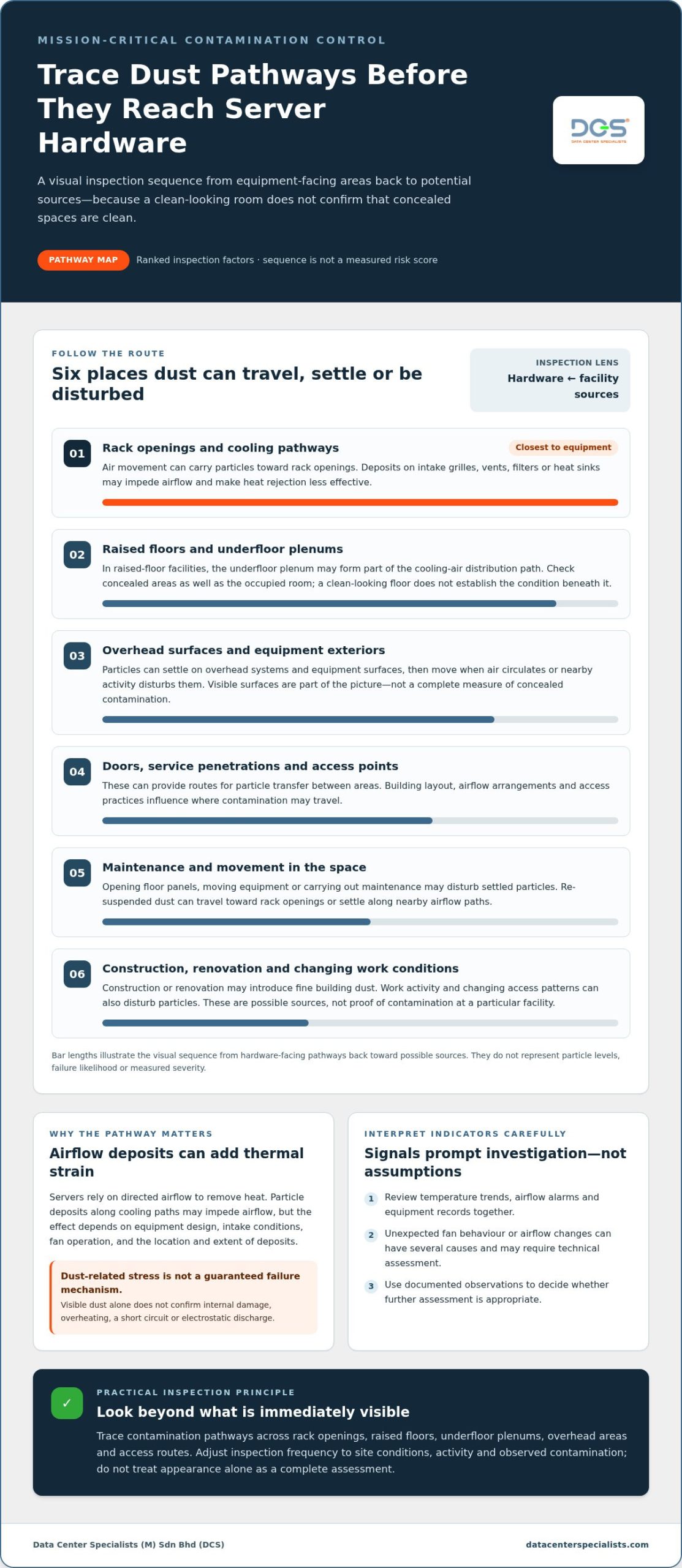
Dust exposure is not confined to the visible surfaces around a server rack. Particles can settle on room finishes, overhead systems and equipment exteriors, then move when air circulates or nearby activity disturbs them. If they reach rack openings or cooling pathways, they become part of the equipment-area contamination picture. The impact of dust on data center equipment depends in part on how particles travel from their source to sensitive spaces.
How dust moves through data center spaces
Air pathways can carry airborne particles between areas, while doors, service penetrations and access points create routes for transfer. Dust that has settled on a surface may become airborne again when people move equipment, open floor panels or perform maintenance. From there, particles may reach rack openings or settle along the surrounding airflow path.
Raised-floor facilities require attention to both the occupied room and the underfloor plenum. The plenum may serve as part of the cooling-air distribution path, so its condition is relevant to the broader contamination assessment. A clean-looking white space does not demonstrate that concealed areas, overhead surfaces or the underside of floor panels are equally clean. Verify relevant spaces rather than treating visible appearance as a complete indicator.
Why contamination sources vary by facility
Construction or renovation can introduce residues such as fine building dust, while maintenance work may disturb settled particles or bring contaminants into an equipment area. Ongoing operations also create changing conditions as equipment is serviced, components are moved and access routes are used. These are possible sources, not proof that a particular facility has contamination.
Exposure patterns depend on building layout, airflow arrangements, access practices and the work taking place. One room may show deposits near a frequently used access point, while another may have concerns concentrated below raised flooring or above equipment rows. Avoid assuming a universal source or contamination level across data centers, even within the same site.
A practical source review follows the pathways. Note where work has occurred, identify access points and inspect transitions between room surfaces, overhead areas, floor voids and racks. Consider whether observed deposits align with a plausible route, but distinguish that observation from a confirmed source. This helps operators target inspection and response without disturbing equipment or undertaking unnecessary cleaning.
For preventing dust damage to server hardware, include concealed spaces in the contamination picture and use facility observations to guide the next step. A coordinated data center contamination prevention approach considers equipment areas alongside raised floors, underfloor plenums and overhead systems, rather than relying on visible room surfaces alone.
Compare Dust-Prevention Controls Beyond Server Enclosures
Server enclosures can help limit direct particle exposure, but they cannot control contamination throughout a data center. Dust may still settle on room surfaces, enter airflow pathways or accumulate in concealed facility spaces. Effective prevention combines controls that address different points along those pathways. No single measure should be treated as a substitute for assessing both equipment areas and the wider environment.
What enclosures can and cannot address
An enclosure can act as a physical barrier between equipment and some surrounding particles, depending on its design and how it is installed and operated. It does not remove dust from the room, raised-floor plenum or overhead systems, and it should not be described as dust-proof. Selection and maintenance also need to account for the equipment’s intended operating conditions. Use enclosures as one layer of protection, not as a reason to defer facility-level inspection or contamination control.
How facility controls complement equipment protection
Compare each control by the pathway it addresses and its limits. The right combination depends on site conditions, equipment arrangement and observed contamination.
| Control | What it addresses | What it cannot replace |
|---|---|---|
| Equipment enclosures | Can provide a barrier that reduces direct exposure to particles around equipment. | Room-level controls, checks of concealed spaces or assessment of airflow pathways. |
| Environmental controls | Support management of air pathways and conditions that can carry or redistribute particles. | Inspection of actual deposits on surfaces, racks or within underfloor areas. |
| Routine inspections | Identify visible deposits, changes in conditions and locations that warrant closer review. | Removal of contamination or proof that concealed spaces are clean. |
| Specialist cleaning | Addresses contamination on identified facility and equipment-area surfaces using a mission-critical approach. | Ongoing controls that limit new contamination from entering or spreading. |
Airflow-path awareness helps teams consider where particles may travel rather than focusing only on the rack exterior. Routine inspections can then check relevant areas, including accessible surfaces near equipment and locations affected by maintenance activity. A data center air quality assessment can support a measurement-focused understanding of environmental conditions. It complements, rather than replaces, visual inspection and cleaning where contamination is present.
Specialist cleaning is appropriate when inspection indicates that deposits extend across areas requiring controlled intervention, such as raised floors, underfloor plenums, overhead systems or equipment areas. It should form part of a broader contamination-control plan, not a one-time substitute for prevention. In practice, preventing dust damage to server hardware means matching each measure to its purpose, reviewing whether it addresses the relevant pathway, and coordinating equipment protection with facility-wide controls.
Build a Practical Server Dust-Prevention and Inspection Routine
A useful inspection routine turns observations into a controlled response. It should cover visible equipment areas and relevant facility pathways without encouraging staff to disturb live hardware. Set inspection frequency according to site conditions, nearby work, operational changes and previous findings. Reassess the schedule when conditions change rather than treating one interval as suitable for every facility.
What facility teams should observe and record
Keep records consistent enough to compare findings over time. Note the location and visible extent of deposits, recent maintenance or construction activity, and any changes in cooling or airflow observations. Record what was observed, not an assumed cause. If readings, alarms or equipment behaviour appear unusual, escalate them through established operational procedures for technical review.
- Review conditions. Check recent work activity, access changes and relevant operational observations. Consider whether maintenance, construction or equipment movement could have affected contamination pathways.
- Inspect accessible pathways. From approved observation points, check airflow openings, rack exteriors, nearby surfaces and overhead areas. Include accessible underfloor spaces where inspection is authorised and safe. Do not open equipment or remove floor panels unless site procedures permit it and the work is within the team’s competence.
- Document findings. Record the location, appearance and extent of visible accumulation, along with the inspection context. Use comparable descriptions and, where site procedures allow, consistent visual records to help identify changes over time.
- Determine the response. Compare findings with previous records and relevant operating observations. Escalate unexpected changes, alarms or deposits near equipment through the facility’s established procedures. Decide whether continued monitoring, technical assessment or specialist intervention is appropriate.
When professional cleaning or assessment is appropriate
Consider specialist intervention when contamination is visible across equipment areas or extends into raised floors, underfloor plenums or overhead spaces. Plan work around the live environment: define the affected area, coordinate with facility operations and establish controls before cleaning begins. This avoids treating active equipment spaces like ordinary rooms.
Do not direct unqualified staff to clean live hardware, use household vacuums or apply methods that could disturb particles or create equipment risk. Keep routine inspections observational unless the task is covered by approved site procedures and personnel are competent to perform it. Cleaning is a controlled intervention, not an improvised response to a dusty surface.
Where measurement is needed to understand airborne particulate conditions, a data center air quality assessment can complement visual checks. Use measurement findings alongside facility observations to inform the response, not as a substitute for inspecting relevant spaces.
A disciplined routine supports preventing dust damage to server hardware by connecting site conditions, documented evidence and an appropriate response. For contamination that calls for specialist intervention, request a professional data center cleaning assessment from Data Center Specialists (M) Sdn Bhd (DCS).
How DCS Professional Cleaning Supports Dust-Damage Prevention
Dust prevention in a mission-critical facility requires attention to contamination across equipment areas and the spaces around them. Data Center Specialists (M) Sdn Bhd (DCS) uses an Assessment, Prepare, Execute, Verify approach for professional data center cleaning. These four stages provide a structured framework, while the scope is planned in relation to observed contamination and the facility’s operational context.
What professional ISO data center cleaning covers
DCS cleaning provides physical contamination control for mission-critical environments, not general janitorial cleaning. The scope covers raised floors, underfloor plenums, overhead systems, racks, equipment and ceiling areas. Considering these spaces together helps address contamination beyond visible room surfaces and equipment exteriors.
DCS professional cleaning is ISO 14644-1 compliant. This describes DCS’s cleaning service; it does not mean the standard itself prescribes a particular cleaning method. The appropriate scope depends on observed facility conditions and which areas require attention. Deposits around equipment may call for a different focus from contamination found in an underfloor space or overhead area.
Coordinating work in a live data center also requires attention to operational conditions. Cleaning should be planned as a specialist intervention, with the relevant areas and operational context considered rather than treating the facility as an ordinary workspace. The aim is to address identified contamination while supporting reliable facility operations, without assuming every project has identical requirements.
What facility operators can expect from DCS experience
DCS has operated since 2008 and delivered 1,000+ projects. Its Assessment, Prepare, Execute, Verify approach provides a consistent framework, while the particular scope remains connected to facility conditions. This matters for operators who need contamination control to account for equipment areas and wider building spaces together.
One project involved cleaning a 19,000+ sqm facility with zero operational disruption. That result applies to that specific project; it is not a guarantee that every cleaning intervention can be completed without disruption. Operational requirements and site conditions differ, so planning should reflect the facility and the work involved.
Professional cleaning can form part of a wider strategy for preventing dust damage to server hardware, alongside routine observation and facility-level controls. DCS provides professional cleaning and contamination-control services for data center owners and operators. Explore professional data center cleaning for information about the service.
Make Contamination Control Part of Operational Planning
Dust prevention is most effective when it becomes part of how the facility is managed, not a reaction to a visible deposit or equipment alert. Use inspection records to identify changing conditions, then coordinate any response with operational teams before work begins. This gives facility managers a clearer basis for deciding whether routine monitoring, further assessment or specialist cleaning is appropriate.
For preventing dust damage to server hardware, turn site observations into a practical plan that reflects the facility’s layout, operating requirements and contamination findings. Avoid a one-size-fits-all cleaning schedule. Set priorities according to evidence, protect live operations through deliberate planning, and review the approach as facility conditions change.
If contamination concerns warrant a closer discussion, contact DCS to discuss your data center cleaning requirements. A focused conversation can help clarify the areas of concern and the appropriate next step for your facility. With a measured, evidence-led approach, your team can strengthen contamination control while keeping operational priorities in view.
Frequently Asked Questions
Can dust damage server hardware even when the room looks clean?
Yes, but a clean appearance alone doesn’t show whether hardware is affected. For a practical check, compare equipment health indicators, such as reported fan faults or temperature alarms, with that device’s normal operating history and maintenance records. A visual observation and an equipment alert provide different kinds of evidence. Neither proves dust is the cause, so have the responsible technical team assess the equipment before deciding on corrective action.
Can server enclosures prevent all dust exposure?
No enclosure should be treated as an absolute barrier. Before deploying one, confirm that its configuration is compatible with the equipment’s operating and maintenance requirements, including the intended airflow arrangement. An enclosure that changes access or the way equipment is serviced may also affect operational procedures. Treat enclosure selection as an engineering decision for the specific installation, and retain a clear process for maintaining and inspecting the protected equipment.
Does compressed air remove dust safely from server hardware?
Not automatically. Whether compressed air is suitable depends on the equipment manufacturer’s instructions and the approved method for the specific work. Improvised use can dislodge particles, move them elsewhere or expose equipment to an inappropriate cleaning method. Don’t use it on live hardware based on general advice. Have the responsible technical team determine whether the method is permitted and who is qualified to perform the work.
Is visible dust a reliable measure of contamination risk?
No. The amount visible to the eye can’t establish particle concentration or determine whether a particular equipment area is within its specified environmental criteria. If a decision depends on airborne particle levels, use an appropriate measurement approach and interpret results in the context of the facility’s requirements. A visual finding can help identify where to investigate, but it shouldn’t be treated as a quantified result or a diagnosis.
Can construction dust affect server hardware after a facility becomes operational?
It can be relevant after handover, particularly if later works take place near operational areas. Rather than assume construction residues are present, review the closeout and work records for the affected zone, including what cleaning and verification were completed. For subsequent maintenance or modification, record the work area and any contamination-control measures in the work documentation. This creates a usable basis for follow-up if conditions change.
Should a server be shut down if dust is found nearby?
Not solely because dust has been noticed nearby. A shutdown decision should be made by authorised operations personnel under the facility’s incident and change-control procedures, taking account of equipment status and operational risk. Don’t disconnect, open or clean a server on your own. Report the observation promptly, identify the affected equipment if possible, and follow the site’s escalation process so the appropriate team can decide whether intervention is required.
What should operators document after finding dust near server racks?
Make the record useful to the team taking over the response. Include the rack or asset identifier, the time observed, any related work order or access activity, and whether alarms or operating conditions changed. Note who was notified and what immediate actions were taken. Keep observations separate from suspected causes, and preserve the record in the facility’s normal reporting system so it can be reviewed alongside relevant maintenance and operational history.