
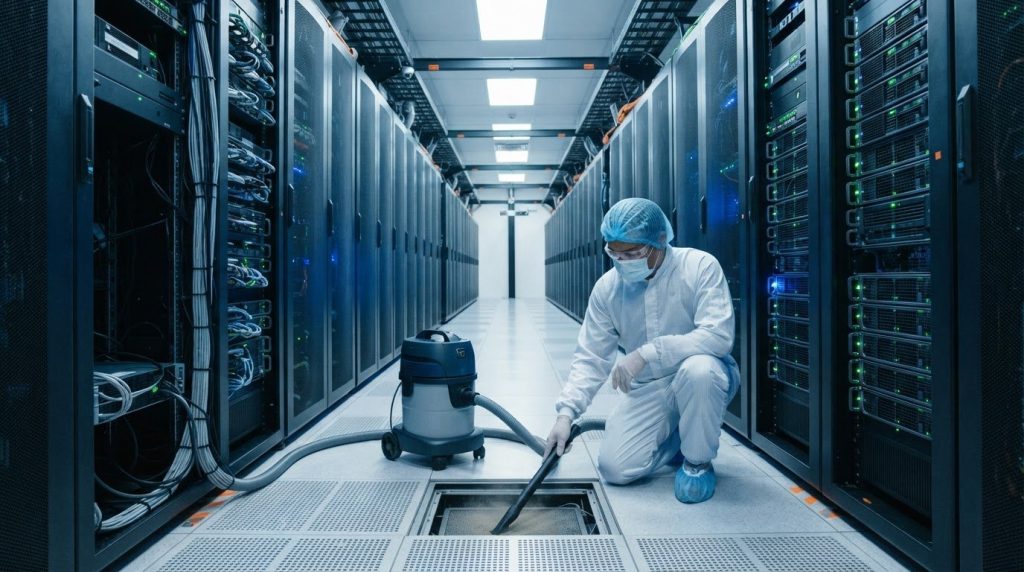
Persistent dust is a contamination-control issue, not just a housekeeping problem. If you’re asking, “My server room is always dusty: what should I do?”, start by tracing how particles enter, checking airflow and filtration, and removing settled dust with suitable HEPA-filtered equipment.
Visible dust is only part of the problem. Particles can collect around racks, vents, raised floors, and other hard-to-reach areas. If dust obstructs airflow or settles on equipment, it can complicate heat management and increase operational risk.
This guide covers five practical ways to reduce dust while protecting an operational environment: control entry points, review airflow, vacuum with suitable HEPA-filtered equipment, clean surrounding surfaces carefully, and identify when specialist support is appropriate. It also explains why quick dusting can spread particles and how to approach cleaning without disturbing equipment or operations.
Key Takeaways
- Trace recurring dust to likely entry points and inspect less visible areas, including underfloor spaces and rack surroundings.
- Look for dust on vents, filters and equipment, since restricted airflow can make heat management more difficult.
- Use HEPA-filtered vacuuming and suitable cleaning methods to capture particles rather than disperse them around sensitive equipment.
- Maintain clear airflow paths and review ventilation when dust continues to accumulate despite routine cleaning.
- Consider specialist data center cleaning when contamination reaches sensitive or hard-to-access areas, or routine methods cannot control it.
1. Why Is Dust So Dangerous in Server Rooms?
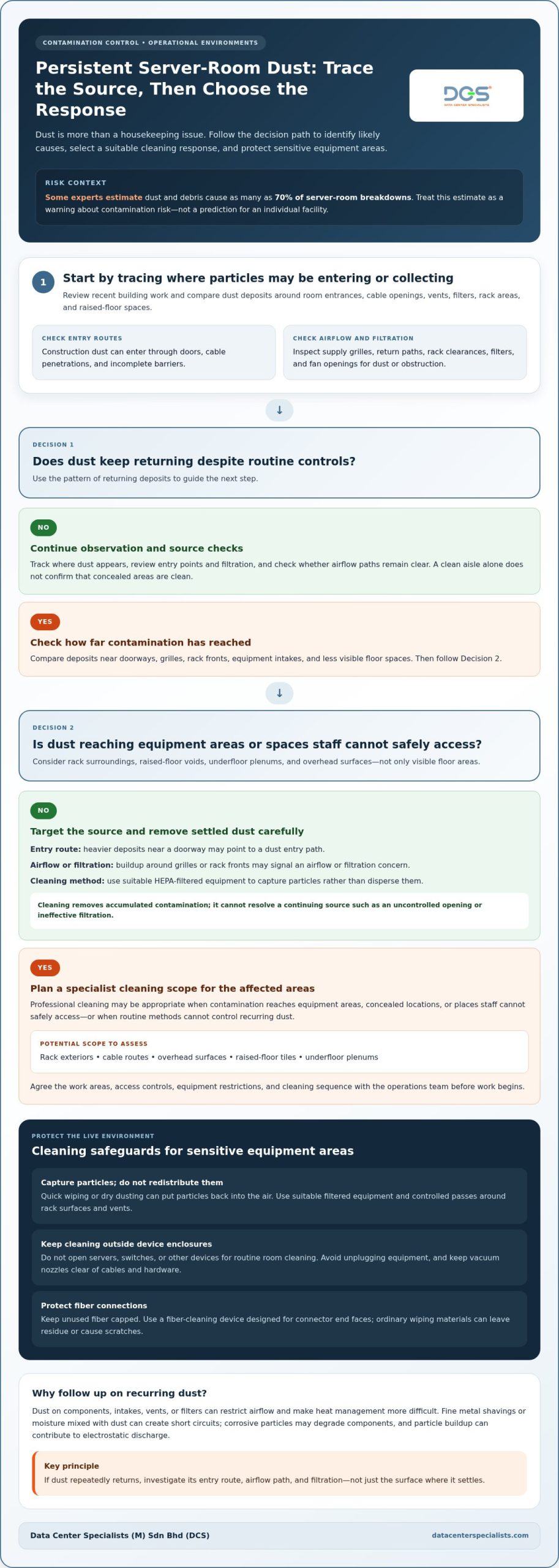
Common sources of excessive dust include construction work, particles entering through doors or cable openings, and clogged filters. Airflow can carry particles into equipment, while electrostatic discharge can attract them to surfaces. Start by reviewing recent building work and inspecting room entrances, vents, and rack areas.
In server rooms, dust on components can interfere with heat transfer. A coating on a server intake or fan can restrict airflow, while blocked vents and filters make temperature control more difficult. As equipment continues generating heat, restricted cooling can contribute to overheating, system crashes, and premature component failure.
Some experts estimate that dust and debris cause as many as 70% of server room breakdowns. Treat that estimate as a warning about contamination risk, not a prediction for an individual facility. Dust can worsen existing cooling problems, so note whether buildup appears near intakes, exhausts, or filters before deciding what to address.
Fine metal shavings or moisture mixed with dust can create short circuits. Corrosive particles may gradually degrade components, and particle buildup around equipment can contribute to electrostatic discharge that damages sensitive electronics. Dust on hard-drive surfaces may also contribute to read/write errors and potential data loss.
Construction work can introduce fine dust through open doors, cable penetrations, and incomplete barriers. Air movement may carry particles to rack intakes before dust is visible on the floor. During nearby work, protect exposed equipment and control openings. Keep fiber connections capped until the room is ventilated and free of construction dust.
To trace the source, compare dust deposits across the room. Heavy buildup near a doorway may indicate an entry route; deposits around grilles or rack fronts may point to airflow or filtration concerns. Check filters and fan openings for obstructions, and inspect raised-floor areas where contamination can collect out of sight.
Remove settled dust with a specialist filtered vacuum designed for sensitive equipment areas. Quick wiping or dry dusting can put particles back into the air, where they may settle on components or enter cooling paths. Avoid unplugging equipment during cleaning. Keep the vacuum nozzle clear of cables and hardware, and use controlled passes around rack surfaces and vents.
Cleaning removes accumulated contamination, but recurring dust requires source control. Track where buildup returns after cleaning, inspect construction boundaries and filtration, and review airflow paths. If dust repeatedly appears inside equipment areas, investigate how it is getting there instead of cleaning the same surfaces again.
To see how airflow and intake filtration can affect dust entry, watch this experiment:
2. Should You Partner With a Professional Server and Data Center Cleaning Company?
Professional cleaning is appropriate when dust returns despite routine controls, reaches equipment areas, or collects in spaces staff cannot safely access. A planned programme addresses contamination across the room rather than only removing visible particles from floors. It also gives facility teams a defined scope for cleaning around live equipment.
Do not open servers, switches, or other devices to clean their interiors during routine room maintenance. Opening equipment can affect warranties, and unsuitable tools or techniques can damage components. Keep cleaning outside device enclosures unless hardware maintenance is authorised and carried out under the equipment owner’s procedures.
A proper cleaning scope identifies the areas requiring attention before work begins. This may include rack exteriors, server cabinets, cable routes, overhead surfaces, raised-floor tiles, and underfloor plenums. Dust can collect beneath tiles or behind rack structures, beyond the reach of surface cleaning. Include these locations in the inspection rather than assuming a clean aisle means a clean environment.
Cleaning an operational server room requires controls for equipment, access, and contamination pathways. A specialist team can plan work around sensitive components, use suitable filtered equipment, and avoid methods that redistribute particles. The team should work to an agreed scope and coordinate access with facility operations, especially when raised-floor tiles or rack areas need attention.
Fiber connections need particular care. Dust or scratches on fiber ends can reduce transmitted light and contribute to signal loss. Keep unused fiber capped, and use a fiber-cleaning device designed for connector end faces. Clothing and ordinary wiping materials can leave residue or cause scratches, so they are not substitutes for proper fiber-cleaning tools.
Professional server room cleaning may be useful when the facility lacks suitable equipment, trained staff, or time to address concealed contamination. It can also support post-construction cleaning, when fine particles may remain around racks, in floor voids, or on overhead surfaces. Cleaning cannot resolve a continuing source, such as dust entering through an uncontrolled opening or ineffective filtration.
Before work, define the areas, access controls, equipment restrictions, and cleaning sequence with the operations team. Record recurring dust locations and review them after cleaning. If underfloor spaces, rack exteriors, and other critical areas need a coordinated scope, professional data center cleaning can address physical contamination in mission-critical environments.
3. Airflow and ventilation
Air movement affects where dust travels and whether it reaches equipment intakes. Inspect supply grilles, return paths, rack clearances, and filters together. A clean filter cannot compensate for blocked airflow or poorly arranged equipment.
In Malaysia, follow the facility’s approved mechanical design, site risk assessments, and applicable building and occupational-safety requirements. The responsible project engineer should identify the requirements for that facility; general cleaning practices do not replace site procedures.
Control dust and humidity by monitoring environmental conditions and comparing readings with the facility’s operating limits. Place sensors where they can reveal variations across the room, then investigate recurring changes near doors, supply outlets, or rack rows.
There is no single MERV or HEPA rating that suits every server room. Select HVAC filtration to match the system design, airflow needs, and equipment requirements. A HEPA filter in a vacuum cleaner is not automatically the right filter for an HVAC system.
Start with a visual airflow review. Check that rack fronts receive supply air and that exhaust air can return without obstruction. Keep materials away from grilles and cables clear of openings. If one rack area feels warmer or collects more dust, compare its airflow path with those of nearby racks.
Keep the room air-conditioned, filtered, and dehumidified according to its operating design. Excess moisture can combine with airborne particles, while inadequate filtration allows more dust to circulate. Use environmental monitors to track temperature and relative humidity, and review trends rather than relying on occasional spot checks.
Inspect filters and fan openings for dust buildup or blockages as part of planned facility checks. A loaded filter can restrict airflow, and a dirty fan can reduce circulation. Follow the equipment maintenance procedure for inspection and replacement, and record changes to track recurring contamination.
Nearby construction or maintenance work requires additional coordination. Dust can enter through open doors, cable penetrations, or incomplete barriers, then travel along active air paths. Coordinate HVAC operation with the project’s commissioning and contamination-control plan rather than allowing construction particles to circulate through the room.
When dust persists, map the pattern before changing ventilation settings. Note deposits around supply grilles, return paths, and rack intakes, then compare them with monitor readings and filter condition. This helps distinguish an airflow imbalance from an entry route or a gap in cleaning.
Coordinate these practices: keep air paths clear, monitor humidity and temperature, inspect filtration, and contain nearby dust sources. Adjust ventilation only in line with the facility’s approved design. Changing airflow without assessing system conditions can create new hot spots or disrupt cooling distribution.
4. HEPA-filter vacuuming
Use a HEPA-filtered vacuum to capture settled particles instead of lifting them into room air. In a server room, vacuuming is a controlled contamination-removal task, not an ordinary floor-cleaning pass. Choose equipment intended for sensitive environments, inspect it before use, and make sure its exhaust does not disturb dust near racks or air intakes.
Before starting, coordinate with the facility operations team. Confirm the permitted work area, access route, equipment restrictions, and whether raised-floor tiles may be lifted. Keep servers connected, avoid contact with live components, and do not direct a nozzle into equipment openings. Vacuuming removes surface contamination; it does not replace hardware maintenance.
Work from cleaner areas toward visibly contaminated areas, using steady passes that limit particle disturbance. For example, vacuum the aisle floor before moving to dustier edges and accessible areas around rack bases. Use suitable attachments for narrow gaps, keeping them clear of cables, connectors, and equipment surfaces that could be scratched or displaced.
High-traffic server rooms may need daily vacuuming with HEPA-filtered equipment, depending on observed contamination and operating conditions. Track where dust returns, such as near a doorway or rack intake, rather than applying the same frequency everywhere. Repeated deposits in one location may point to an unresolved entry route or airflow issue.
Underfloor spaces require a separate, controlled approach. Follow the site’s approved access procedure before lifting a tile, then vacuum exposed areas without disturbing cables or the plenum’s airflow path. Work carefully around cable bundles, and replace each tile correctly before moving on. If the floor void contains heavy debris or construction residue, aisle vacuuming alone will not address it.
After vacuuming, use compatible antistatic cloths or lightly damp wipes on suitable surfaces, following site procedures and equipment restrictions. Avoid spraying liquids near racks, outlets, or floor openings. Never use compressed air to blow settled dust away; it can spread particles toward components and nearby equipment.
Inspect the vacuum’s filter and collection system according to its maintenance instructions. A damaged or poorly seated filter can undermine particle capture, while a full collection container can make safe handling more difficult. Remove collected material outside the controlled equipment area, taking care not to release dust during disposal.
Record the cleaned zones, observed deposits, and any access limitations. Comparing notes across cleaning visits helps teams identify recurring hotspots and adjust the scope. HEPA vacuuming works best as part of a planned contamination-control process covering floors, rack surroundings, and accessible hidden areas.
5. Using a HEPA vacuum on walls, floors and ceilings
Dust settles beyond rack fronts. Include walls, floors, ceiling surfaces, and accessible ledges in the cleaning scope, since overhead particles can later fall onto equipment. Use a HEPA-filtered vacuum with suitable attachments, working methodically from higher surfaces toward the floor. This sequence captures released particles during the same cleaning pass.
Before vacuuming above equipment, coordinate access with facility operations. Identify live equipment, cable routes, lights, detectors, and other ceiling-mounted services. Keep tools away from devices and openings, and avoid contact with components. If a surface cannot be reached safely without disturbing equipment or services, leave it for a controlled specialist cleaning task.
For overhead areas, vacuum accessible ceiling surfaces and ledges with an attachment suited to the surface. Use slow, controlled strokes rather than fast brushing, which can disperse dust into the room. Wipe suitable surfaces afterward with antistatic cleaning fluids, following the facility’s approved method and avoiding application near equipment, electrical connections, or air outlets.
Walls can retain particles around corners, door frames, cable penetrations, and behind equipment. Work from the upper wall downward, paying attention to these transitions. Keep the vacuum nozzle from scraping painted or coated finishes. If dust is concentrated around a penetration, record its location; repeated deposits may indicate an entry path that cleaning alone will not resolve.
Use a HEPA vacuum on floors, including aisles, edges, and areas around rack bases. Move cables only when site procedures permit, and do not pull or lift them to reach hidden dust. Raised-floor tiles require controlled access because the space beneath supports airflow and may contain cables. Vacuum exposed sections carefully, then return tiles to their correct positions.
Where practical, use separate cleaning tools or attachments for different surfaces. A nozzle used on a visibly dusty floor should not be used on a clean overhead ledge without first being cleaned appropriately. Check the vacuum body, hose, filter seating, and collection container before work. Damaged or poorly assembled equipment can release captured particles back into the room.
After cleaning, inspect the room under normal lighting. Look for remaining dust on ledges, floor edges, door frames, and around rack bases. Record recurring locations and compare them during later inspections. This helps distinguish a missed surface from a continuing source, such as construction dust or particles entering through an opening.
Where raised-floor voids and room surfaces need coordinated attention, arrange professional data center cleaning for a scope suited to the facility’s operational conditions.
Data Center Specialists (M) Sdn Bhd (DCS): Professional Data Center ISO Cleaning Services
Data Center Specialists (M) Sdn Bhd (DCS) provides Professional Data Center ISO Cleaning Services for mission-critical environments where dust continues to accumulate or reaches hard-to-access areas. The work focuses on physical contamination control, including server-room surfaces, rack areas, and raised-floor spaces, rather than routine general cleaning.
Consider professional cleaning when repeated vacuuming does not resolve recurring deposits, or when dust is present beneath raised floors or around sensitive equipment. A defined scope helps facility teams address contamination while accounting for operational access and equipment restrictions. DCS also provides related services, including Data Center Energy Assessment, Testing, Adjusting & Balancing (TAB), and Cleanroom Performance Testing (CPT).
For persistent contamination in a live server room, explore professional data center cleaning as a practical next step. Contact Data Center Specialists (M) Sdn Bhd (DCS) to discuss your facility’s cleaning requirements.
Make Dust Control Part of Routine Facility Decisions
Treat recurring dust observations as facility-management information, not isolated cleaning notes. Record where deposits reappear, what work was taking place nearby, and whether ventilation or access conditions had changed. Assign follow-up to an operations owner so recurring patterns prompt investigation of the source, not just repeated removal.
If you’re asking what to do when your server room is always dusty, review the contamination pattern and the controls around it. A clear record helps your team distinguish an occasional deposit from a persistent condition that needs a broader response.
For support with mission-critical cleaning or related facility requirements, contact Data Center Specialists (M) Sdn Bhd (DCS) to discuss your environment and operational needs. A considered plan gives your team a practical basis for maintaining dust control as the facility changes.
Frequently Asked Questions
Should You Partner With a Professional Server and Data Center Cleaning Company?
Yes, consider specialist support when cleaning involves operational areas, raised floors, or work around sensitive infrastructure. If your server room is always dusty, record where deposits return and what work or access changes came before them. This information helps define the areas and sources to address. Agree on access boundaries and operational coordination before cleaning begins, especially where staff need access to live equipment.
Why Is Dust So Dangerous in Server Rooms?
Dust’s location and composition can indicate different contamination risks. Deposits near network connectors call for a different response from construction residue in an underfloor void. Record the affected area and material’s appearance, then escalate unusual findings through facility procedures. This gives operations teams useful evidence to investigate recurring contamination instead of treating every deposit alike.
Why is a Clean Server Room Important?
A clean server room supports orderly maintenance and makes environmental changes easier to identify. For example, new residue near a cable entry can prompt an investigation before it spreads. Clear access around equipment also helps authorised technicians carry out inspections without moving stored items. Align the room’s housekeeping scope with facility access rules and equipment procedures.
How can I check server-room HVAC filters, airflow, and air leaks?
Follow the HVAC maintenance procedure and compare filter condition with the system’s specified service criteria. Check that filters sit correctly in their frames, since gaps can let air bypass them. Inspect door seals and cable penetrations for visible openings. If readings or airflow differ from the facility design, document the location and have qualified facilities personnel assess the system before making adjustments.
What is the safe procedure for cleaning dust from servers and racks?
Before work starts, obtain operations approval and define permitted surfaces, access routes, and equipment boundaries. Follow site task controls and the equipment manufacturer’s instructions. Record which racks or zones are included so staff can identify what was handled. Keep internal device cleaning outside routine room cleaning unless authorised equipment procedures specifically allow it.
How often should server rooms and IT equipment be cleaned?
Use observed conditions and contamination history to set the schedule. One recommendation is to deep-clean a server room every three months, while high-traffic areas may need more frequent attention. Reassess the plan after construction, changes to room access, or an increase in visible deposits. Keep separate schedules for room surfaces and equipment-related work, as each has different access and authorisation requirements.
What are the risks of dust buildup on servers and networking equipment?
Dust buildup can make equipment condition harder to assess and may conceal changes such as corrosion, residue, or physical damage. Contamination at fiber ends can affect optical transmission. Protect unused fiber with connector caps, and treat connector cleaning as a specific task requiring appropriate tools. Record affected connections so operations staff can compare findings with any reported signal issues.
Should a server room use positive air pressure, and how is it maintained?
Positive pressure can help limit dust entry through small openings when the ventilation design is intended to provide it. Have facilities personnel assess pressure across the room and confirm that supply and return arrangements support the design. Keep doors and penetrations controlled, and record pressure-related changes after maintenance or construction. Avoid increasing supply airflow without an engineering review, as this can alter the room’s cooling distribution.