
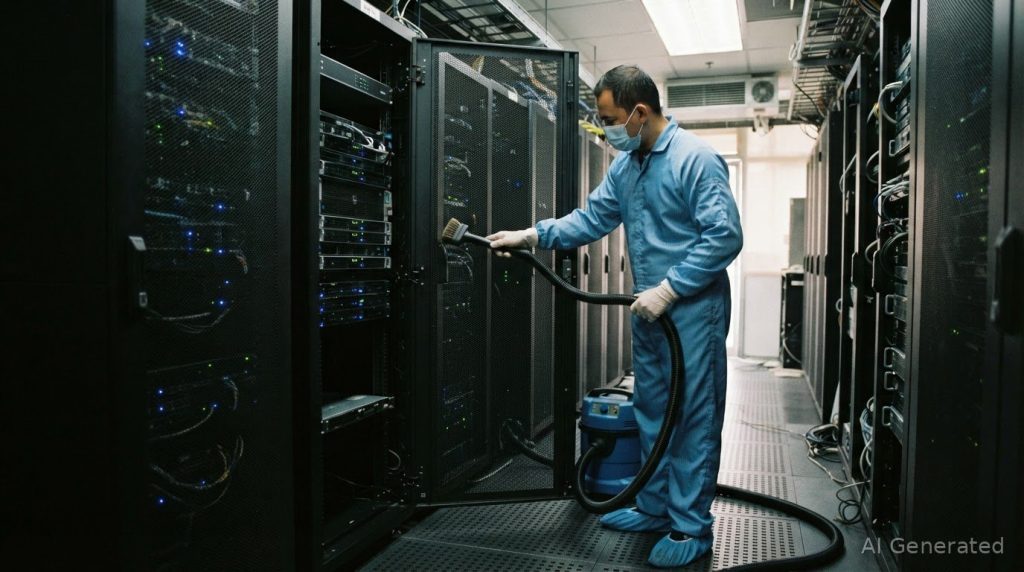
A small server room is not an ordinary office space, and its cleaning shouldn’t be treated as routine janitorial work. A small server room cleaning service should be delivered by professionals experienced in mission-critical environments, where dust, moisture and static electricity can put sensitive equipment at risk. Contamination can also restrict airflow, contribute to overheating and increase the chance of disruption. The cleaning approach needs to account for operating equipment, raised floors and the room’s specific access and safety requirements.
It’s reasonable to want a clean environment without introducing new risks to your IT infrastructure. This guide explains who should clean a small server room and what a professional service should consider before work begins. It covers floors, racks and equipment surfaces, overhead areas and underfloor plenums, and explains how contamination control can support airflow and operational continuity. You’ll also learn how to assess a provider’s method and site coordination to decide whether the proposed work suits your facility in Malaysia.
Key Takeaways
- Choose a cleaning specialist experienced with mission-critical environments, not a general cleaning service.
- Set the cleaning scope around the room’s equipment, raised floor, underfloor plenum and overhead surfaces.
- Use methods and materials suited to sensitive electronics and electrostatic discharge (ESD) controls.
- Distinguish a small server room’s needs from a larger data centre’s, then tailor the work to the site and its contamination risks.
- Include airflow and contamination checks in the maintenance approach to help reduce overheating and disruption risks.
Who Should Be Cleaning Your Server Room?
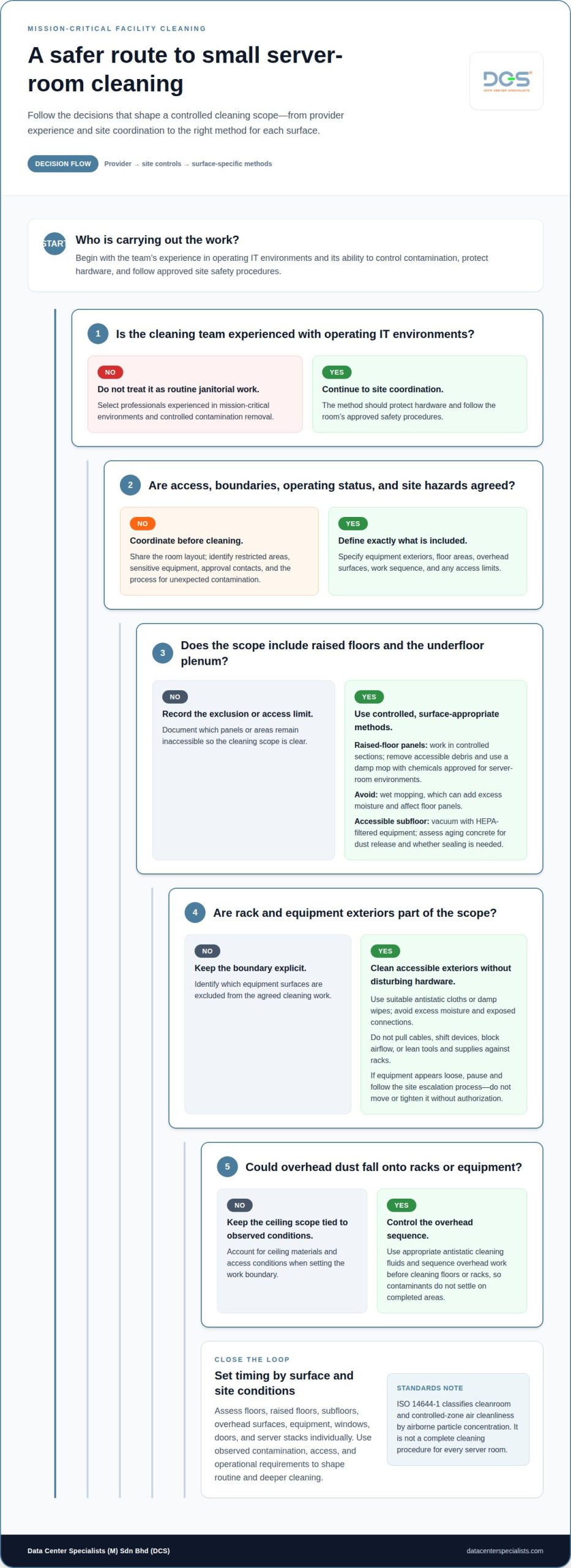
Assign the work to professionals experienced in operating IT environments, rather than routine building cleaners. Their methods should control contamination, protect hardware and follow the room’s approved safety procedures.
-
Assess dust-related equipment risks
Have a trained specialist inspect visible dust, grime and other contamination around racks, air vents and equipment surfaces. Particles can migrate into operating hardware, restrict airflow and contribute to heat buildup, equipment failure or downtime. Moisture and static electricity can also pose risks to sensitive components. The cleaning scope should identify where contamination is present and how it can be removed safely.
Consider where contaminants may collect, including above the equipment and around the ceiling. Build-up on exterior surfaces can indicate that dust may also be accumulating in less visible areas. Repeated overheating or hardware faults also deserve attention. Controlled cleaning can help reduce conditions associated with premature hardware problems, but it does not replace equipment maintenance.
-
Check applicable safety and industry standards
Set the scope against your facility’s approved safety procedures and applicable site requirements. According to the International Organization for Standardization, ISO 14644-1 classifies air cleanliness in cleanrooms and controlled zones by airborne particle concentration. It is an air-cleanliness classification standard, not a complete cleaning procedure for every server room.
Before cleaning, coordinate access, work boundaries, equipment operating status and site-specific hazards with the facility team. Provide the room layout and identify restricted areas, sensitive equipment and approval contacts. This preparation helps the cleaning team plan its sequence without disturbing cables or interfering with operations. Specify which equipment exteriors, floor areas and overhead surfaces are included, and agree how unexpected contamination will be handled.
For a facility in Malaysia, align the work with its own approved safety controls and cleaning standards rather than assuming one method fits every site. A professional data center cleaning approach should distinguish air cleanliness classification from the practical controls used during cleaning.
-
How professionals clean equipment exteriors while limiting jostling
Plan a controlled sequence for rack exteriors and accessible equipment surfaces. Professionals can use antistatic cloths or suitable damp wipes, while avoiding excess moisture and exposed connections. Cleaning should remove surface dust without pulling cables, shifting devices or blocking airflow.
Keep cleaning activity clear of rack wheels and cable routes to reduce vibration and disturbance. Check that equipment and mounting parts remain stable, and do not lean tools or supplies against racks. If a rack or device appears loose, pause and follow the site’s escalation process instead of tightening or moving hardware without authorization. This careful approach cleans surfaces while limiting movement that could disrupt connections or damage equipment.
Cleaning raised floors, electronics, overhead areas, and subfloors
A professional service can cover room floors, raised-floor panels, the underfloor plenum, equipment exteriors and overhead surfaces. A small server room cleaning service should define these areas separately and set methods and timing according to access, contamination and site operations.
-
How professionals clean raised floors and subfloors
Handle raised-floor panels in controlled sections. Professionals remove accessible debris and use a damp mop with chemicals approved for server-room environments. A wet mop can add excess moisture and affect floor panels, so it is not a suitable substitute.
Underfloor plenum cleaning removes dust and debris that could migrate back into the room or interfere with airflow. Professionals can vacuum accessible concrete subfloor areas with HEPA-filtered equipment. If the concrete is aging, its condition matters because it may release dust; specialists can assess whether sealing is needed to help protect equipment. Document panel access and any areas that remain inaccessible.
-
How professionals clean electronics and overhead areas
Limit equipment cleaning to accessible exterior surfaces, using suitable antistatic cloths or damp wipes. Avoid excess moisture, exposed connections and actions that could shift equipment or disturb cables. For overhead surfaces, professionals use appropriate antistatic cleaning fluids and control dust so it does not fall onto racks or open equipment.
Include ceiling areas where dust or debris could enter the room. The method should account for overhead materials and access conditions, rather than treating the ceiling like a standard room surface. Agree on the sequence before work starts so overhead cleaning does not deposit contaminants on already-cleaned floors or racks.
-
Set cleaning frequency according to site conditions
Set cleaning frequency by surface and use, taking into account site conditions, contamination risk, access and operational requirements. Assess areas such as floors, windows and doors, raised floors, subfloors, overhead surfaces, equipment and server stacks individually. Observed contamination and site operations can inform the timing of routine and deeper cleaning.
A specialist plan can coordinate cleaning tasks with site access and observed contamination instead of assuming one schedule suits every room.
-
Maintain floor and static controls
Use floor-care methods that comply with the room’s electrostatic discharge controls. Damp mopping with approved chemicals supports raised-floor care without adding unnecessary moisture. Do not assume an ordinary floor product is suitable for a server environment.
Regular cleaning also helps identify spills, debris or panel issues before they affect the work area. For facilities needing specialist raised-floor cleaning, the scope should define floor surfaces and underfloor access clearly.
Differences between data centre and server room cleaning
Choose the cleaning scope based on the environment, not its name alone. A small server room and a data centre both need contamination control, but their layouts, equipment density and coordination needs can differ.
- Define the room’s footprint and systems before setting the scope. A small server room may contain a few racks, a cooling unit and limited floor access. A larger data centre may have multiple equipment rooms, raised floors, underfloor plenums and extensive cable routes. These differences determine which surfaces need attention and how work should move through the facility. For example, a room without a raised floor has no underfloor plenum to include, while a raised-floor server room may need both tile surfaces and accessible subfloor areas cleaned. Base the plan on an inspection of the actual layout, not assumptions about room size.
- Coordinate work with equipment density and operations in mind. In a compact room, a rack or cooling-system inlet may be close to the work area. In a data centre, multiple rows, airflow paths and operational zones may require separate work boundaries. Identify cables, equipment access points and surfaces where dust could migrate toward running hardware. Set a sequence that keeps cleaning materials and movement clear of equipment intakes. The same broad task, such as cleaning rack exteriors, can involve different access and coordination needs in each environment. A thorough scope also records areas excluded from direct contact.
- Match the cleaning method to the contamination and the facility’s airflow design. Poorly controlled work can stir up dust on floors, rack surfaces or overhead areas. In either setting, cleaning should remove contaminants without directing them toward equipment or disturbing cables. A small server room may need focused attention on a few high-risk surfaces, such as a cooling-system intake and the floor around racks. A larger data centre may require a coordinated sequence across several zones, including raised-floor and underfloor areas where present. This helps control dust migration and keep airflow paths clear, but does not guarantee against equipment failure.
- Assess the benefits by looking at the environment’s condition, not its room category. Regular, planned cleaning can reduce accumulated dust around equipment and help keep airflow paths clear. It can also make visible contamination and housekeeping issues easier to identify during scheduled inspections. For example, debris near a rack intake calls for attention to that area and its surroundings. Specialist data centre cleaning uses controlled methods in mission-critical spaces, while a server room plan should suit the layout and operational needs. When defining the work in Malaysia, consider site access, room configuration and sources of contamination.
HEPA-filter vacuuming
Use HEPA-filtered vacuuming to remove debris from equipment areas, rack exteriors and accessible subfloor surfaces. The method and work sequence should protect operations and avoid redistributing contamination.
- Match the vacuum and attachments to the surface. Professionals use HEPA-filtered, ESD-compliant vacuums on equipment surfaces where applicable. Suitable tools collect dust and debris rather than shifting them across a rack or floor. Choose attachments that reach accessible edges and gaps without contacting cables, connections or sensitive components. The plan should specify which surfaces will be vacuumed and which need another method, such as wiping.
- Work systematically around racks and equipment. Vacuum accessible rack exteriors and nearby floor areas in a controlled sequence, keeping the nozzle clear of equipment openings and cable routes. Avoid dragging hoses across cables or striking rack frames. A narrow attachment, for example, may reach a floor edge, while exposed connections should remain untouched. This careful approach removes visible debris without disturbing critical equipment.
- Include the underfloor plenum if the room has a raised floor. Once the site team approves access, professionals can vacuum accessible concrete subfloor areas with HEPA-filtered equipment. This removes accumulated debris that could migrate through the floor space and affect airflow. Keep panels and work boundaries controlled, and avoid leaving dust where it could be drawn toward equipment. The extent of underfloor work depends on access and observed contamination.
- Coordinate vacuuming with equipment operations. Some tasks may be possible while equipment is running, subject to site approval and a risk assessment. The cleaning team should follow agreed work boundaries, avoid air intakes and keep tools clear of cooling paths. If conditions change or debris is found near a critical component, pause and follow site procedures. Uncontrolled dust can restrict airflow and contribute to overheating, so controlled work matters more than speed.
- Inspect the work area after vacuuming. Confirm that accessible surfaces are free of collected debris, tools and hoses have been removed, and cables remain routed as found. Record areas that could not be reached or required another cleaning method. This close-out gives facility operations a clear account of the work and supports future planning. HEPA-filtered vacuuming is one part of contamination control, not a substitute for a full room assessment.
Preventing overheating and downtime
Control contamination around cooling paths, electronic equipment and overhead surfaces to reduce conditions that can contribute to overheating. A professional plan should coordinate cleaning tasks with facility operations, access controls and observed contamination.
- Trace how dust could reach equipment. Inspect surfaces above racks, ceiling areas, cooling-system returns and nearby floors. Particles released from a dusty ceiling can settle on equipment or enter airflow paths. For example, debris above an acoustical ceiling may become airborne during access work, so the cleaning sequence should contain and remove it deliberately.
Record visible contamination and its location before work begins. This gives operations staff a clear basis for prioritising areas around electronic equipment and cooling airflow. It also helps distinguish an isolated deposit from contamination spread across several surfaces.
- Include overhead and ceiling surfaces in the cleaning scope. Professionals can use HEPA-filtered vacuums above acoustical ceiling tiles and remove loose debris by hand. They should control dust during access and prevent particles from falling onto racks or equipment. The work should also account for fixtures and ledges where dust can collect.
Coordinate ceiling access with site operations before opening panels. Identify nearby equipment, cable routes and restricted areas. This sequence helps prevent cleaning debris from entering an intake or disrupting work around running systems.
- Protect cooling paths throughout the work. Keep tools, waste and removed debris clear of equipment intakes, exhausts and return-air routes. If dust is found near a cooling inlet, include the surrounding surfaces in the scope rather than cleaning only the visible spot. Restricted airflow can reduce heat removal and contribute to equipment overheating.
Do not treat cleaning as a cooling-system repair. Cleaning addresses contamination on accessible surfaces and in agreed areas; operational staff handle equipment faults through their maintenance procedures. This distinction keeps the response focused when an alarm or temperature concern occurs.
- Schedule work to limit operational disruption. Agree on access boundaries, work order and communication with facility operations before the cleaning team enters. In an occupied room, complete work in one controlled area before moving to the next. If equipment must remain running, site approval and a risk assessment determine which tasks can proceed.
After work, remove tools and collected debris, then review the cleaned surfaces with the operations contact. Note any contamination that needs follow-up. This close-out helps staff distinguish cleaning observations from equipment alarms or maintenance issues.
- Set overhead inspection and cleaning intervals based on observed contamination, dust sources and site conditions. Construction activity and room use can also inform inspection priorities. A documented scope helps coordinate ceiling, rack and cooling-path work.
For mission-critical facilities, discuss professional contamination-control cleaning when overhead debris or dust migration needs a defined response. A planned approach supports cleaner surfaces and airflow paths, while operational monitoring remains essential for identifying developing heat or downtime risks.
Data Center Specialists (M) Sdn Bhd (DCS): Data Center Server Room Cleaning
Data Center Specialists (M) Sdn Bhd (DCS) provides Data Center Server Room Cleaning for facilities that need controlled cleaning around operational IT equipment. The service can cover rack and equipment surfaces, raised floors, underfloor areas and other agreed spaces, with the scope shaped by site conditions and operational requirements.
Turn to a specialist when dust or debris builds up near equipment, airflow paths or accessible floor areas, or when planned cleaning must account for sensitive systems. DCS also provides Professional Data Center ISO Cleaning Services. If cleaning is not the only concern, a Data Center Energy Assessment or Testing, Adjusting & Balancing (TAB) can address related facility-performance questions.
For a technical discussion about server room cleaning requirements, contact Data Center Specialists (M) Sdn Bhd (DCS).
Set a Clear Path for Ongoing Care
Make the next step a practical operating decision: define who coordinates access, how cleaning observations reach facility operations and what changes should prompt a scope review. A new equipment layout, construction activity or recurring dust near an intake can change where attention is needed. Keeping these details in routine facility records helps the cleaning plan stay relevant as the room evolves.
Choosing a small server room cleaning service should support consistent maintenance, not just respond to visible dust. Align the scope with operational priorities, site procedures and the room’s actual conditions. This gives your team a clear basis for planning future work and discussing changes before they affect the environment.
For a technical discussion about your server room’s cleaning requirements, contact Data Center Specialists (M) Sdn Bhd (DCS). A considered next step can help your team plan care with confidence.
Frequently Asked Questions
How do professional cleaners keep contaminants out of a server room?
Professionals limit contaminant transfer through controlled access, defined work zones and careful handling of cleaning materials. Before work, they identify entry routes, nearby construction activity and areas where dust could travel toward equipment. Tools and collected debris stay within the assigned work area and are removed during close-out. For example, entry from a dusty construction zone may call for a separate route or additional containment controls.
What cleaning products do professional server room cleaners use?
Professionals select products suited to each surface and the server-room environment rather than defaulting to general-purpose cleaners. Antistatic cloths or damp wipes may suit equipment exteriors; floor products should be approved for server-room use. Product choice also depends on material compatibility and moisture control. Do not apply cleaning chemicals directly to electronic equipment or exposed connections.
How often should a small server room be professionally cleaned?
Determine the cleaning frequency from the room’s contamination levels, use, construction activity and site-specific risks rather than applying a universal interval. Construction work, frequent access, visible dust and recurring debris can call for closer attention. Keep routine housekeeping separate from specialist cleaning: daily rubbish removal does not replace cleaning equipment surfaces or hard-to-reach areas. A documented schedule helps operations teams track completed work and emerging contamination patterns.
Which companies offer server room cleaning services in Malaysia?
Data Center Specialists (M) Sdn Bhd (DCS) offers Data Center Server Room Cleaning and Professional Data Center ISO Cleaning Services in Malaysia. These specialist services address physical contamination in mission-critical environments. For procurement, define the room scope, operating conditions and required cleaning records before discussing the work. This helps align the service with the facility’s equipment areas and access arrangements.
What qualifications and certifications should server room cleaners have?
Look for demonstrated experience in mission-critical environments, appropriate site induction and a clear method for protecting equipment during cleaning. Ask for relevant training records and documented procedures, then confirm they address access control, electrostatic discharge awareness and incident escalation. ISO 14644-1 classifies air cleanliness by airborne particle concentration; it is not, by itself, a personal certification for cleaners.
How should I evaluate cleaning methods and equipment for servers and data centres?
Check that the method suits each surface and contamination zone. A suitable plan identifies equipment exteriors, floor areas, overhead surfaces and underfloor spaces, then specifies appropriate tools, such as HEPA-filtered vacuums where applicable. Review how the team will protect cables, control debris and record completed areas. Request a clear work sequence and close-out record rather than relying on a general promise to clean thoroughly.
What are the risks of improper server room cleaning?
Improper cleaning can introduce moisture, static discharge or physical disturbance, and can spread dust toward equipment air paths. A wet method used in the wrong area may leave excess moisture; careless tools can catch cables or strike rack components. If dust restricts airflow, equipment temperatures may rise, contributing to hardware problems or downtime. Poorly controlled work can also leave debris behind instead of removing it.
What factors affect server room cleaning service pricing?
Pricing depends on floor area, rack count, raised-floor access, contamination levels, working hours and reporting requirements.